Digital Asset Storage: What Growing Teams Need
Digital Asset Storage: What Growing Teams Need If your team is juggling files across email threads, personal drives, chat apps, and random folders named “final-v2-final,” you do not have a storage problem alone. You have an organization, access, and collaboration problem. That is where digital asset storage comes in. For solo founders, startups, and growing teams, the right setup is not about buying the most complex enterprise platform on the market. It is about having a simple, secure, and s
 Emma LarsonJune 7, 202610 min read
Digital Asset Storage: What Growing Teams Need
If your team is juggling files across email threads, personal drives, chat apps, and random folders named “final-v2-final,” you do not have a storage problem alone. You have an organization, access, and collaboration problem.
That is where digital asset storage comes in.
For solo founders, startups, and growing teams, the right setup is not about buying the most complex enterprise platform on the market. It is about having a simple, secure, and scalable home for your documents, images, brand files, and shared assets so people can find what they need fast, share it safely, and keep work moving.
AssetHQ is built around that practical reality. Instead of bloated systems and hidden complexity, it gives teams a straightforward way to store, organize, preview, share, and manage files with secure access controls, fast uploads, and flat, predictable pricing.
"Knowledge workers spend an average of at least two hours per day - or 25% of their workweek - searching for the documents, information, or people they need to perform their jobs." - Glean
"The web content management software market, which includes DAM systems, is projected to grow at a compound annual growth rate (CAGR) of 13.5% through 2028." - Forrester
Why this matters now
Growing teams create more files long before they create better systems. Marketing images, onboarding docs, product screenshots, contracts, creative drafts, sales materials, and customer-facing assets pile up quickly. Without a dependable structure, teams waste time searching, duplicate work, share outdated files, and risk exposing sensitive information.
Digital asset storage solves that by creating a single source of truth.
What is digital asset storage?
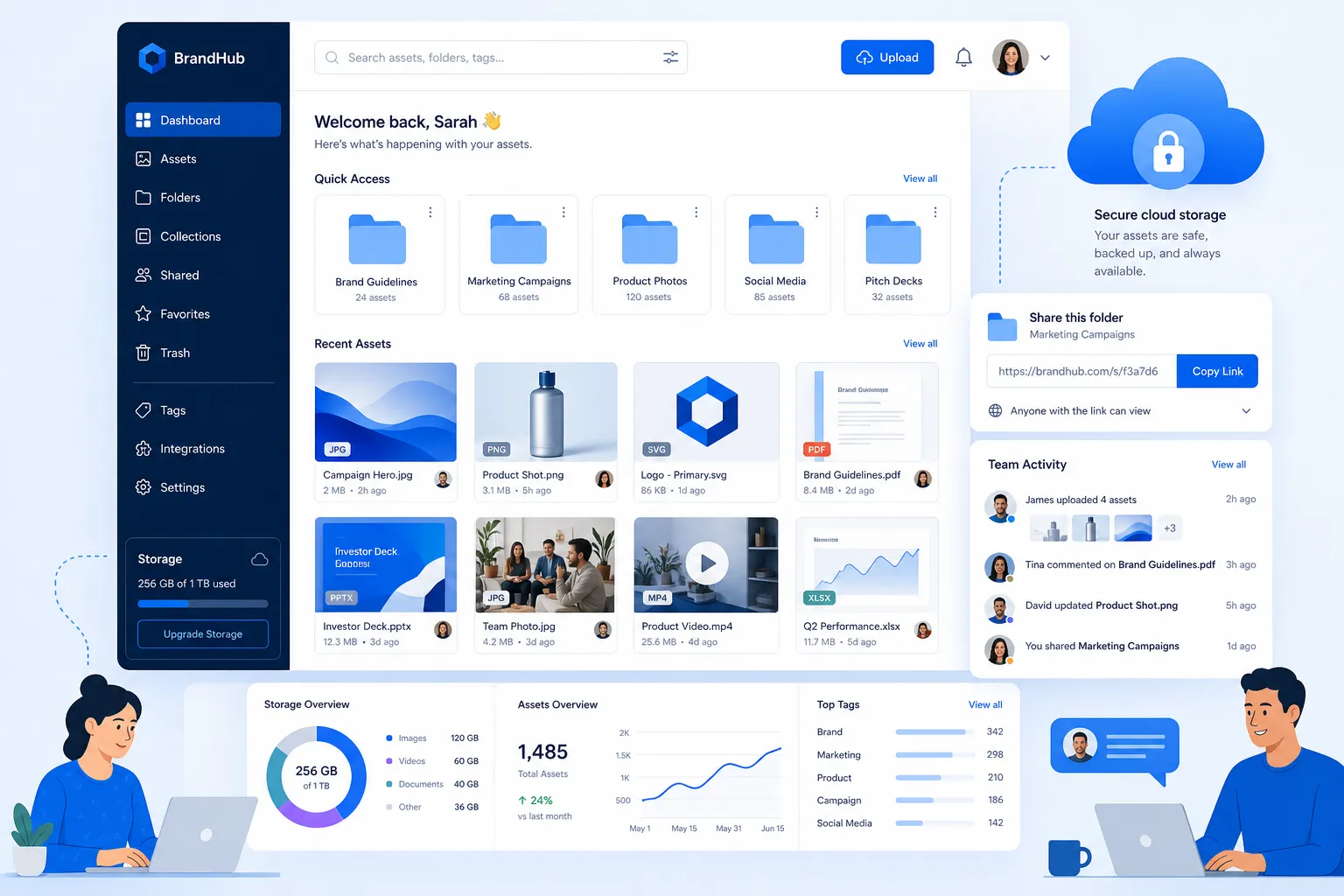
Digital asset storage is the system your business uses to store, organize, access, manage, and share digital files. Those assets may include:
- Documents
- Images
- Brand files
- PDFs
- Presentations
- Design files
- Videos
- Internal reference files
In a business setting, a file becomes more valuable when it is easy to locate, clearly labeled, securely stored, and shared with the right people. That is why digital asset storage is more than raw cloud space. It combines storage, structure, permissions, and findability.
Digital asset storage vs. basic file storage
These terms are often used interchangeably, but they are not exactly the same.
Type | What it does | Where it falls short |
|---|---|---|
Basic file storage | Saves files online so you can upload and download them | Often becomes messy, hard to search, and difficult to govern as teams grow |
Digital asset storage | Stores files and helps organize, preview, share, control access, and support collaboration | Requires a better system, but pays off in speed and clarity |
Full DAM platform | Adds richer asset management features like metadata, workflow, rights handling, and version control | Some tools are too complex or expensive for smaller teams |
For many businesses, the sweet spot is a platform that delivers DAM-style organization and sharing without enterprise-heavy friction. That is exactly why teams look for a practical solution like AssetHQ.
Why growing teams struggle with file storage
Competitor articles consistently emphasize centralization, search, collaboration, compliance, and scalability. Those are all important. But many gloss over a key reality:
Most growing teams do not fail because they lack storage. They fail because their storage is too scattered, too unclear, and too hard to manage consistently.
Common pain points
Files are spread across too many tools
A logo is in one cloud drive, product screenshots are in Slack, signed PDFs are in email, and campaign images live on someone’s laptop.
People cannot tell which version is current
Without a clear file home and permission structure, “latest version” becomes a guessing game.
Sharing is inconsistent or unsafe
Teams send attachments, public links, or files from personal accounts, with little control over who can still access them.
Visual assets are hard to review
If your business works with images, thumbnails and previews matter. A file list without visual context slows everything down.
New team members inherit chaos
As the company grows, file sprawl becomes part of onboarding. Instead of moving fast, new hires waste time learning unwritten folder logic.
What good digital asset storage actually looks like
The best digital asset storage does not overwhelm teams. It quietly removes friction.
1. Organized storage that feels intuitive
A clear folder structure still matters. For most small businesses and growing teams, folders are easier to understand and maintain than highly technical metadata models.
AssetHQ leans into this strength with simple and intuitive file management so teams can organize documents, images, and shared files without needing a specialist.
2. Fast file access
Storage should not make people wait. Teams need a platform where uploads are quick, files open fast, and common actions feel immediate.
When people trust that files are easy to retrieve, they stop saving duplicates “just in case.”
3. Secure sharing with controls
Sharing is where many businesses lose control. You need to share files externally without losing confidence in who can access them.
That means features like:
- Expiring links
- Access control
- Team permissions
- Controlled file visibility
AssetHQ makes this practical with secure file sharing, including expiring links and access controls that help protect sensitive files without making collaboration painful.
4. Image preview and visual browsing
For image-heavy teams, storage should support fast browsing. Previews reduce clicks, prevent mistakes, and help non-designers locate the right asset quickly.
This is especially useful for marketing teams, agencies, ecommerce operations, and startups managing branded content.
5. Team collaboration without complexity
Growing teams need shared access, not enterprise red tape. Good storage supports collaboration while still keeping ownership and visibility clear.
That is where a simple platform often wins. Teams are more likely to use the system properly when it feels easy.
What kinds of assets should you store in one place?
A practical digital asset storage system should handle more than creative files alone.
Typical business assets to centralize
- Brand logos and visual guidelines
- Product images
- Marketing collateral
- Sales decks
- Contracts and signed PDFs
- Training materials
- Process documents
- Internal templates
- Press kits
- Shared client files
Why centralization matters
When all of these live in one dependable location, teams benefit from:
- Less duplicate work
- Faster retrieval
- Safer sharing
- Better collaboration
- Cleaner onboarding
- Fewer outdated assets in circulation
The features growing teams should prioritize
Many competitor articles focus on broad DAM concepts. That is useful, but buyers also need a practical shortlist. Here is what actually matters when you are choosing digital asset storage for a growing team.
A practical checklist for choosing digital asset storage
Simple organization
Look for a system that makes sense immediately. If your team needs training just to save a file correctly, adoption will suffer.
Secure file sharing
Choose a platform that supports controlled access and expiring links, especially if you regularly share files with clients, contractors, or external partners.
Strong image handling
If your team works with visuals, image previews are not a bonus. They are essential for speed and accuracy.
Team permissions
Not every file should be visible to everyone. You need a storage system that supports collaboration while preserving appropriate access control.
Fast performance
Large files, frequent uploads, and everyday browsing should feel responsive. Slowness creates workarounds, and workarounds create chaos.
Scalability
Your storage system should work for one person today and a larger team tomorrow. AssetHQ is especially well positioned here because it is suitable for solo users, startups, and growing teams without forcing a jump to an overly complex enterprise tool.
Clear pricing
Many businesses underestimate how frustrating storage pricing becomes over time. Flat, transparent pricing matters. AssetHQ stands out with affordable flat pricing and no hidden fees, which makes budgeting easier as file volume grows.
Digital asset storage vs. DAM: what growing teams really need
Some teams search for “digital asset storage” when they really mean “simple DAM.” Others think DAM means something too advanced for them.
The truth is simpler.
You probably need DAM-style benefits if you want to:
- Keep assets organized
- Search and browse efficiently
- Share files securely
- Control access
- Support multiple users
- Reduce duplicate work
- Maintain one trusted version of important files
You may not need a heavyweight DAM if you do not need:
- Complex enterprise workflow automation
- Deep rights management across global licensing environments
- Advanced taxonomy governance
- Highly customized compliance structures
For many teams, the ideal tool is a lightweight, practical DAM and file storage solution. AssetHQ fits this gap by helping businesses manage files professionally without buying into complexity they will never use.
How digital asset storage improves collaboration
Storage is often treated like back-office infrastructure. In practice, it shapes how teams work every day.
Better collaboration starts with shared clarity
When everyone knows:
- where files live,
- which files are approved,
- who can access them,
- and how to share them safely,
work moves faster.
Real-world examples
Team | Storage challenge | Better outcome with structured digital asset storage |
|---|---|---|
Startup founders | Files scattered across personal tools | One dependable home for business-critical assets |
Marketing teams | Hard to find the latest campaign files | Organized folders, visual previews, faster reuse |
Operations teams | Important documents hidden in email | Centralized access and simpler handoffs |
Client-facing teams | Risky file sharing and unclear permissions | Secure links and controlled external access |
Growing companies | New hires struggle to find files | Easier onboarding and consistent structure |
Security is not optional anymore
Several competitor articles mention security, but many treat it as an enterprise-only issue. That is a mistake.
Small and growing teams also handle sensitive information, including:
- Contracts
- Client assets
- Internal documents
- Pricing files
- Product materials
- Brand assets under embargo
What secure digital asset storage should include
- Role-based access
- Controlled sharing
- Link expiration
- Reliable storage infrastructure
- Clear permissions
- Reduced reliance on personal accounts
AssetHQ addresses this directly with enterprise-grade secure storage in a system that still feels approachable and easy to use.
That combination matters. Security only helps if teams actually use the platform correctly.
The hidden cost of bad digital asset storage
Competitor content often talks about efficiency. Let’s make that more concrete.
Poor storage creates costs in five ways
1. Lost time
People waste hours searching, asking around, and re-checking versions.
2. Duplicate work
Teams recreate files they already had because they cannot find them.
3. Slower collaboration
Approvals, handoffs, and launches take longer when files are hard to locate or access.
4. Brand inconsistency
Different people use different versions of logos, templates, or campaign assets.
5. Security risk
Uncontrolled sharing creates unnecessary exposure.
For a growing business, these are not minor inconveniences. They compound as the team scales.
Content gaps competitors often miss
After reviewing competitor coverage, a few recurring gaps stand out. Filling them helps make this article more useful for actual buyers.
Gap 1: Simplicity is undervalued
Many articles assume “more features” means “better.” But for growing teams, ease of adoption is often the deciding factor. A system that is intuitive gets used. A system that feels heavy gets bypassed.
Gap 2: Folder-based clarity still matters
Competitors talk heavily about metadata, AI tagging, and enterprise workflows. Those have value, but many teams still need a clean, understandable folder structure first. That is the foundation of reliable storage.
Gap 3: Image handling is often treated as secondary
Teams working with visual content need image preview and easy browsing, not just file names in a list. This has a direct impact on speed and accuracy.
Gap 4: Pricing transparency is a real buying factor
A lot of content overlooks the budgeting side. Growing teams care about whether a platform is affordable, predictable, and free of surprise charges.
Gap 5: Storage should fit both solo users and teams
Many articles aim at large enterprises or abstract “organizations.” In reality, many buyers are moving from founder-led chaos to team-based systems. They need a solution that works for one person now and a team later.
Signs you have outgrown basic file storage
You may need a better digital asset storage setup if any of the following sound familiar:
- Your team asks for the same files repeatedly
- You are unsure which version is the latest
- Important assets live in personal accounts
- External sharing feels messy or risky
- Images are hard to browse quickly
- New hires struggle to find what they need
- You keep paying for storage but still feel disorganized
If that sounds familiar, it is probably time to move from generic cloud storage to a more deliberate file management system.
How to choose the right solution for your team
Here is a simple buying framework.
Ask these questions
Is it easy for non-technical users to adopt?
If not, your team will create side systems.
Does it support the assets you actually use?
Documents, images, presentations, and shared files should all be easy to manage.
Can you share files securely?
Look for expiring links and access controls, not just open-ended file links.
Does it help your team work faster?
Preview, upload, search, and access speed all matter.
Will it grow with you?
You need a platform that can support a solo founder, a 5-person team, and a growing organization without a painful migration.
Is pricing clear?
Complicated pricing models often become operational headaches later.
Why AssetHQ fits growing teams
AssetHQ is especially well suited for businesses that want the benefits of organized digital asset storage without enterprise bloat.
What makes it a practical choice
- Simple and intuitive file management
- Secure file sharing with expiring links and access control
- Organized storage for documents, images, and files
- Image preview and management capabilities
- Team collaboration for growing organizations
- Enterprise-grade secure storage
- Fast upload and file access
- Affordable flat pricing with no hidden fees
- Scalable for solo users and teams
That combination is rare. Many tools are either too basic to manage growing complexity or too complex to roll out smoothly. AssetHQ sits in the middle: professional, dependable, and easy to live with.
Best practices for setting up digital asset storage
Even the best platform works better with a good operating model.
Start with a simple structure
Do not over-engineer your folders on day one. Build around how your team actually works.
Example top-level folders:
- Brand
- Marketing
- Sales
- Operations
- Legal
- Product
- Archive
Define who owns what
Assign folder responsibility where it matters. Ownership improves consistency.
Use naming conventions
Small changes help a lot. Examples:
Brand-Logo-Primary-2026Sales-Deck-Q3-ApprovedProduct-Screenshot-Mobile-App-v1
Separate active and archived files
Do not make teams dig through old material to find current assets.
Share from the system, not from desktops
This preserves control, reduces duplication, and improves security.
Review access regularly
As teams grow, permissions should evolve with them.
Final verdict
Digital asset storage is not just about where files live. It is about whether your team can find, trust, share, and use the files that keep work moving.
For growing teams, the right solution should be:
- simple enough to adopt quickly,
- secure enough to trust,
- organized enough to reduce chaos,
- and scalable enough to support the next stage of growth.
That is where AssetHQ stands out. It gives businesses a clean, reliable, and affordable way to manage documents, images, and shared files without the complexity of enterprise-heavy systems.
If your current setup feels scattered, slow, or risky, this is the right moment to fix the foundation. Try AssetHQ to bring your files into one secure, intuitive system your team will actually use.
FAQ
What skills are needed to work with digital assets?
You need a mix of organization, file management, communication, and basic security awareness. For many teams, the most important skill is knowing how to store, label, find, and share assets consistently so everyone works from the same source of truth.
What are the 5 stages of the asset lifecycle?
The five common stages are creation, organization, storage, sharing/use, and archiving. A good digital asset storage system supports each stage by making files easy to manage, access, protect, and retire when they are no longer active.
Who are the largest digital asset custodians?
The largest digital asset custodians are typically major cloud platforms, enterprise software vendors, media platforms, and large organizations managing huge content libraries. For growing businesses, though, the better question is which storage platform gives your own team the right balance of simplicity, security, and control.
What is Warren Buffett's golden rule?
Warren Buffett’s well-known rule is often summarized as “Never lose money”, followed by “Never forget rule No. 1.” In the context of digital asset storage, the lesson is to protect valuable business files with secure storage, controlled sharing, and a reliable system that reduces costly mistakes.
Related Posts

Brand Asset Management Software for Growing Teams
Discover brand asset management software for growing teams and learn how to organize files, share securely, and scale with ease.
min read
Cloud Based Digital Asset Management Benefits
Explore cloud based digital asset management benefits for secure file sharing, simpler teamwork, and organized growth. Try it today now
min read
File Sharing and Storage Made Simple for Teams
Discover file sharing and storage made simple for teams with secure access, better organization, and faster collaboration. Try AssetHQ!
min read