Cloud Backup Solutions for Small Business Guide
Cloud Backup Solutions for Small Business Guide If you are comparing cloud backup solutions for small business, you are probably trying to answer a very practical question: how do we protect our files without adding more complexity, cost, or IT headaches? For small businesses, startups, and growing teams, backup is not just about avoiding disaster. It is about keeping operations moving when someone deletes the wrong folder, a laptop dies, ransomware hits, or a team member needs fast access to
Cloud Backup Solutions for Small Business Guide
If you are comparing cloud backup solutions for small business, you are probably trying to answer a very practical question: how do we protect our files without adding more complexity, cost, or IT headaches?
For small businesses, startups, and growing teams, backup is not just about avoiding disaster. It is about keeping operations moving when someone deletes the wrong folder, a laptop dies, ransomware hits, or a team member needs fast access to the latest version of a critical file. The challenge is that many backup tools are either too limited, too technical, or too bloated for the way smaller teams actually work.
This guide breaks down what matters most in cloud backup for small business, how to evaluate your options, and how to build a shortlist with confidence. It also covers an important distinction many competing articles blur: backup alone is not the same thing as organized day-to-day file management. That is where a platform like AssetHQ can play a critical supporting role by giving teams a simple, secure place to store, organize, preview, and share documents and images before those assets are backed up.
"43% of all cyberattacks target small businesses." - Source
"Despite 92% of businesses having backups, 31% fail to restore data from them during a ransomware attack." - Source
What cloud backup solutions for small business actually do
At a basic level, a cloud backup solution copies your business data to remote storage so you can recover it later. That sounds simple, but the best solutions do much more than upload files to the cloud.
A strong small business backup system should help you:
- Automatically back up files without relying on staff to remember
- Restore individual files, folders, or full systems quickly
- Protect laptops, desktops, servers, and sometimes SaaS apps
- Maintain version history so you can recover from accidental edits or deletion
- Encrypt data in transit and at rest
- Support business continuity during ransomware, hardware failure, or human error
Many businesses also need to protect more than one type of asset at once. That usually includes:
- Shared documents
- Contracts and business records
- Marketing assets and images
- Team project folders
- Local device files
- Server data
- Cloud app data such as Microsoft 365 or Google Workspace
Backup is not the same as storage or collaboration
This is one of the biggest gaps in competitor content.
Cloud backup solutions for business focus on recovery. They are designed to bring files back after loss, corruption, or attack. They are not always ideal for active collaboration, visual asset review, secure link sharing, or keeping growing file libraries organized for everyday work.
That is where AssetHQ fits naturally into a modern stack.
AssetHQ helps teams:
- Store documents, images, and shared files in a simple, intuitive structure
- Preview and manage visual assets without friction
- Share files securely with access control and expiring links
- Keep team collaboration organized without enterprise-heavy complexity
- Scale from solo founders to growing teams with affordable flat pricing
- Maintain reliable, enterprise-grade secure storage with fast uploads and file access
In other words, backup protects your data after something goes wrong. AssetHQ helps your team stay organized and productive before anything goes wrong.
Why small businesses need cloud backup more than ever
Small businesses often assume they are too small to be targeted or that a few synced folders are enough. In reality, they are often more exposed because they have less formal IT oversight, more ad hoc file sharing, and fewer tested recovery processes.
Common data loss risks for small businesses
Here are the most common triggers behind backup-related buying decisions:
Risk | What happens | Why backup matters |
|---|---|---|
Accidental deletion | A user removes or overwrites a file | Version history and point-in-time restore prevent permanent loss |
Ransomware | Files are encrypted or systems become inaccessible | Clean backups are essential for recovery |
Hardware failure | Laptop, server, or external drive stops working | Cloud copies protect against local device failure |
Remote work sprawl | Files live across multiple devices and home offices | Centralized cloud backup reduces gaps |
SaaS data loss | Data inside apps is deleted or corrupted | Dedicated backup may be needed beyond app-native retention |
Disasters or theft | Fire, flood, office theft, or lost devices | Offsite copies preserve business continuity |
The hidden problem: file chaos
Another overlooked issue is that many businesses struggle not only with backup, but with finding the right files in the first place. Teams often scatter documents across desktops, shared drives, cloud folders, chat threads, and personal devices. That makes backup harder, restores messier, and compliance riskier.
A cleaner file management workflow can improve backup outcomes. AssetHQ is especially useful here because it gives teams one dependable, organized environment for managing digital assets and shared files before those assets are included in a broader backup strategy.
Cloud backup for small business vs cloud backup solutions for business
These terms overlap, but they are not always the same in practice.
Cloud backup for small business
This usually emphasizes:
- Simpler setup
- Lower cost
- Fewer admin requirements
- Device and endpoint protection
- Straightforward recovery
- Small team collaboration needs
Broader cloud backup solutions for business
This usually includes more enterprise-oriented capabilities such as:
- Server and virtual machine backup
- Compliance reporting
- Advanced policy controls
- Multi-site recovery
- Broader workload coverage
- More complex deployment options
For most small businesses, the best answer is not the most feature-packed platform. It is the one that fits your actual environment, recovery goals, and budget.
What to look for in the best cloud backup solutions for small business
The strongest competitors all touch on features, but many stop short of explaining which ones matter most for real buying decisions. Here is the clearer checklist.
1. Automatic and reliable backup scheduling
If a backup system depends on manual action, it will fail eventually. Look for:
- Continuous or scheduled backups
- Automatic detection of changed files
- Policy-based backup rules
- Backup status alerts
2. Fast, flexible recovery
Backup is only useful if restore works when needed. Prioritize:
- File-level restores
- Folder-level restores
- Full image or system recovery if needed
- Point-in-time recovery
- Simple restore workflow for non-technical users
3. Security and access control
You need more than encryption. Look for:
- Encryption in transit and at rest
- Multi-factor authentication
- Role-based access controls
- Audit logs
- Immutable backup or ransomware protection features where available
4. Coverage for the systems you actually use
Not every business needs server backup, but many need more than just laptop file copies. Confirm support for:
- Windows and Mac endpoints
- Shared drives or network folders
- Servers or virtual machines if applicable
- Cloud applications such as Microsoft 365 or Google Workspace
- External drives if part of your workflow
5. Clear retention and versioning
Retention rules decide how long you can go back. This matters for both compliance and practical recovery. Ask:
- How many file versions are kept?
- How long are deleted files retained?
- Can you customize retention by folder, user, or device?
- Is archive storage available for long-term needs?
6. Performance and bandwidth control
Smaller businesses cannot afford a backup tool that slows everything down. Important features include:
- Incremental backup
- Compression and deduplication
- Bandwidth throttling
- Scheduled backup windows
- Fast restore from cloud or local cache
7. Simple management
For small teams, usability is not a bonus feature. It is essential. Your system should make it easy to:
- See backup status quickly
- Add users or devices
- Review failures
- Restore data without deep technical knowledge
This same principle is why many teams prefer AssetHQ for active file management. It removes unnecessary complexity from storage, organization, visual browsing, and secure sharing, which is especially valuable for lean teams without dedicated admins.
The 3-2-1 backup rule still matters
One thing competitors mention but often fail to contextualize is how backup strategy should guide tool selection.
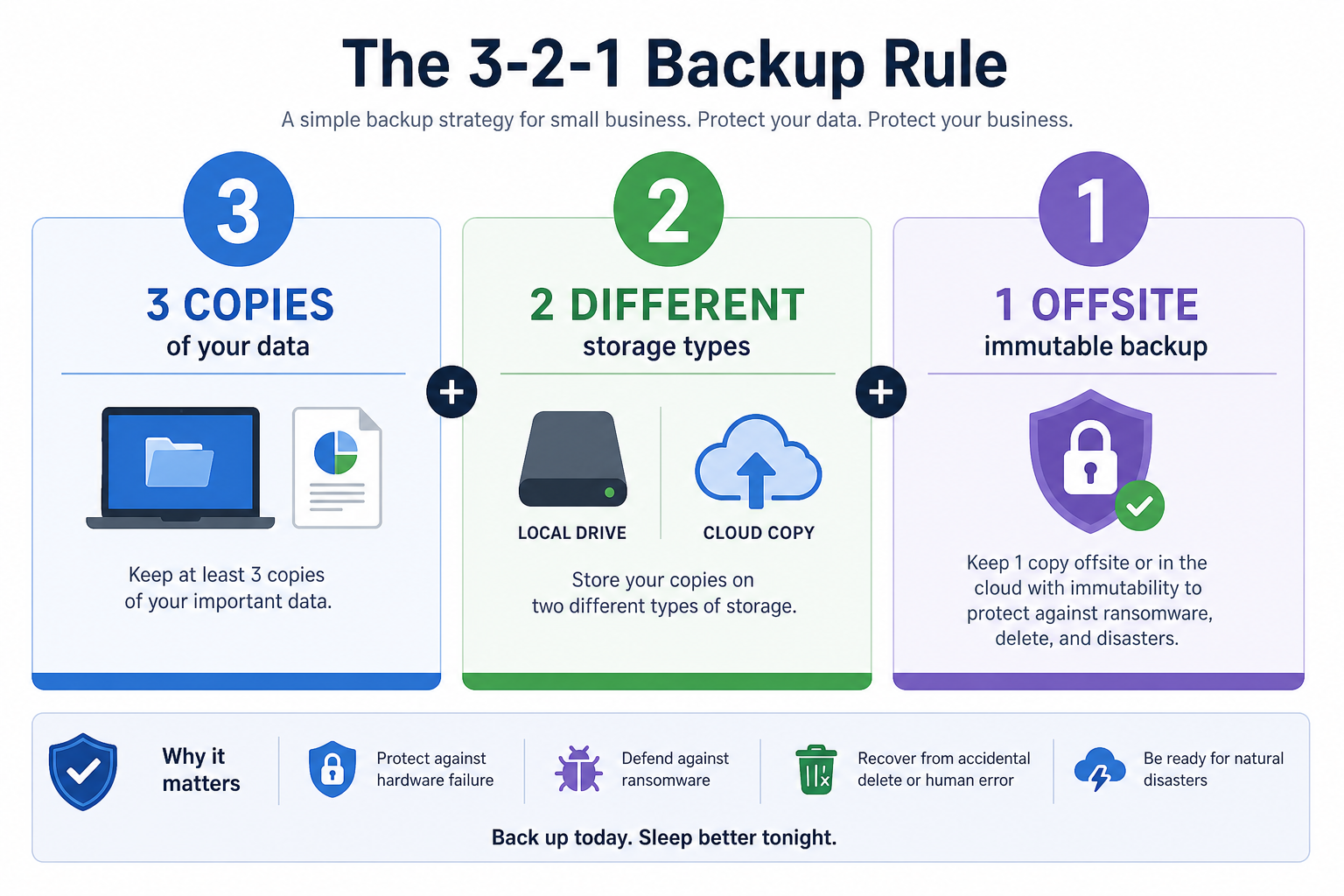
The classic 3-2-1 rule means:
- Keep 3 copies of your data
- On 2 different media types
- With 1 copy offsite
A more modern extension is 3-2-1-1-0:
- 3 copies of data
- 2 media types
- 1 offsite copy
- 1 immutable or offline copy
- 0 backup errors after testing
How this applies to small businesses
A practical setup might look like this:
Layer | Example |
|---|---|
Primary working copy | Files stored and actively used in AssetHQ or team systems |
Secondary local or synced copy | Device copy, NAS, or local storage |
Offsite backup copy | Cloud backup platform |
Extra resilience | Immutable backup, offline archive, or hardened retention |
This is where combining organized file management with dedicated backup becomes powerful. AssetHQ can serve as your clean, secure home for business-critical documents and images, while a backup provider protects that content from loss.
Types of cloud backup small businesses should understand
Not every backup product protects the same things. Understanding the categories helps you avoid overbuying or missing a major gap.
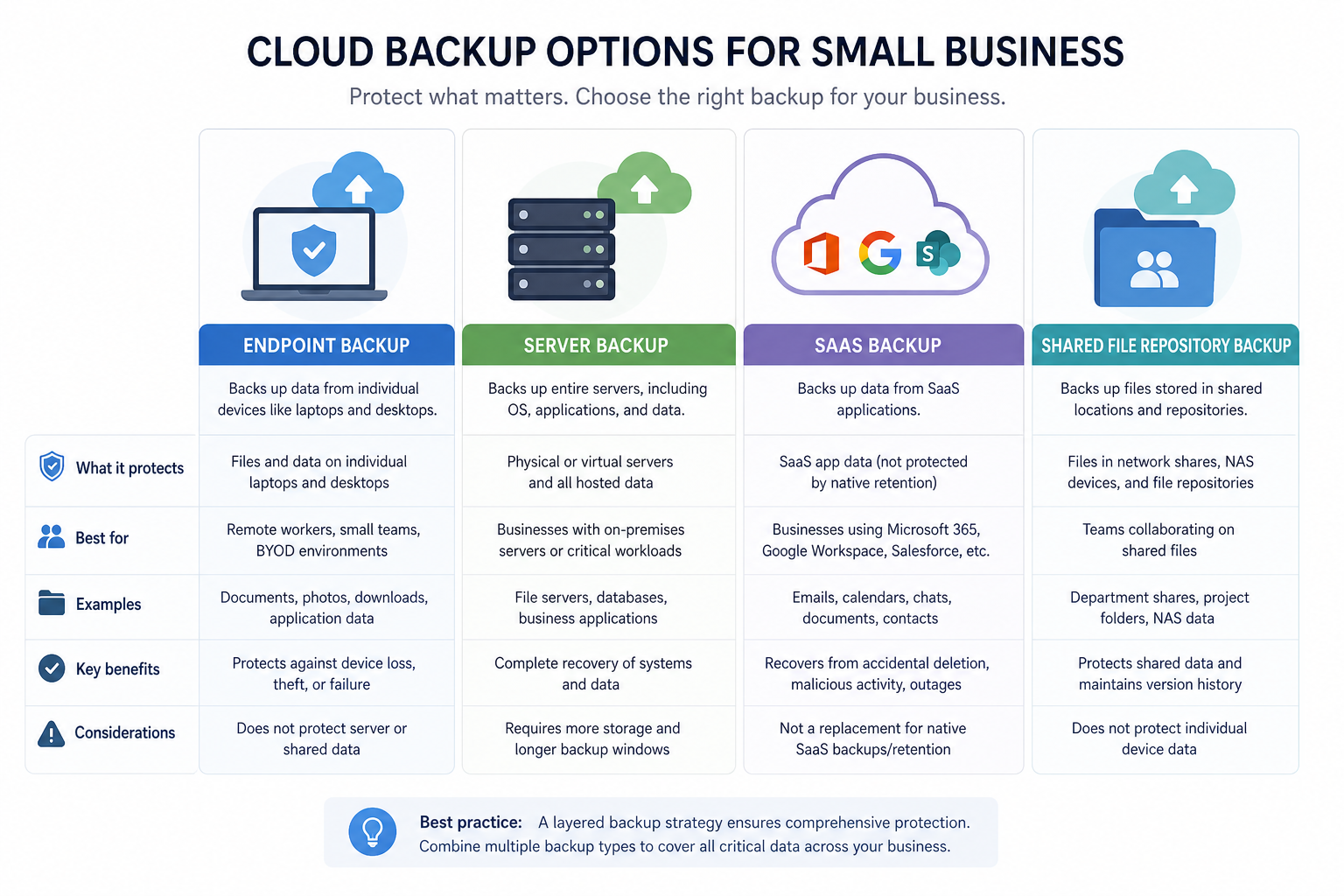
Endpoint backup
Protects laptops and desktops. Best for businesses with distributed teams, remote workers, or device-heavy environments.
Server backup
Protects file servers, application servers, and sometimes databases. Best for companies with on-prem or hybrid infrastructure.
SaaS backup
Protects cloud application data, such as email, documents, and collaboration records in platforms like Microsoft 365. Important because app-native retention is not always a true backup strategy.
Shared repository backup
Protects central libraries of business files, images, contracts, and creative assets. This matters a lot for teams that collaborate around shared content.
AssetHQ is especially strong as the working repository in this model. It helps teams centralize and manage files clearly, with secure access and image preview support, so shared assets stay structured rather than scattered.
Cloud backup features that matter most by business type
For solo founders and micro businesses
You likely need:
- Easy setup
- Automatic endpoint backup
- Low admin overhead
- Affordable monthly pricing
- Clean file organization
AssetHQ is a strong complement here because it gives solo users a professional way to store, organize, and share files without enterprise software complexity.
For small teams with active collaboration
You likely need:
- Shared folder protection
- Version history
- Secure file access
- User permissions
- Fast restore for mistakes and overwrites
This is where combining backup with a collaboration-friendly platform matters. AssetHQ supports secure sharing, organized storage, and team access controls while your backup platform handles recovery.
For growing companies with mixed environments
You likely need:
- Endpoint and server backup
- Retention policies
- Reporting and alerts
- Broader access management
- Scalable pricing
Growing teams often outgrow basic shared-drive habits before they outgrow their backup tool. AssetHQ helps close that gap with scalable organization, image and file management, and flat, predictable pricing.
How to evaluate cloud backup providers without getting lost in feature overload
Use this shortlist framework.
Ask these 10 questions
- What exactly gets backed up: files, devices, servers, SaaS data, or all of the above?
- How easy is it to restore a single file?
- How long does a full recovery typically take?
- Does it support ransomware-resistant features?
- Can non-technical users manage basic restores?
- What are the retention and versioning limits?
- Are there extra charges for restores, storage growth, or advanced features?
- Does it integrate with your existing workflows?
- How does it handle remote teams and multiple devices?
- Is the interface simple enough that your team will actually use it correctly?
A practical scoring table
Criteria | Why it matters | Weight |
|---|---|---|
Recovery speed | Downtime costs money | High |
Ease of use | Small teams need simplicity | High |
Security | Protects sensitive business files | High |
Device and workload coverage | Prevents gaps | High |
Pricing clarity | Avoids surprise costs | Medium |
Retention flexibility | Supports compliance and rollback | Medium |
Reporting and alerts | Helps catch failures early | Medium |
Sharing and organization workflow | Improves everyday efficiency | Medium |
Notice the last point. This is a content gap in many rankings: a business does not only need backup software. It needs a practical daily file environment. AssetHQ helps solve that by giving teams a fast, intuitive way to organize documents, images, and shared files with enterprise-grade security and none of the usual bloat.
Common mistakes small businesses make when choosing backup
Mistaking sync for backup
File sync is useful, but it is not the same as backup. Sync can propagate deletions and corruption. Backup preserves recoverable history.
Backing up only devices, not shared systems
If your key files live in shared repositories, design platforms, or SaaS apps, endpoint backup alone is not enough.
Ignoring restore testing
A backup that cannot restore quickly is not protection. It is just storage.
Buying for edge-case features
Do not overpay for enterprise capabilities you will never use. Match the tool to your size and risk profile.
Letting file sprawl grow unchecked
Messy storage makes backup harder to manage. A platform like AssetHQ can reduce this risk by giving your business a clean, controlled place for documents, images, and team assets.
A smart modern stack: backup plus structured file management
For many small businesses, the best answer is not one all-in-one system. It is a practical stack that separates active use from recovery protection.
A simple model
Need | Best-fit tool type |
|---|---|
Organize and access everyday files | Digital asset management or file storage platform |
Share files securely with clients or teammates | Secure sharing platform with permissions |
Preview and manage images and documents | Visual file management platform |
Recover from deletion, corruption, or ransomware | Dedicated cloud backup solution |
Where AssetHQ fits
AssetHQ is a smart fit for businesses that want:
- A simple and intuitive home for files
- Organized storage for documents, images, and shared assets
- Fast upload and access
- Image preview and management
- Secure file sharing with expiring links and access controls
- Team collaboration without enterprise-heavy friction
- Affordable, flat pricing and scalability as the team grows
If your current environment is a mix of messy drives, email attachments, and generic cloud folders, AssetHQ can dramatically improve the day-to-day side of file management while your cloud backup solution handles disaster recovery.
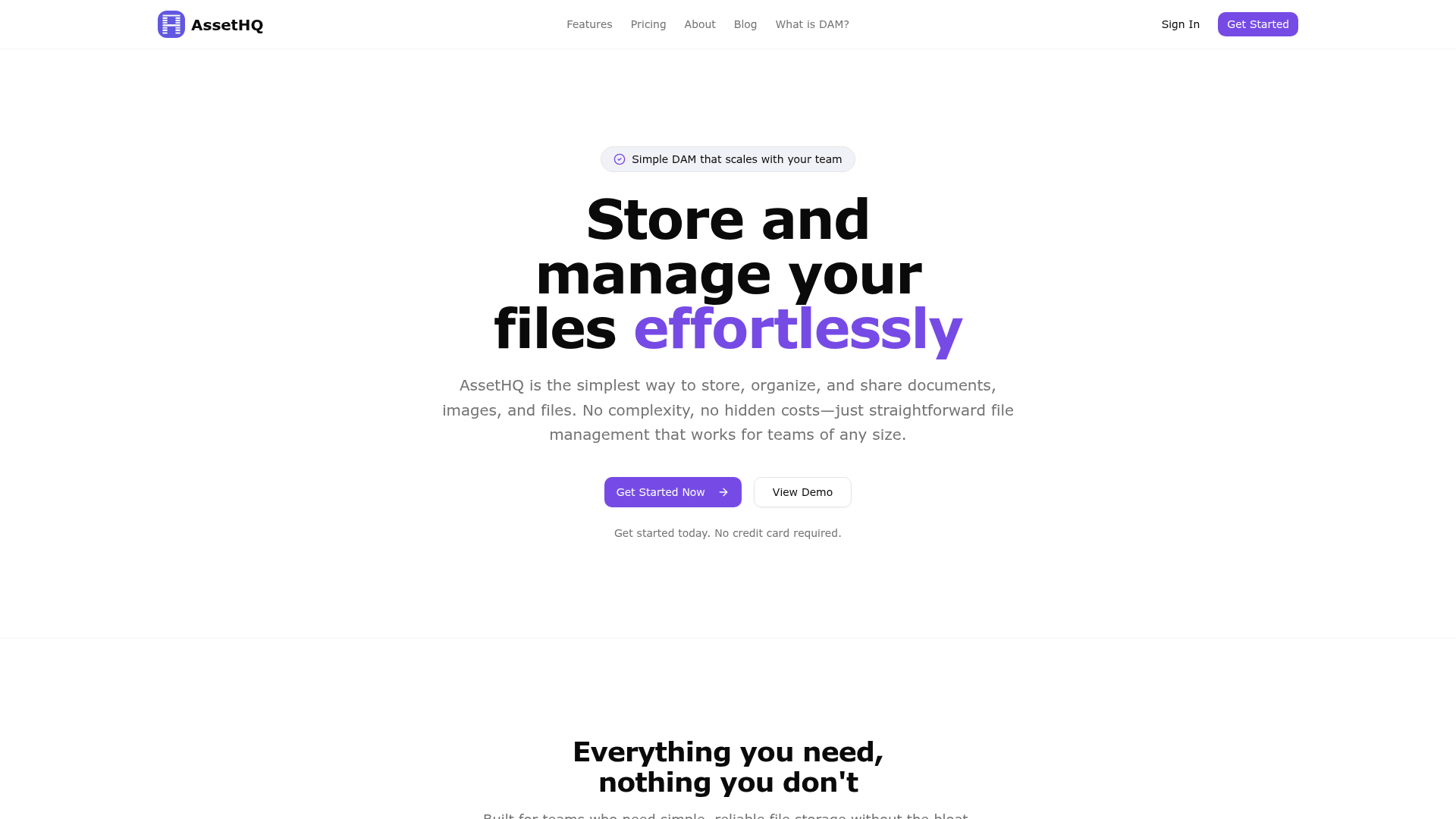
AssetHQ website snapshot
What the best cloud backup solutions for small business usually have in common
After synthesizing competitor content, several recurring themes stand out. The best providers generally offer:
- Strong automation
- Good recovery options
- Security features beyond basic encryption
- Support for growing data volumes
- Reasonable pricing for small teams
But here are the content gaps most articles miss
Most competitor articles do not explain enough about:
- The difference between backup and sync
- The role of organized asset storage in backup success
- How file chaos increases recovery risk
- Why small teams should evaluate restore simplicity, not just storage size
- How collaboration workflows affect backup design
- The value of pairing a backup tool with a lightweight, secure file management platform like AssetHQ
That is the bigger takeaway: the best solution is often not just a backup vendor. It is a combination of reliable backup + dependable file organization + secure sharing.
Final verdict
If you are evaluating cloud backup solutions for small business, focus on the basics that actually protect operations:
- Automatic backups
- Fast and simple restores
- Strong security
- Clear retention policies
- Coverage for the systems you use
- Pricing that stays predictable as you grow
Then go one step further and ask whether your team’s files are actually organized well enough to support that backup strategy.
That is where AssetHQ stands out. While dedicated backup tools protect you during failure, AssetHQ gives your business a better everyday foundation: simple file management, secure sharing, image previews, organized storage, fast access, and team collaboration without unnecessary complexity or hidden costs.
For solo founders, startups, and growing teams, that combination is hard to beat. Use a cloud backup solution to protect your data. Use AssetHQ to make your data easier to manage, safer to share, and simpler to scale.
Ready to simplify file management before your next backup decision?
If your team wants a cleaner, more secure way to store, organize, preview, and share documents and images, AssetHQ is a practical next step. It gives you the structure and control most small businesses are missing, without the heavy cost or learning curve of enterprise DAM tools.
FAQ
Which cloud storage is best for small business?
The best choice depends on whether you need backup, active file management, or both. For everyday organization, secure sharing, and team collaboration, AssetHQ is a strong fit for small businesses that want simplicity and scalable structure. For disaster recovery, pair it with a dedicated cloud backup solution.
What is the 3-2-1 1 0 backup rule?
The 3-2-1-1-0 rule means keeping 3 copies of your data, on 2 different media types, with 1 copy offsite, 1 copy immutable or offline, and 0 backup errors after testing. It is a modern best practice for stronger ransomware resilience and recovery readiness.
What is the 3-2-1 rule with your backups?
The classic 3-2-1 backup rule means you should keep 3 copies of your data, use 2 different storage types, and store 1 copy offsite. It helps reduce the risk of losing everything from deletion, hardware failure, or disaster.
Which cloud platform is best for small business?
There is no single best platform for every use case. If your priority is simple, secure file storage and collaboration, AssetHQ is a strong option for small teams; if your priority is system recovery, choose a cloud backup provider that matches your devices, apps, and restore requirements.
What is one downside of cloud back?
One downside of cloud backup is that recovery speed can depend on internet performance and provider limitations. That is why businesses should test restores regularly and combine backup with organized file management for faster day-to-day access.
Is Zoho free for small businesses?
Some Zoho products offer free plans, but availability depends on the specific tool and feature set. Small businesses should compare free tiers carefully, because storage limits, access controls, and collaboration features may be restricted compared with paid platforms.
Related Posts

Brand Asset Management Software for Growing Teams
Discover brand asset management software for growing teams and learn how to organize files, share securely, and scale with ease.
min read
Cloud Based Digital Asset Management Benefits
Explore cloud based digital asset management benefits for secure file sharing, simpler teamwork, and organized growth. Try it today now
min read
File Sharing and Storage Made Simple for Teams
Discover file sharing and storage made simple for teams with secure access, better organization, and faster collaboration. Try AssetHQ!
min read