Cloud Storage: Types, Providers, and Best Uses
Cloud Storage: Types, Providers, and Best Uses Cloud storage sounds simple until you actually need to choose one. Do you need a personal cloud drive app for photos and documents? A private cloud storage setup for sensitive company files? A shared cloud storage platform for a growing team? Or a cloud storage hosting environment that can handle backups, media libraries, and business collaboration without becoming expensive or hard to manage? That confusion is exactly why this guide exists. Thi
Cloud Storage: Types, Providers, and Best Uses
Cloud storage sounds simple until you actually need to choose one.
Do you need a personal cloud drive app for photos and documents? A private cloud storage setup for sensitive company files? A shared cloud storage platform for a growing team? Or a cloud storage hosting environment that can handle backups, media libraries, and business collaboration without becoming expensive or hard to manage?
That confusion is exactly why this guide exists.
This article breaks down the major types of cloud storage, the leading cloud storage service providers, and the best use cases for each option. It also covers the practical differences between consumer cloud storage and business-focused platforms, how desktop cloud storage compares with web cloud storage, and what to look for if you need a secure, affordable system for documents, images, and shared files.
For teams that have outgrown messy folders, scattered links, and bloated tools, there is also a better middle ground: a simple file management platform like AssetHQ that gives you organized storage, image previews, secure sharing, fast access, team collaboration, and enterprise-grade security without the overhead of enterprise-heavy systems.
What cloud storage actually is
Cloud storage is a system that stores your files on remote servers instead of only on a local computer or physical storage device. That means your files can be accessed through the web, synced to desktop software, or opened inside a cloud storage app on mobile.
In practical terms, cloud storage lets you:
- store files without relying on one computer
- access documents from anywhere
- share files with other people
- back up important data
- scale storage up or down as needs change
For individuals, that often means easier access to photos, videos, and documents. For businesses, it means reliable file access, disaster recovery, team collaboration, and more controlled storage management.
"Approximately 94% of enterprises worldwide have adopted some form of cloud computing." - DataStackHub
That level of adoption makes sense. Most organizations no longer want every file tied to on-premises infrastructure alone.
Why cloud storage matters more now
The real value of cloud cloud storage is not just “putting files online.” It is about reducing friction.
Modern teams need to:
- upload and retrieve files fast
- organize large libraries of documents and media
- collaborate securely across locations
- control access without complicated IT workflows
- avoid overspending on tools packed with features they will never use
That is where your choice of cloud storage provider starts to matter. Some tools are built mainly for backup. Some for personal file syncing. Some for enterprise compliance. And some, like AssetHQ, are better suited for teams that need straightforward digital asset management and dependable file sharing without a steep learning curve.
The main types of cloud storage
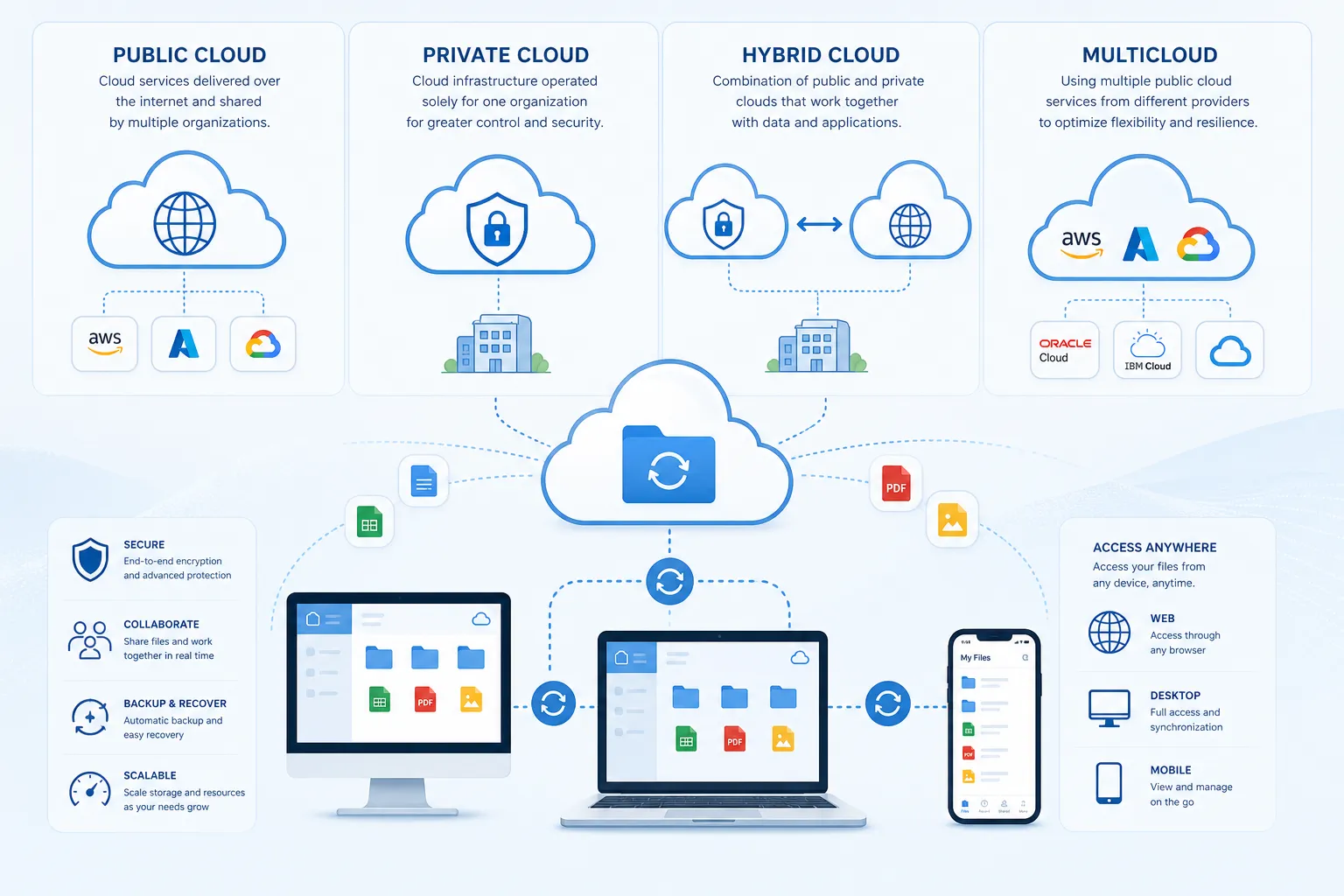
Public cloud storage
Public cloud storage is hosted by third-party providers and delivered over the internet. This is the model most people think of first.
Examples include Google Drive, Dropbox, Microsoft OneDrive, Box, and AWS cloud storage services like Amazon S3.
Public cloud storage is usually best for:
- general business file storage
- team collaboration
- file syncing across devices
- scalable backups
- web-based access from anywhere
Private cloud storage
Private cloud storage uses dedicated infrastructure for one organization. It may be hosted on-premises or managed through a dedicated environment from a provider.
This option is often chosen for:
- sensitive internal data
- strict compliance requirements
- custom security or governance needs
- industries like healthcare, finance, or legal services
Private cloud storage offers more control, but usually costs more and requires more technical oversight.
Hybrid cloud storage
Hybrid cloud storage combines public and private environments.
A company might keep sensitive files in private infrastructure while using public cloud storage services for collaboration, backups, or less sensitive assets.
Hybrid cloud models are useful when organizations need:
- flexibility
- better cost control
- staged migration from on-premises systems
- separation between sensitive and general-use data
Multicloud storage
Multicloud means using more than one cloud storage company or provider.
For example, a business might use AWS for application storage, Box cloud storage for external collaboration, and another platform for internal asset management.
Multicloud setups can help with:
- redundancy
- avoiding vendor lock-in
- workload-specific optimization
- regional or compliance requirements
Shared cloud storage
Shared cloud storage is not a separate infrastructure model so much as a collaboration use case. It refers to folders, workspaces, or storage environments where multiple users can access, upload, edit, or manage files together.
This is essential for teams handling:
- marketing assets
- design files
- contracts
- product documentation
- internal knowledge files
AssetHQ is especially strong here because it keeps shared files organized with intuitive folders, previews, and access controls instead of turning collaboration into chaos.
The 3 technical storage architectures you should know
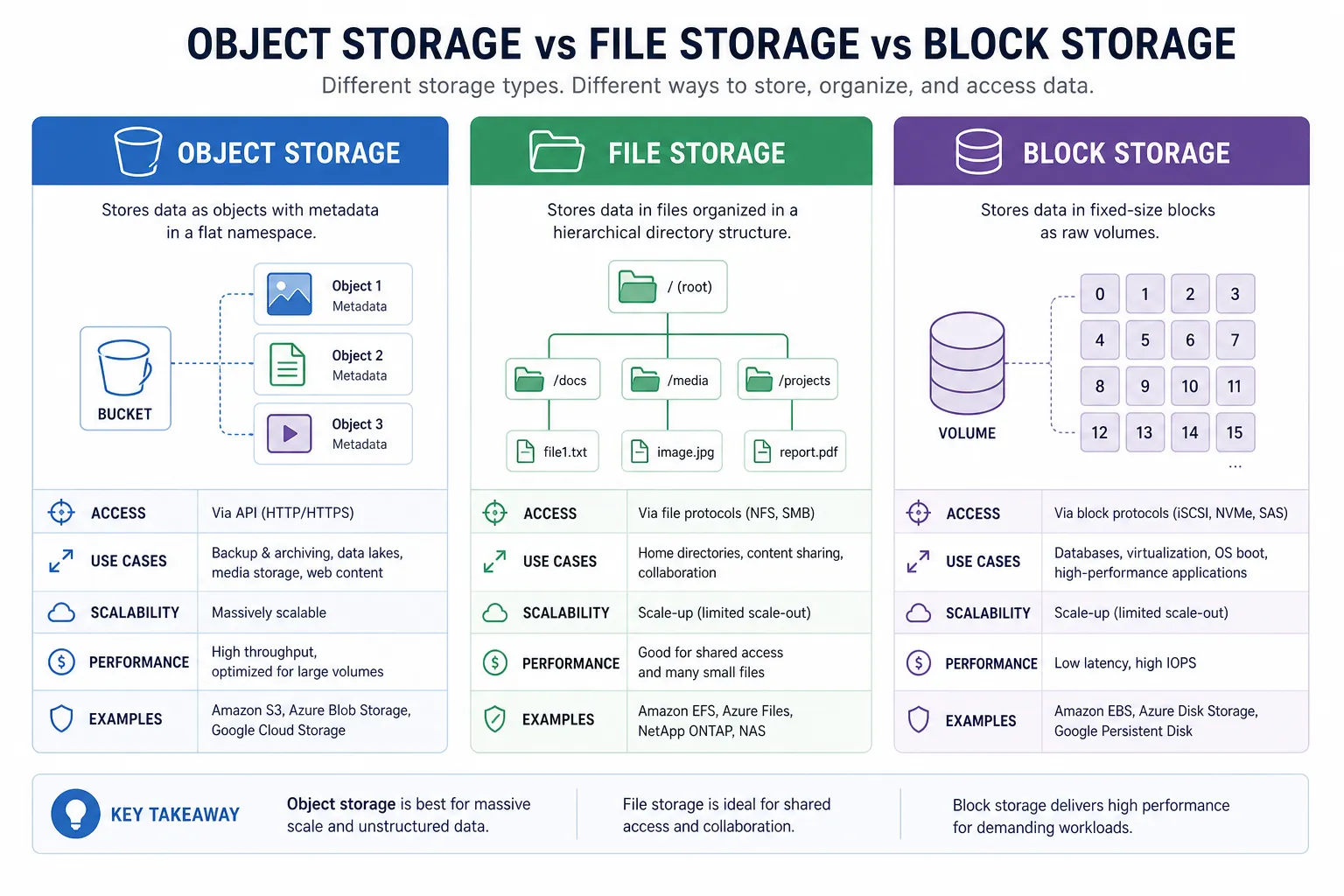
When people compare cloud storage platforms, they often miss an important distinction: the technical storage architecture behind the service.
Object storage
Object storage stores data as individual objects with metadata and unique identifiers.
Best for:
- images
- videos
- backups
- large unstructured data sets
- static website assets
- application storage
AWS cloud storage offerings like Amazon S3 are well-known examples of object storage.
File storage
File storage uses folders and files in a familiar hierarchy.
Best for:
- team documents
- collaborative folders
- shared drives
- organized business assets
This is the format most users find easiest to work with day to day, especially in a cloud storage manager app or web cloud storage interface.
Block storage
Block storage splits data into blocks and is often used for high-performance workloads.
Best for:
- databases
- virtual machines
- enterprise systems
- performance-intensive infrastructure
For most small businesses and creative teams, block storage is not the main buying decision. File-focused and object-focused platforms usually matter more.
The most popular cloud storage providers and where each fits
Below is a practical comparison of popular cloud storage providers and platforms.
Provider | Best for | Strengths | Watchouts |
|---|---|---|---|
Google Drive | General productivity and Google Workspace users | Familiar interface, easy sharing, strong Docs/Sheets ecosystem | Can become cluttered for asset-heavy teams |
Microsoft OneDrive | Microsoft 365 and Windows users | Tight Office integration, desktop syncing | Best experience is inside Microsoft ecosystem |
Dropbox | Cross-platform syncing and general file sharing | Reliable sync, simple sharing | Pricing can feel high for growing teams |
Box | Enterprise collaboration and compliance | Security, governance, enterprise features | Often more than small teams need |
Amazon S3 | Developers and large-scale cloud storage hosting | Durable, scalable, flexible | Not ideal as a simple everyday user interface |
iCloud | Apple users | Smooth Apple device integration | Limited outside Apple ecosystem |
AssetHQ | Teams needing simple DAM and file storage | Organized folders, image previews, secure sharing, flat pricing, easy collaboration | Less suited to infrastructure-heavy developer use cases |
Google Drive
Google Drive is a widely used drive cloud storage option for both personal and business use. It works well for teams already living in Google Workspace.
Best uses:
- collaborative docs
- spreadsheets
- basic team folders
- general office workflows
OneDrive
OneDrive is a strong one cloud storage choice for companies standardized on Microsoft 365.
Best uses:
- Office-heavy organizations
- internal document storage
- Windows-centric environments
Dropbox
Dropbox remains a strong cloud storage application for users who want easy syncing and simple file access across devices.
Best uses:
- freelancers
- client file sharing
- simple cross-device storage
Box
Box cloud based storage is more enterprise-oriented. It offers strong governance, permissions, and compliance tooling.
Best uses:
- large organizations
- regulated industries
- formal content governance
Amazon S3
Amazon S3 is one of the biggest names in cloud storage server infrastructure. It is not primarily a casual cloud drive app. It is a highly scalable cloud storage platform used by developers and businesses for apps, backups, archives, and data-intensive workloads.
Best uses:
- application assets
- data lakes
- system backups
- large cloud storage at scale
AssetHQ
AssetHQ is ideal when you do not want bloated enterprise software, but you need more structure than a generic cloud drive.
Best uses:
- document libraries
- brand assets
- image storage and previews
- secure team sharing
- scalable organization for growing companies
Where AssetHQ stands out is simplicity. Teams can upload quickly, organize files intuitively, preview images without friction, control access, and share securely using expiring links and permissions. That makes it a particularly strong fit for startups, small businesses, agencies, and internal teams that want professional file management without a heavy admin burden.
Consumer cloud storage vs business cloud storage
Not all cloud storage services are built for the same job.
Consumer cloud storage
Consumer cloud storage is designed primarily for individuals. It usually emphasizes:
- photo backup
- personal device sync
- light file sharing
- ease of use across phones and laptops
Examples include iCloud, Google Drive personal plans, and Dropbox personal plans.
Business cloud storage
Business cloud storage is designed for teams and operational workflows. It should include:
- access controls
- permission management
- reliable shared cloud storage
- audit visibility
- collaboration features
- scalable structure
This is where many teams realize they need more than a generic cloud storage app. Once files become critical business assets, the storage system needs to support workflow, not just capacity.
Best cloud storage by use case
Best for personal use
If your main need is photo backup, documents, and device syncing, Google Drive, iCloud, or OneDrive are usually fine choices depending on your ecosystem.
Best for startups and small teams
Startups need easy cloud storage, fast setup, secure sharing, and low overhead. AssetHQ is a strong fit here because it keeps the experience simple while still giving teams professional controls and organized file management.
Best for enterprise compliance
Box and certain private cloud storage environments are stronger choices when compliance, governance, and advanced administrative controls are top priorities.
Best for developers and infrastructure
AWS cloud storage is often the right answer when you need programmatic access, storage APIs, data durability, and cloud-native application architecture.
Best for digital assets and visual libraries
For teams managing documents, product images, brand assets, sales collateral, and shared files, AssetHQ offers a cleaner day-to-day experience than many broad productivity tools.
Desktop, web, and mobile cloud storage: what changes?
A lot of buyers focus only on storage amount and miss the interface layer.
Desktop cloud storage
Desktop cloud storage usually syncs files directly to your computer. This is useful when you want a familiar file explorer experience or offline access.
Best for:
- regular file editing
- local workflows
- offline access
Web cloud storage
Cloud storage web interfaces let you access files through a browser. This works well for sharing, quick retrieval, and accessing documents from anywhere.
Best for:
- remote access
- lightweight admin
- sharing links
- collaboration without installing software
Cloud storage app for Android and mobile
A cloud storage app for Android or iPhone matters when teams or individuals need files on the move. Good mobile apps should support uploads, previews, downloads, and secure access.
Best for:
- field teams
- travel
- mobile approvals
- quick document access
The best cloud storage software usually works well across all three: desktop, web, and mobile.
What most competitor guides miss
Many articles list providers and prices, but gloss over the practical issues that make people switch later.
1. Organization matters as much as storage size
Big cloud storage is not automatically better. If your files are hard to browse, preview, or share properly, more space just creates a bigger mess.
2. Sharing controls are often the real decision point
A tool may look fine until you need to send files externally with expiration dates, permission limits, or controlled access. Secure sharing is often where basic consumer tools start to feel limiting.
3. Teams need speed and simplicity, not just enterprise features
Many growing companies do not want overbuilt software. They want something intuitive, dependable, and affordable. That is the space AssetHQ serves especially well.
4. Visual asset handling is often under-discussed
If your organization uses images regularly, preview support matters. A platform that treats images, documents, and shared files as organized assets instead of anonymous attachments can save a surprising amount of time.
How to choose the right cloud storage provider
Here is a practical framework.
Choose based on your primary workflow
Ask yourself what you really need the system to do.
If you mainly need... | Prioritize... |
|---|---|
Personal file sync | mobile apps, desktop syncing, free or low-cost plans |
Team document sharing | folder structure, permissions, collaboration |
Digital asset organization | previews, metadata support, simple browsing |
App storage and backups | scalability, API access, durability |
Compliance-heavy storage | private environments, auditability, governance |
Evaluate security beyond marketing claims
Look for:
- encryption at rest and in transit
- role-based access
- secure links
- expiration controls
- admin permissions
- enterprise-grade storage security
"The average cost of data breaches stemming from cloud misconfigurations is $4.14 million." - IBM Cost of a Data Breach Report 2025 (via DataBreachCost.com)
That is why security is not optional. It is also why simple, well-structured permissions can be safer than overly complicated systems that get misconfigured.
Consider the true cost
Paid cloud storage is about more than monthly price. Consider:
- user-based pricing
- storage tiers
- data transfer fees
- support costs
- admin time
- hidden upgrade pressure
One reason AssetHQ is appealing is its straightforward, flat pricing approach. That matters to teams that want predictability and do not want to purchase cloud storage through a maze of add-ons.
Think about future growth
The right cloud storage system should support solo users today and growing teams tomorrow.
That means asking:
- can this scale without becoming confusing?
- can new users be added easily?
- can folders and assets stay organized over time?
- can we share securely with partners or clients?
A practical cloud storage decision matrix
Use this if you are still deciding.
Situation | Best fit |
|---|---|
You need a personal cloud drive app | Google Drive, OneDrive, iCloud |
You need cloud storage hosting for apps or backups | Amazon S3 or similar infrastructure storage |
You need enterprise controls and compliance | Box or private cloud storage |
You need easy shared cloud storage for a growing team | AssetHQ |
You need image previews, organized folders, and secure external sharing | AssetHQ |
You need large cloud storage at developer scale | AWS cloud storage |
You need simple web cloud storage with minimal training | AssetHQ or Google Drive |
When AssetHQ is the better choice
AssetHQ is not trying to be everything for everyone. That is exactly why it works.
If your team wants:
- simple and intuitive file management
- secure file sharing with expiring links and access control
- organized storage for documents, images, and files
- image preview and management capabilities
- collaboration that works for growing teams
- enterprise-grade secure storage
- fast uploads and fast file access
- affordable flat pricing without hidden fees
- a scalable solution for solo users and teams
then AssetHQ fits naturally.
Instead of forcing your team into a bloated enterprise system or a generic file dump, AssetHQ gives you a clear structure that supports everyday work. It is especially useful for marketing teams, founders, operations teams, agencies, and businesses that need reliable asset organization without complexity.
Example of a familiar cloud storage interface
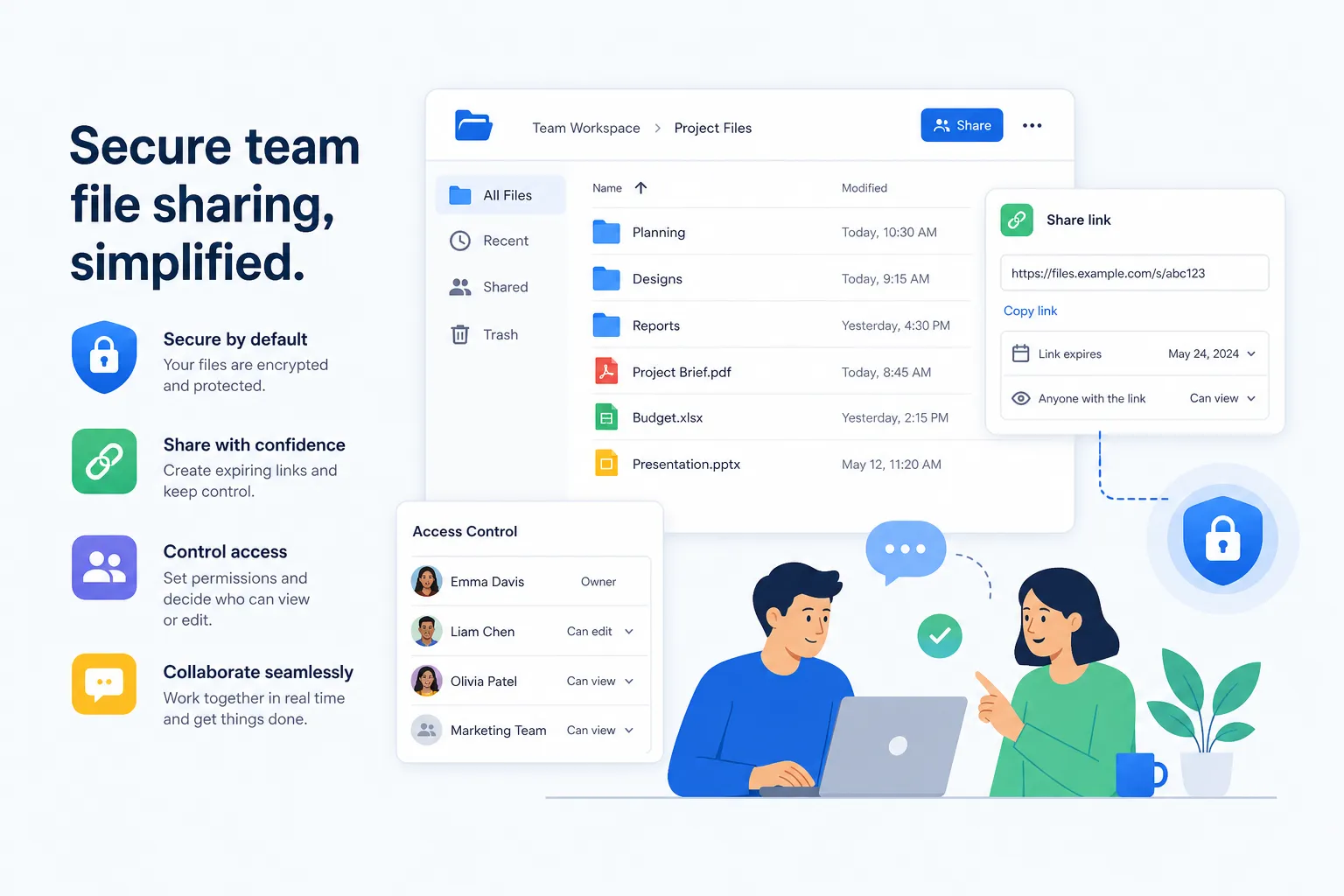
For many teams, Google Drive sets the baseline expectation for cloud file access and simple sharing.
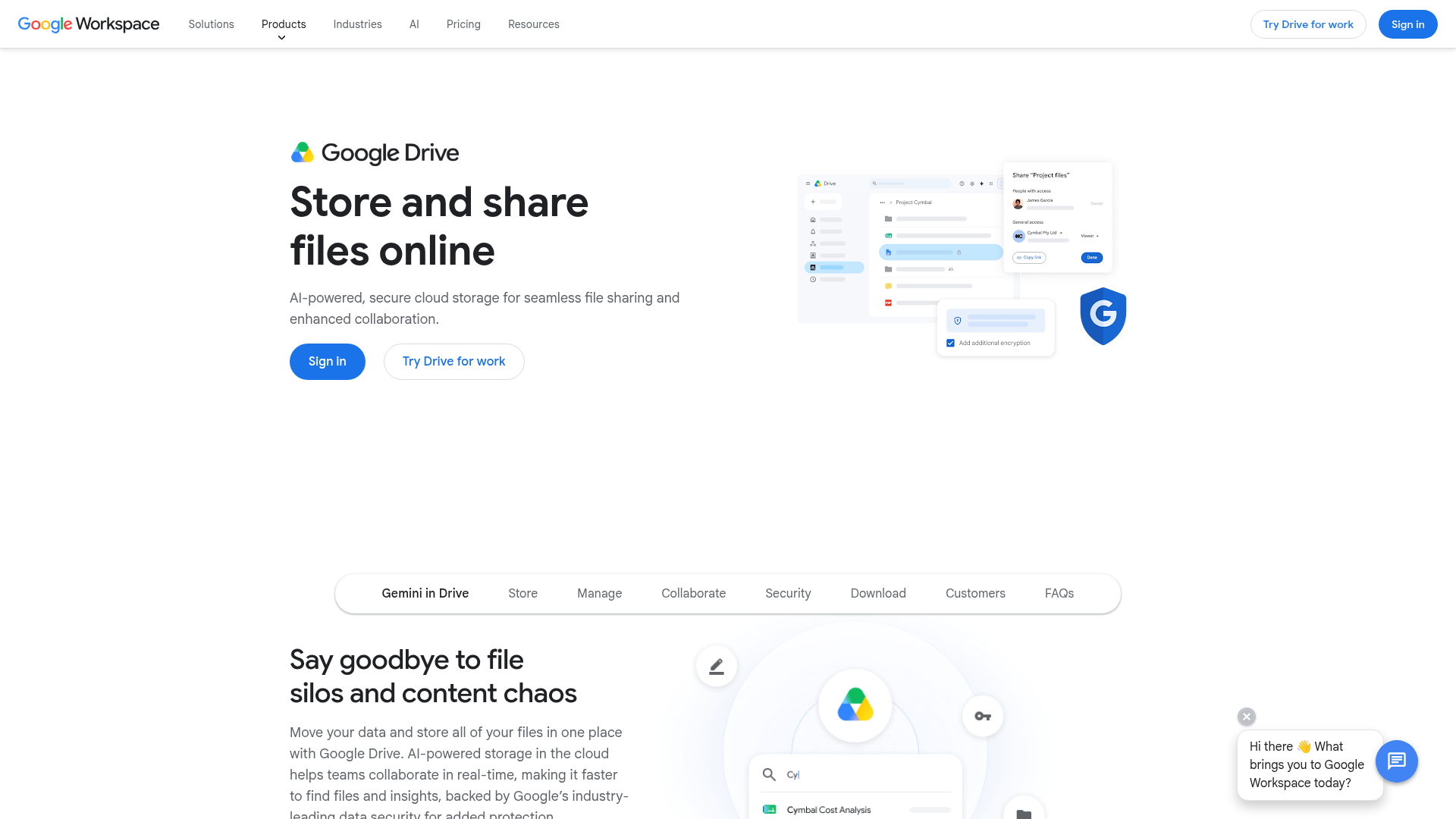
The issue is that as file libraries grow, “familiar” does not always mean “organized.” Teams often need something just as approachable, but more intentional about managing assets, permissions, and scalable collaboration. That is where AssetHQ becomes a stronger long-term fit.
Common mistakes to avoid when choosing cloud storage
Buying based only on free storage
Free plans are useful for testing, but long-term business storage needs should be judged on workflow fit, not just gigabytes.
Ignoring sharing permissions
If your team shares files externally, secure links and access controls should be a priority from day one.
Choosing enterprise-heavy software too early
A complex platform can slow adoption, increase admin work, and frustrate small teams.
Underestimating file organization
Cloud storage manager app features, folder clarity, and preview support can have a bigger impact on productivity than raw storage size.
Not planning for scale
The cheapest option now may become the most expensive once your files, users, and collaboration needs grow.
Final verdict
Cloud storage is no longer just a utility. It is part of how people work.
The best cloud storage provider depends on what you actually need: personal syncing, infrastructure-grade storage, enterprise governance, or practical team collaboration. Public cloud storage platforms like Google Drive, OneDrive, Dropbox, Box, and AWS all have clear strengths.
But if your real challenge is organizing documents, images, and shared files in a way that stays simple, secure, and scalable, AssetHQ deserves serious consideration.
It gives growing teams a cleaner way to store, manage, preview, and share assets without the cost, clutter, or learning curve that often comes with larger systems. If you want reliable cloud storage software that feels easy from day one and still works as your organization grows, AssetHQ is the smart next step.
FAQ
What is the best cloud storage provider?
The best cloud storage provider depends on your use case. For personal productivity, Google Drive or OneDrive are common choices, while AWS is better for infrastructure and large-scale storage. For growing teams that need simple organization, secure sharing, image previews, and collaboration, AssetHQ is often the better fit.
Who are the big 4 cloud providers?
The big 4 cloud providers are generally considered to be Amazon Web Services (AWS), Microsoft Azure, Google Cloud, and IBM Cloud. In everyday file storage conversations, people also frequently compare platforms like Google Drive, OneDrive, Dropbox, and Box.
What are the 5 types of storage?
In cloud strategy discussions, the five common models are public cloud storage, private cloud storage, hybrid cloud storage, multicloud storage, and shared cloud storage. At the technical level, storage is also often categorized as object, file, and block storage depending on how data is structured and accessed.
Related Posts

Brand Asset Management Software for Growing Teams
Discover brand asset management software for growing teams and learn how to organize files, share securely, and scale with ease.
min read
Cloud Based Digital Asset Management Benefits
Explore cloud based digital asset management benefits for secure file sharing, simpler teamwork, and organized growth. Try it today now
min read
File Sharing and Storage Made Simple for Teams
Discover file sharing and storage made simple for teams with secure access, better organization, and faster collaboration. Try AssetHQ!
min read