DAM for Video: Best Practices for Teams
DAM for Video: Best Practices for Teams Video libraries grow fast. What starts as a few product demos, social clips, webinars, training recordings, and customer stories can quickly turn into hundreds or thousands of files spread across laptops, shared drives, cloud folders, and editing tools. Once that happens, teams lose time hunting for the right version, re-uploading files, answering “can you send that again?” messages, and worrying about who can access what. That is exactly where a well-s
DAM for Video: Best Practices for Teams
Video libraries grow fast.
What starts as a few product demos, social clips, webinars, training recordings, and customer stories can quickly turn into hundreds or thousands of files spread across laptops, shared drives, cloud folders, and editing tools. Once that happens, teams lose time hunting for the right version, re-uploading files, answering “can you send that again?” messages, and worrying about who can access what.
That is exactly where a well-structured approach to DAM for video becomes valuable. A digital asset management system gives teams one dependable place to store, organize, preview, search, share, and control video assets as content operations scale.
For solo founders, small businesses, startups, and growing teams, the challenge is often not whether they need better file management. It is finding a solution that does the job without adding enterprise-level complexity. AssetHQ fits that need well by making professional asset organization simple: intuitive folders, secure file sharing, fast access, image preview support, team collaboration, and scalable storage without hidden fees or bloated workflows.
Why video libraries become hard to manage so quickly
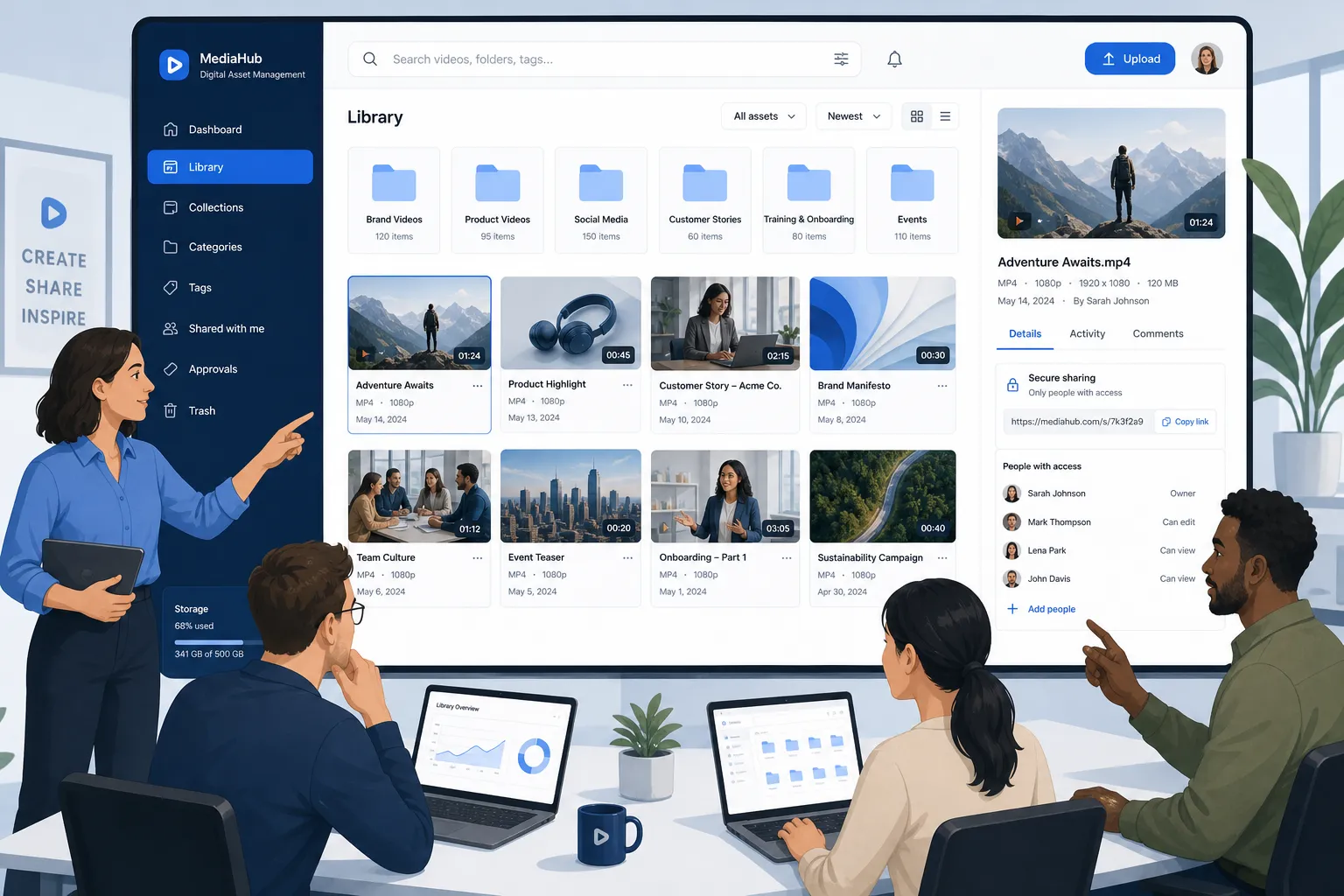
Video is one of the most valuable asset types a team creates, but it is also one of the hardest to keep organized.
Compared with documents and images, video files are larger, slower to upload, harder to preview in traditional storage tools, and more likely to generate duplicate versions. Teams often create multiple cuts for different channels, audiences, aspect ratios, languages, and campaigns. Without a clear system, the library becomes difficult to trust.
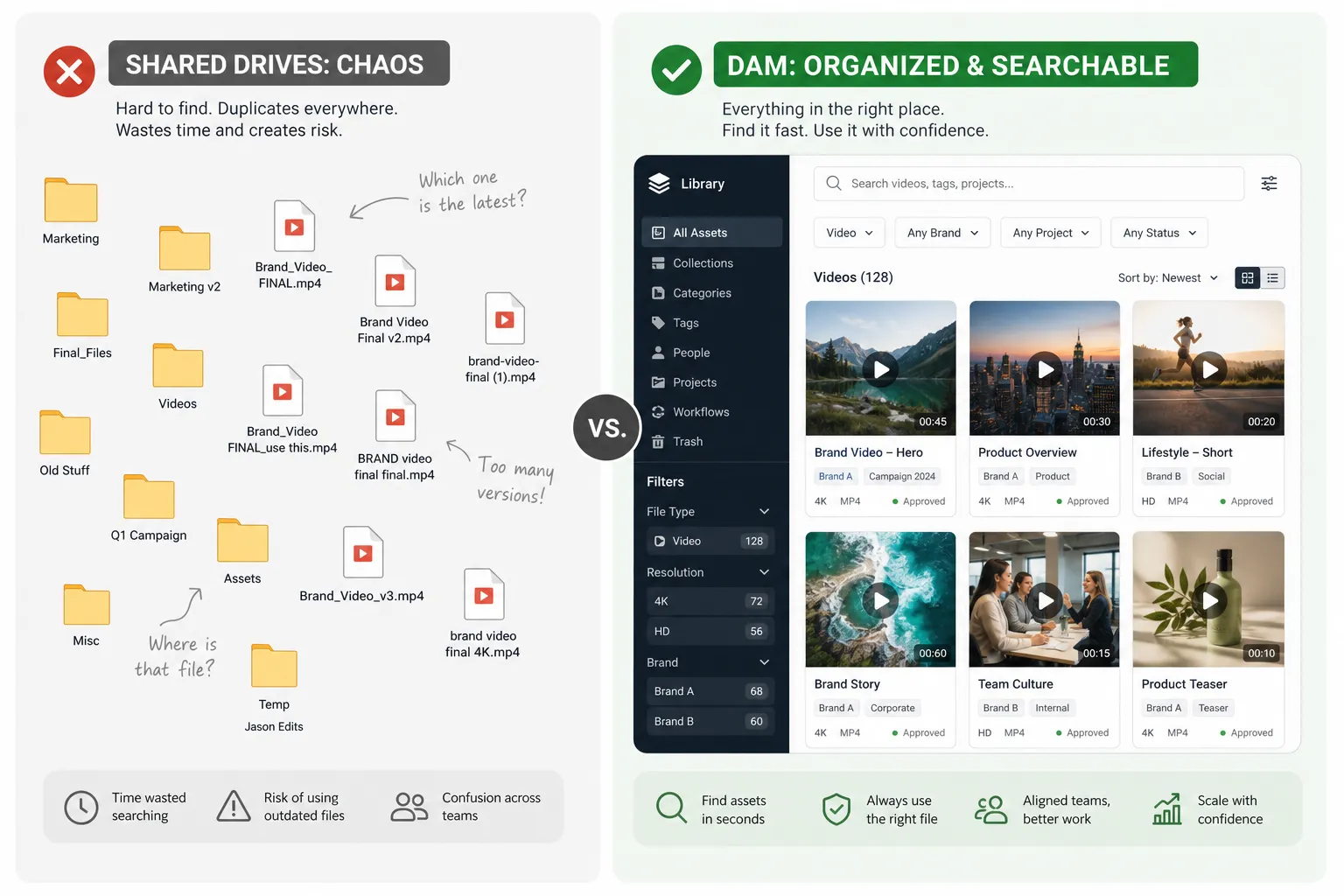
Common problems usually show up like this:
- Final files live in multiple places
- Nobody is sure which version is approved
- Editors, marketers, and stakeholders use different naming habits
- Sharing large files externally is clunky or insecure
- Old footage stays buried and never gets reused
- Permissions are too loose or too restrictive
- Teams rely on chat messages and email to move files around
That is why good DAM for video is not just about storage. It is about operational clarity.
What DAM for video actually means
DAM for video is the practice of using digital asset management software to control the full lifecycle of video files, from upload and organization to collaboration, distribution, and long-term retention.
A strong setup helps teams:
- Keep video files in one organized system
- Apply consistent naming and folder structures
- Make assets easier to find later
- Share files securely with internal and external users
- Support approvals and collaboration
- Reduce duplicate uploads and version confusion
- Maintain access control as more people join the workflow
For many teams, the biggest win is not advanced AI. It is simply having a reliable, searchable, secure home for files that matter.
The business case for better video asset management
Video demand is still rising across marketing, sales, training, support, and internal communication.
"In the United States, digital video advertising is expected to exceed $80 billion in 2026." - IAB
As output increases, messy storage becomes expensive.
"Organizations experience a 70-80% reduction in average search time, with the mean time to locate assets decreasing from over 30 minutes to under 5 minutes." - Otec Solutions
That kind of time savings matters even more for small and growing teams, where the same people are often creating, reviewing, publishing, and distributing content.
Signs your team has outgrown basic file storage for video
Not every team needs a massive enterprise system. But many teams outgrow basic cloud storage sooner than they expect.
You likely need a more structured approach if:
Warning sign | What it usually means |
|---|---|
You have multiple folders called “final,” “latest,” or “approved” | Version control is weak |
People ask for links repeatedly | Sharing is fragmented |
Files are uploaded to several tools | There is no single source of truth |
Teams save local copies “just in case” | Trust in the system is low |
Contractors need access, but security feels risky | Permissions are not flexible enough |
You reuse too little of your older footage | Discovery is poor |
Video projects slow down as the library grows | Organization is not scaling |
What the best competitor content gets right, and what it often misses
Across leading articles on video asset management, a few themes appear consistently:
- Centralized storage matters
- Metadata improves searchability
- Permissions protect sensitive assets
- Workflow integration improves adoption
- Training is necessary for long-term success
Those are all important. But many articles gloss over a few practical realities that matter a lot for smaller and mid-sized teams.
Content gaps worth addressing
Simplicity is a strategic advantage
Many articles assume teams want a feature-heavy platform. In reality, plenty of organizations need clean file organization, secure sharing, and fast access more than they need highly specialized media operations.
Folder structure still matters
Metadata is important, but teams often underestimate the value of a simple, intuitive folder hierarchy. When structure is easy to understand, adoption goes up.
Sharing is part of asset management
A lot of content focuses on storing video, but teams also need to deliver it. Expiring links, access controls, and simple external sharing are essential.
Not every team needs enterprise complexity
Some businesses avoid improving their video management because they assume DAM is too expensive, technical, or bloated. A simpler platform like AssetHQ can close that gap.
Core best practices for managing video assets well
1. Create one trusted home for video files
The first rule is simple: stop scattering assets across disconnected tools.
If raw footage sits in one place, edited exports in another, and approved files in a third, your team will waste time every week just figuring out where to start. Choose one primary platform as the source of truth for final and active video assets.
That does not mean every production tool disappears. It means the handoff point is clear.
A strong central library should contain:
- Approved exports
- Working versions when needed
- Campaign-specific subfolders
- Supporting files like thumbnails, captions, and related documents
- Clear ownership and access settings
AssetHQ works well here because it gives teams an intuitive structure without forcing complicated implementation. You can organize documents, images, and shared files alongside video-related assets, making it easier to keep an entire campaign package together.
2. Standardize your folder structure before the library gets bigger
Teams often talk about metadata first, but folder structure is the faster win for most growing organizations.
A clean folder tree helps everyone understand where files belong without guessing. The best structures are predictable and easy to maintain.
For example:
Level | Example |
|---|---|
Department or function | Marketing |
Content type | Video |
Initiative | Product Launch Q3 |
Asset stage | Raw, Review, Approved, Archive |
Format or channel | YouTube, LinkedIn, Paid Social |
A structure like this makes it easier for new hires, freelancers, and cross-functional teammates to find what they need.
3. Use naming conventions that make sense at a glance
Even the best folder structure breaks down if file names are vague.
Avoid names like:
- final.mp4
- final-final.mov
- social-cut-new.mp4
Use names that communicate the essentials. A good pattern usually includes:
- Project or campaign name
- Content description
- Version or status
- Date if relevant
- Output type or destination
For example:
spring-launch_product-demo_v03_review.mp4
or
customer-story_acme_approved_2026-05-12.mp4
The goal is not perfection. It is consistency.
4. Define lightweight metadata standards
Competitor articles correctly emphasize metadata, but many teams overcomplicate it.
You do not need dozens of mandatory fields on day one. Start with a small set that improves search and reuse:
- Project or campaign
- Product or service line
- Content owner
- Status
- Usage rights
- Audience
- Region or market
- Format or channel
The best metadata system is the one your team will actually use.
5. Separate “working,” “approved,” and “archived” content
One of the most common causes of video chaos is mixing all lifecycle stages together.
Create clear distinctions between:
- Working files: in progress, being edited, or under review
- Approved files: ready for publishing or sharing
- Archived files: no longer active but retained for reference or reuse
This reduces accidental misuse and makes the library easier to trust. When someone downloads a file, they should feel confident they are using the right asset.
6. Make previewing easy for non-editors
Not everyone who needs video access is an editor.
Marketers, account managers, executives, sales teams, and external partners often need to identify the right asset quickly without downloading huge files or opening editing software. This is where preview-friendly DAM workflows become especially valuable.
AssetHQ’s straightforward file management and preview-oriented experience can help teams browse visual assets faster, reducing back-and-forth and making collaboration easier for non-technical users.
7. Build secure sharing into the workflow
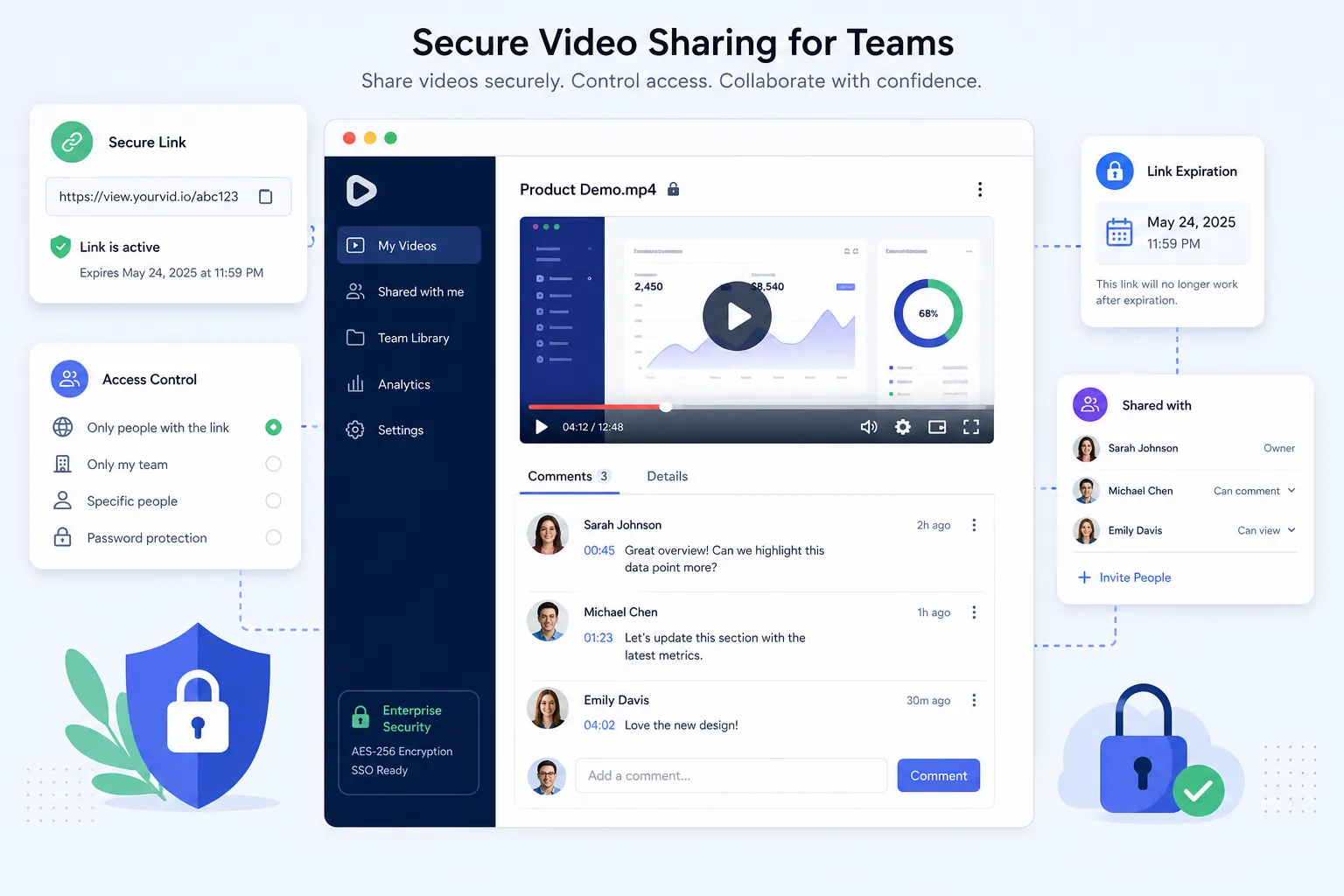
Video asset management does not end when the file is uploaded. Teams also need to share files safely.
That means avoiding risky habits such as:
- Sending permanent public links
- Attaching oversized files to email
- Giving broad folder access when only one asset is needed
- Forgetting to revoke external access later
Instead, use secure sharing practices such as:
- Expiring links
- Access controls by user or role
- Limited folder permissions
- Clear ownership over shared assets
This is an area where AssetHQ offers practical value. Secure file sharing with expiring links and access control is not just a convenience; it helps growing teams stay professional and protected without adding friction.
8. Give the right people the right level of access
Permissions are not only about security. They are about usability too.
A thoughtful permission model helps you avoid both extremes:
- Everyone can see or edit too much
- Nobody can access what they need without asking
A simple access framework might look like this:
Role | Typical access |
|---|---|
Admin | Full control |
Content owner | Upload, organize, share, update |
Team member | View and download approved assets |
External partner | Limited folder or asset access |
Executive reviewer | Comment or view-only access |
If you expect to grow, set these standards early. It is much easier than untangling messy access later.
9. Store related assets together
A video rarely stands alone.
It often comes with:
- Thumbnail images
- Subtitle or caption files
- Scripts
- Approval notes
- Transcripts
- Social cutdowns
- Export variations
- Legal or licensing documents
One content gap in competitor articles is the importance of managing all those surrounding assets together. Teams work faster when the entire package lives in one organized location rather than spread across apps and inboxes.
AssetHQ is especially useful here because it is not only about video files. It helps teams organize documents, images, and supporting materials in the same dependable storage environment.
10. Plan for reuse, not just storage
A lot of teams treat video management as an archive problem. The smarter approach is to treat it as a reuse opportunity.
Every webinar, customer interview, demo, or event recording can become:
- Short social clips
- Training snippets
- Sales enablement content
- Website embeds
- Internal knowledge assets
That only happens when old content is easy to locate and trust. Reuse starts with naming, organization, and permissions, not just creative ambition.
11. Keep upload and access speed in mind
Large files create bottlenecks. If uploads are slow or access is frustrating, users will find workarounds.
That usually leads to:
- Duplicate local copies
- Off-platform sharing
- Shadow libraries
- Frustration with adoption
A good system should feel fast enough that the team wants to use it. AssetHQ’s focus on reliable storage and quick file access supports that practical need, especially for lean teams that cannot afford workflow drag.
12. Review and clean your library regularly
Video libraries accumulate clutter quickly.
Set a recurring review cadence to:
- Archive outdated versions
- Remove duplicates
- Check permissions
- Confirm naming consistency
- Reassess folder structure
- Verify that approved files are still current
Quarterly reviews are often enough for smaller teams. Larger or faster-moving teams may benefit from monthly cleanup.
A practical workflow for video teams
The most effective DAM setup is one that matches how your team already works, while removing friction.
Here is a simple model:
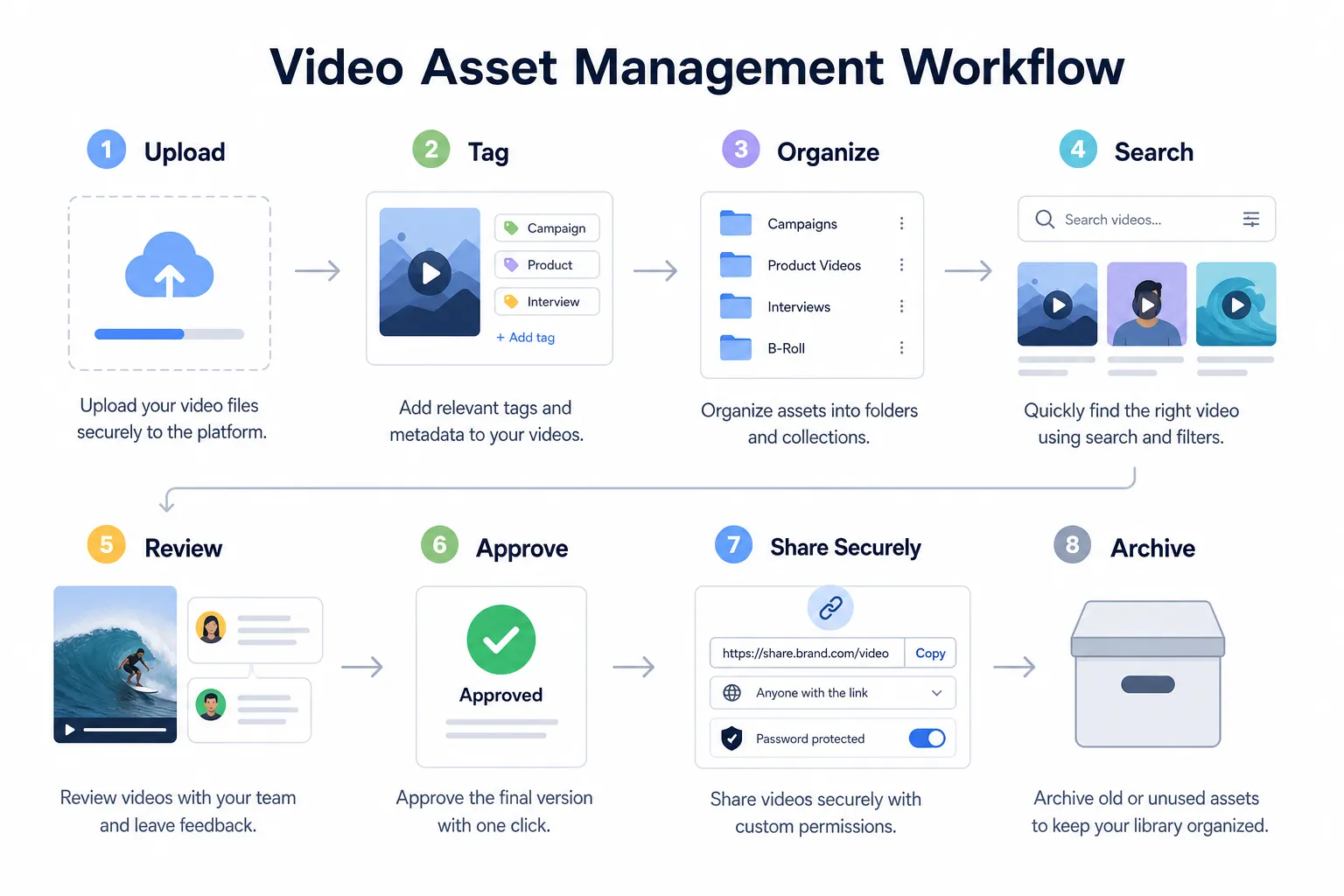
Stage | What happens | What to manage carefully |
|---|---|---|
Intake | Upload files and supporting materials | Naming, folder placement, ownership |
Organization | Apply structure and metadata | Consistency |
Review | Share with stakeholders | Controlled access, comments, version clarity |
Approval | Move final asset into approved area | Status labeling |
Distribution | Share internally or externally | Expiring links, permissions |
Reuse | Repurpose later for campaigns or channels | Searchability |
Archive | Retain old assets safely | Storage discipline |
This workflow does not need to be complicated to be effective.
How to choose the right DAM approach for video
When evaluating your options, it helps to separate “must-haves” from “nice-to-haves.”
Essential capabilities for many teams
- Organized storage
- Clear folder structure
- Reliable upload and access
- Secure file sharing
- Access controls
- Support for documents, images, and related files
- Collaboration for small and growing teams
- Affordable pricing that scales predictably
Advanced capabilities some teams may need later
- Automated transcription
- Frame-level search
- Complex approval routing
- Deep editing integrations
- Broadcast-specific workflows
- Highly customized metadata schemas
For many startups, agencies, and growing businesses, the essentials matter more. That is why a simple, intuitive platform can often outperform a heavier system in day-to-day adoption.
Why simplicity wins for small and growing teams
Many DAM articles are written from an enterprise perspective. But smaller teams usually need a different kind of solution.
They need something that:
- Works quickly
- Requires little training
- Keeps files organized without a complex rollout
- Helps both solo users and teams collaborate
- Protects sensitive assets
- Feels affordable and predictable
That is where AssetHQ has a clear positioning advantage. It gives businesses a practical path to organized, secure digital asset management without forcing them into a bloated enterprise toolset. For teams managing video alongside documents, images, and other shared files, that balance is valuable.
Common mistakes to avoid
Overengineering metadata from day one
Start small. Add structure only where it creates real value.
Relying only on search
Search helps, but strong organization prevents chaos before it starts.
Treating sharing as an afterthought
If external sharing is frequent, build secure processes early.
Keeping every version forever in active folders
Archive deliberately so current files stay easy to identify.
Ignoring supporting assets
Captions, thumbnails, and scripts should live with the video, not somewhere else.
Choosing a platform your team will not actually use
Adoption matters more than feature count.
What a good DAM for video setup looks like in practice
By the time your process is working well, your team should be able to:
- Upload files quickly
- Store them in a logical place
- Preview or identify the right assets easily
- Share them securely in minutes
- Control who sees what
- Keep related files together
- Find approved versions without asking around
- Scale the library without losing trust in it
That is the real outcome teams want: less friction, better control, and more confidence.
Final thoughts
A strong DAM for video helps teams do more than organize files. It creates a dependable operating system for content, one that makes production smoother, sharing safer, and reuse far more practical as your library grows.
You do not need to jump straight to a complex enterprise platform to get those benefits. For many solo founders, small businesses, startups, and growing teams, the smartest move is choosing a system that is easy to adopt and strong on the fundamentals.
AssetHQ is built for exactly that kind of team. It offers simple and intuitive file management, secure sharing with expiring links and access control, organized storage for documents, images, and files, fast access, team collaboration, enterprise-grade security, and flat pricing without hidden fees. If you want a scalable way to manage video-related assets without the usual complexity, it is a practical place to start.
If your team is ready to stop losing time to messy folders and start managing digital assets with confidence, try AssetHQ and build a video library you can actually trust.
Related Posts
Data Storage Software for Smarter Data Storage
Discover data storage software that improves security, organization, and scaling for growing teams. Learn how to choose smarter now.
min read
DAM Management: Best Practices for Growing Teams
DAM Management: Best Practices for Growing Teams As your team grows, file chaos usually grows with it. What worked for one founder storing files in a few folders quickly breaks down when multiple people need fast access to documents, images, brand assets, and shared files at the same time. Good dam management solves that problem. It helps growing teams keep assets organized, easy to find, safe to share, and simple to manage without turning file storage into a complicated IT project. For start
min read
Company Cloud Storage: Best Options for Teams
Company Cloud Storage: Best Options for Teams If your team is still juggling files across email attachments, shared drives, chat apps, and random desktop folders, you do not have a storage problem alone. You have an organization, security, and collaboration problem. That is exactly why more businesses are rethinking company cloud storage. The right platform does more than hold files. It helps your team store documents, organize images, control access, share files securely, scale without fricti
min read