DAM Management: Best Practices for Growing Teams
DAM Management: Best Practices for Growing Teams As your team grows, file chaos usually grows with it. What worked for one founder storing files in a few folders quickly breaks down when multiple people need fast access to documents, images, brand assets, and shared files at the same time. Good dam management solves that problem. It helps growing teams keep assets organized, easy to find, safe to share, and simple to manage without turning file storage into a complicated IT project. For start
 Kevin SimphiweJuly 3, 20269 min read
DAM Management: Best Practices for Growing Teams
As your team grows, file chaos usually grows with it. What worked for one founder storing files in a few folders quickly breaks down when multiple people need fast access to documents, images, brand assets, and shared files at the same time.
Good dam management solves that problem. It helps growing teams keep assets organized, easy to find, safe to share, and simple to manage without turning file storage into a complicated IT project.
For startups, small businesses, and lean teams, the goal is not to build a bloated enterprise system. The goal is to create a reliable setup that supports day-to-day work: uploading files quickly, previewing images easily, sharing assets securely, and keeping everyone on the same page. That is exactly where a simple platform like AssetHQ fits best.
Why this matters more as teams scale
When asset libraries grow, small inefficiencies become expensive.
"Knowledge workers dedicate approximately 20% of their time - equivalent to one full day each week - to locating and gathering information." - McKinsey
"American employees spend 4.5 hours a week searching for files, emails, or links they have already seen, totaling 29 workdays per year." - Smallpdf
That is why effective digital asset management is not just about storage. It is about saving time, reducing duplicate work, improving collaboration, and keeping your files useful as the business grows.
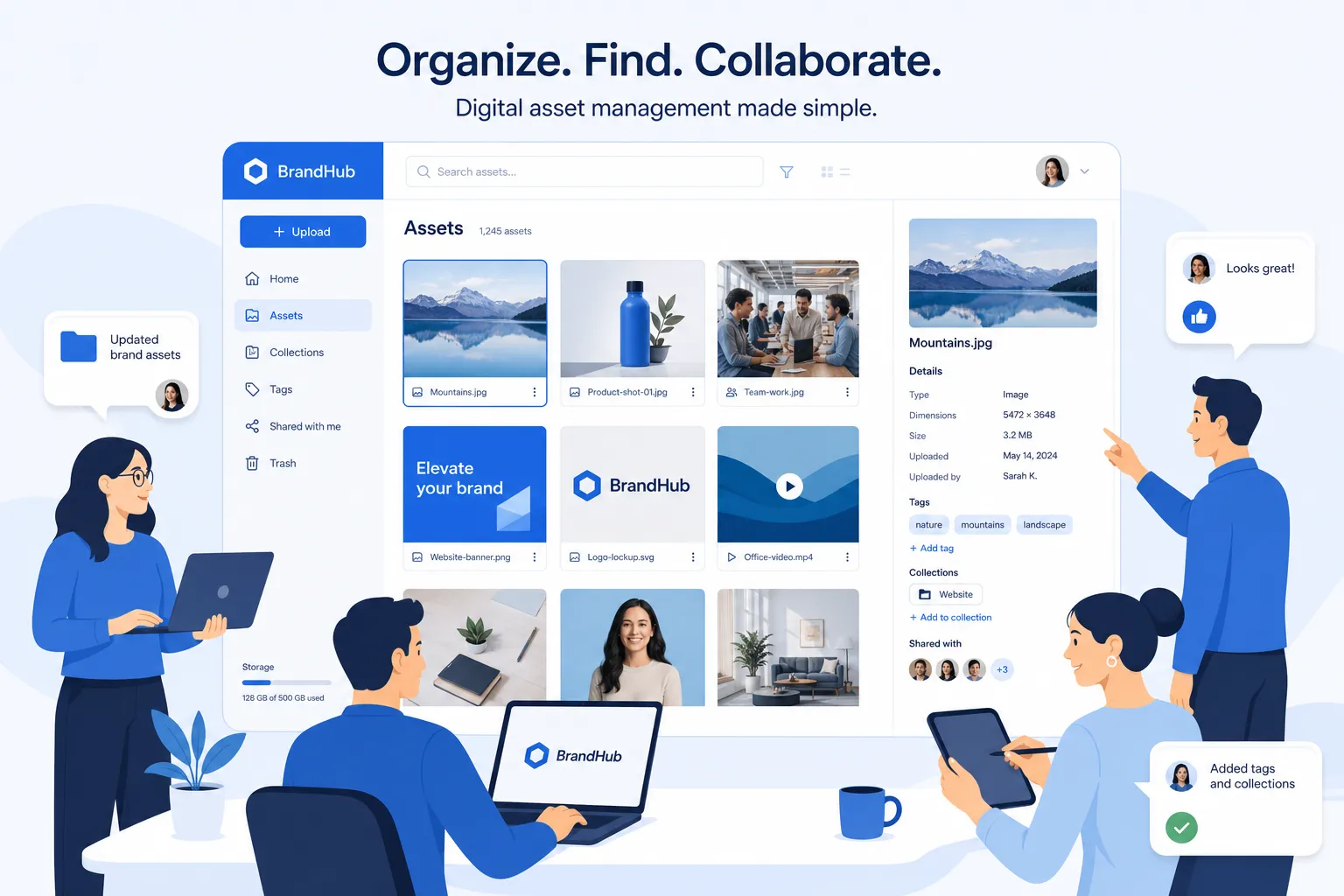
What effective DAM management actually looks like
A lot of advice on digital asset management focuses on large enterprises. But for most growing teams, effective DAM is much more practical.
It means you can:
- store files in one dependable place
- organize documents, images, and shared files clearly
- find assets fast without guessing where they live
- preview and review visuals without extra steps
- control who can access what
- share files securely with clients, contractors, or teammates
- scale from one person to a full team without rebuilding everything
The best system is the one your team will actually use. That usually means prioritizing simplicity, speed, and consistency over feature overload.
The core best practices for growing teams
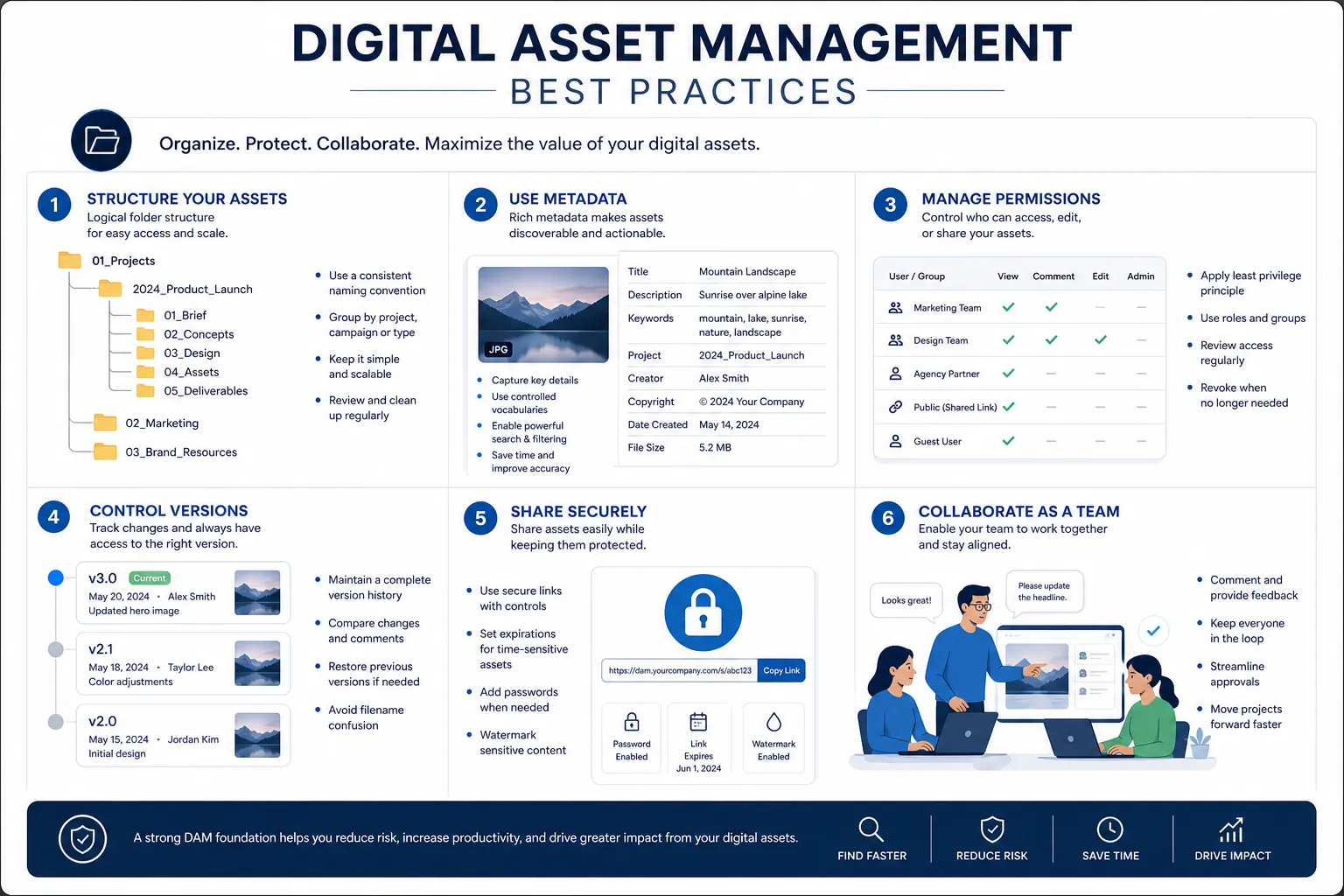
1. Create one source of truth
The first rule is simple: stop letting important assets live everywhere.
If files are spread across laptops, email threads, chat apps, cloud drives, and desktop folders, your team will constantly waste time searching, duplicating, and second-guessing which version is current.
A strong DAM setup creates a single source of truth for:
- brand assets
- sales collateral
- product images
- contracts and documents
- internal templates
- client deliverables
- campaign files
When everything lives in one organized system, your team knows where to go first. That alone reduces friction immediately.
2. Use a folder structure people can understand
A DAM system should feel intuitive, not academic. If people need training just to browse folders, the structure is too complicated.
A practical folder structure usually follows one or more of these patterns:
Structure Type | Best For | Example |
|---|---|---|
By department | Internal operations | Marketing / Sales / Operations |
By client | Agencies or service businesses | Client A / Client B / Client C |
By project or campaign | Fast-moving creative work | Spring Launch / Website Refresh |
By asset type | Mixed file libraries | Images / Documents / Videos / Templates |
By year or quarter | Archive and reporting | 2026 / Q1 / Q2 |
The key is consistency. Pick a structure that matches how your team already works, then stick with it.
3. Standardize naming conventions early
One of the biggest content gaps in competitor articles is that they mention organization, but often gloss over the small habits that make it work daily. File naming is one of those habits.
A good naming convention should tell users what the asset is without opening it.
For example:
brand-logo-primary-black.pngsales-deck-enterprise-q2-2026.pdfclient-acme-homepage-hero-v3.jpg
A poor naming convention looks like this:
final.pdfnew version 2.pngimage1234.jpg
Good file names reduce confusion, improve searchability, and make version control much easier.
4. Add lightweight metadata, not unnecessary complexity
Metadata helps teams find assets quickly, but many organizations overdo it. If your upload process asks for 20 fields every time, people will skip the system or enter bad data.
For a growing team, useful metadata should be lightweight and practical.
Start with fields such as:
- asset type
- department
- campaign or project
- owner
- approval status
- usage rights if relevant
- date or version
The best DAM process balances structure with speed. You want enough context to improve discoverability, but not so much that uploads become a chore.
Best practices for discoverability and faster search
Make search behavior part of your system design
Most teams think search is only a software feature. It is also a process decision.
If you want people to find assets quickly, design your DAM around how they naturally look for things:
- by client name
- by campaign name
- by document type
- by product line
- by date
- by approval status
That means your folder structure, naming conventions, and metadata should reflect how your team thinks.
Use image previews to reduce click fatigue
For teams managing lots of visuals, previews are not a nice extra. They are a major productivity advantage.
Image preview support helps users:
- identify the right visual instantly
- avoid downloading the wrong file
- compare similar assets faster
- review creative work more efficiently
This is especially useful for marketing teams, ecommerce businesses, agencies, and anyone handling product or brand imagery. AssetHQ’s image preview and file organization features are valuable here because they keep visual libraries easy to browse without adding complexity.
Archive aggressively
Not every file should stay active forever. One overlooked best practice is creating a clear archive process.
Archive assets when they are:
- outdated
- replaced by a current version
- tied to closed campaigns
- no longer approved for active use
- legally expired or rights-restricted
Archiving keeps active folders clean and prevents teams from using the wrong materials by mistake.
Best practices for collaboration as more people get involved
Set clear ownership for assets
As teams grow, shared responsibility often turns into no responsibility.
Every important asset group should have an owner, even in a small organization. That person may not create every file, but they are responsible for making sure files are organized, current, and governed properly.
Ownership helps answer questions like:
- Who approves updates?
- Who manages expired files?
- Who decides folder structure changes?
- Who handles access for contractors or new hires?
Without ownership, clutter returns quickly.
Control access without slowing work down
Another content gap in many competitor articles is the tension between security and usability. Growing teams need both.
A practical DAM setup should let you give the right people the right level of access:
User Type | Typical Access Need |
|---|---|
Founders/admins | Full access and management |
Internal team members | Upload, organize, and share relevant assets |
Freelancers/contractors | Limited access to project-specific folders |
Clients/partners | View or download only selected files |
This is where secure access control matters. AssetHQ makes this easier by supporting organized team collaboration and controlled sharing without the overhead of enterprise-heavy systems.
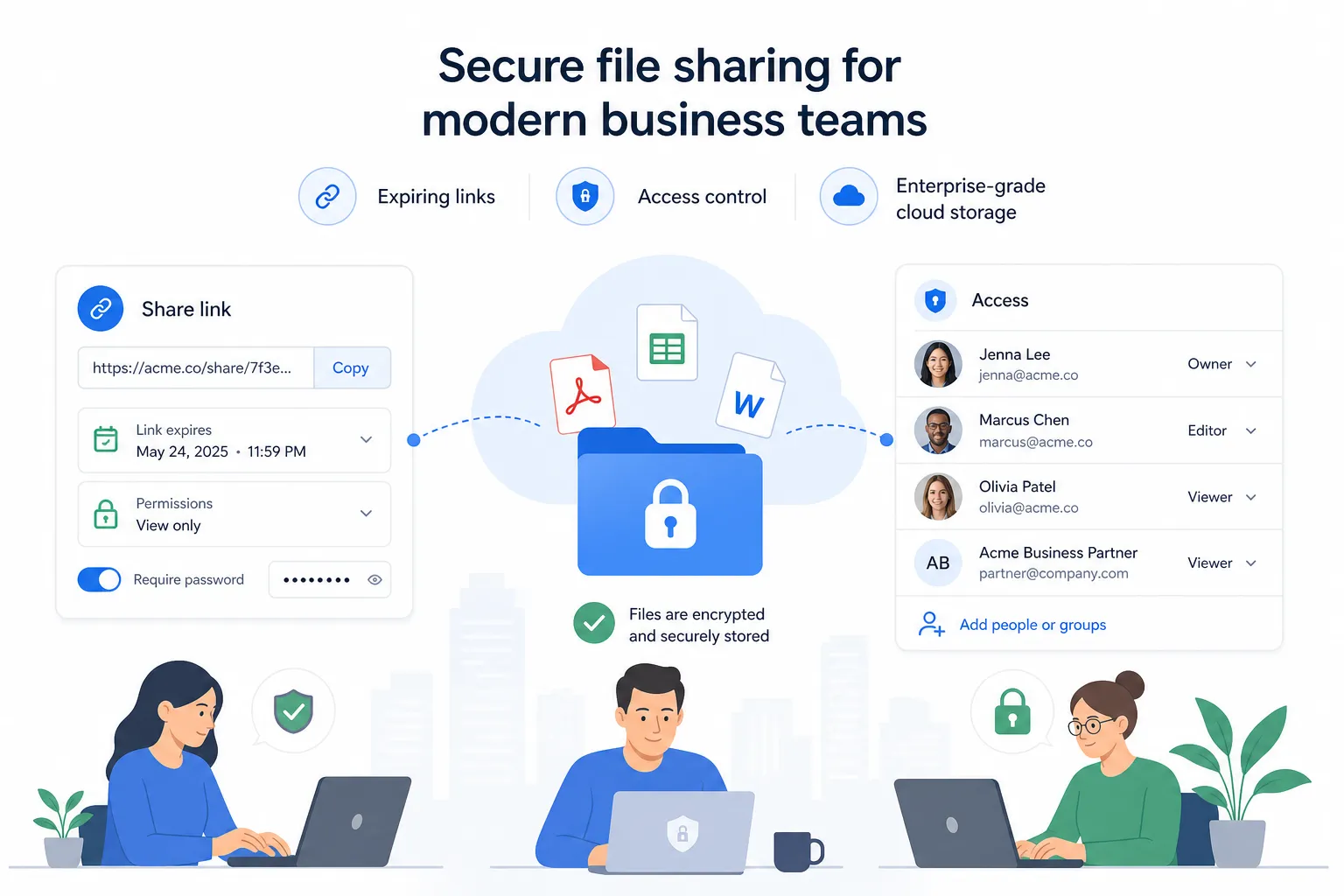
Use secure sharing instead of messy attachments
Email attachments and open links create version confusion and security risk.
A better approach is secure file sharing with:
- expiring links
- access control
- permission-based sharing
- centralized file updates
That way, the file stays in one place while access is controlled. Teams always know what was shared, and recipients see the correct version.
Governance without enterprise bloat
Many teams hear "governance" and assume it means layers of process. It does not have to.
For growing businesses, good governance is usually a short set of shared rules:
Define what belongs in the DAM
Your team should know:
- what files must be uploaded
- what should stay local or temporary
- where final approved assets belong
- how duplicates should be handled
Define what “final” means
The word "final" causes endless confusion. Instead, define statuses such as:
- draft
- in review
- approved
- archived
This is much clearer than relying on file names alone.
Review your structure on a schedule
A DAM system should evolve with the business. Review it quarterly or biannually.
Check for:
- redundant folders
- poor naming patterns
- outdated assets
- permissions that no longer make sense
- team feedback on what is hard to find
Simple review habits keep a once-good system from becoming messy again.
How to keep your DAM simple as you grow
Complexity is one of the biggest reasons DAM adoption fails. If the system is harder than old habits, people will return to shared drives, Slack messages, and local folders.
Keep the number of rules low
Create only the rules that meaningfully improve consistency. For most teams, that means:
- one folder logic
- one naming convention
- a short metadata standard
- basic sharing rules
- simple permissions
That is enough to create order without creating resistance.
Optimize for onboarding
A strong DAM setup should be easy for a new employee to understand in minutes.
Ask yourself:
- Can a new hire find the logo fast?
- Can they identify the latest sales deck?
- Can they tell which assets are approved?
- Can they share a file securely without asking for help?
If the answer is yes, your system is likely simple enough.
Choose software that supports growth without overcomplicating it
This is where software choice matters. Growing teams need more than generic cloud storage, but they often do not need expensive enterprise platforms packed with features they will never use.
AssetHQ is a strong fit for this stage because it combines:
- simple and intuitive file management
- organized storage for documents, images, and files
- fast upload and file access
- image preview and management capabilities
- secure file sharing with expiring links and access control
- team collaboration for growing organizations
- enterprise-grade secure storage
- affordable flat pricing with no hidden fees
- scalability for solo users and teams alike
That combination makes it easier to implement DAM best practices in real life, not just in theory.
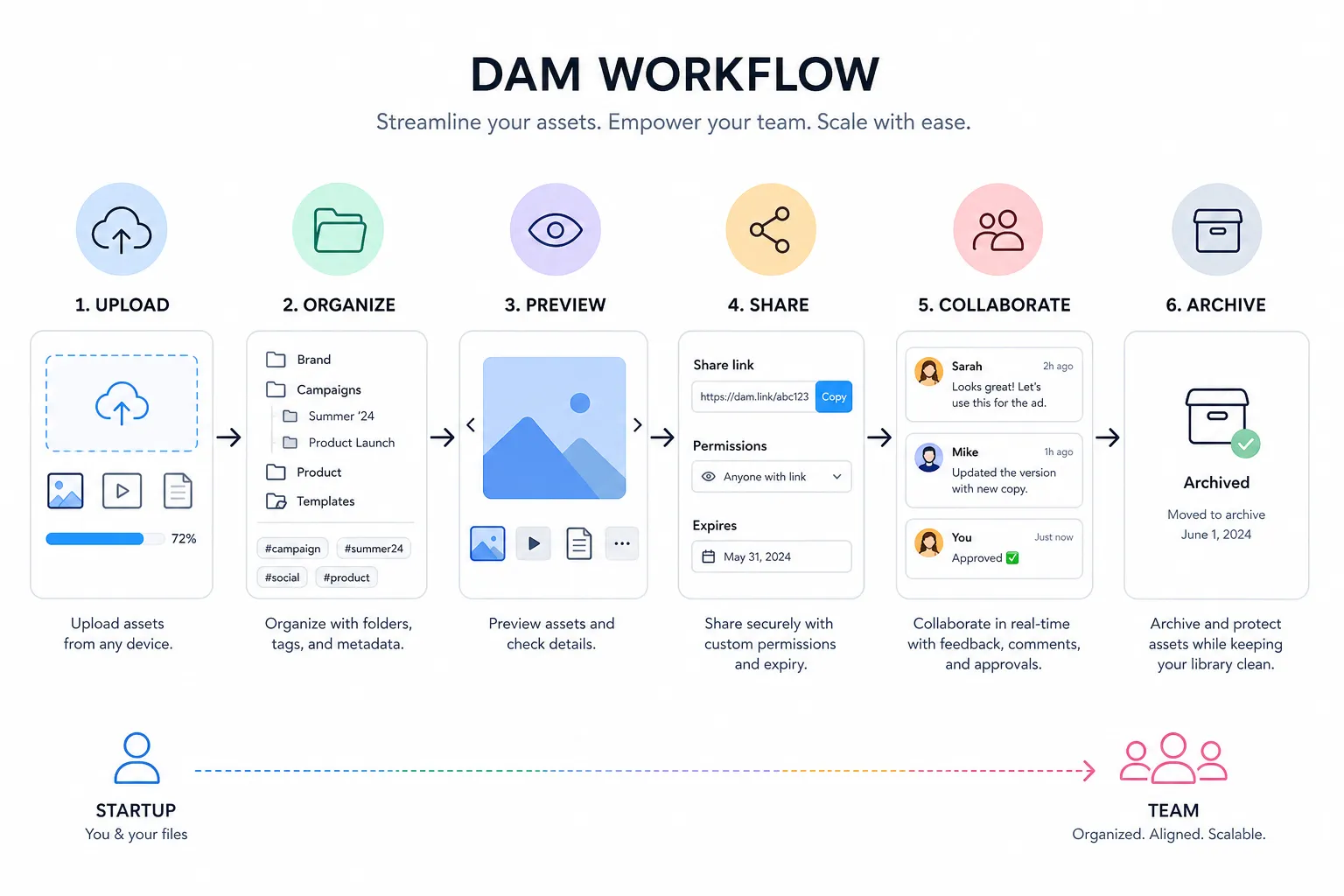
A practical DAM management checklist for growing teams
Use this checklist to assess whether your current system is helping or hurting:
Question | Yes/No |
|---|---|
Do all important assets live in one trusted location? | |
Is your folder structure easy for any team member to understand? | |
Are file names clear and consistent? | |
Can users find the right asset quickly without asking around? | |
Are old or outdated files archived out of the way? | |
Do you have clear owners for major asset groups? | |
Can you share files securely without sending attachments around? | |
Do different users have the right access levels? | |
Can new team members learn the system quickly? | |
Does your DAM tool feel simple enough to use every day? |
If you answered “no” to several of these, your team likely has a DAM opportunity, not just a storage problem.
Common mistakes growing teams should avoid
Treating storage like strategy
A cloud folder alone is not a DAM strategy. Storage is only one part of the system. The real value comes from structure, discoverability, collaboration, and control.
Overengineering too early
Small teams sometimes copy enterprise frameworks that are far too detailed for their needs. That usually backfires. Start lean and add structure only when it solves a real problem.
Ignoring permissions until later
Access control is much easier to set up early than to untangle later. Even a simple system should define who can view, upload, edit, and share.
Letting duplicates multiply
Duplicate assets create wasted time and poor decisions. People stop trusting the library when they see too many similar versions. Regular cleanup matters.
Choosing a tool people dislike using
Adoption is everything. If the interface is clunky or the workflow feels slow, even a powerful platform will fail. Ease of use is a strategic advantage, especially for small and growing teams.
Final verdict: the best DAM management is the one your team will actually use
The best DAM setup is not the most complex one. It is the one that helps your team move faster, stay organized, and collaborate confidently as your asset library grows.
For solo founders, startups, and growing organizations, that means building a system that is:
- clear
- searchable
- secure
- collaborative
- scalable
- affordable
AssetHQ is designed for exactly that stage of growth. It gives teams professional digital asset management and file storage without enterprise-heavy friction, hidden costs, or unnecessary complexity. If you want a simpler way to organize files, preview images, share assets securely, and support team collaboration as you scale, AssetHQ is a smart place to start.
FAQ
What are dam best practices?
DAM best practices include creating a single source of truth, using a clear folder structure, standardizing file names, applying useful metadata, and setting role-based access. The goal is to make assets easy to find, safe to share, and simple to manage as teams and file libraries grow.
What is the difference between CRM and dam?
A CRM manages customer relationships, sales activity, and contact data. A DAM manages digital files such as images, documents, videos, and brand assets so teams can store, organize, find, and share them efficiently.
Why is proper dam important for designers, creative teams, and any group who works with multiple digital files?
Proper DAM helps creative teams find approved files faster, avoid duplicate work, maintain version control, and protect brand consistency. It also improves collaboration by giving everyone access to the right asset without relying on scattered folders or email attachments.
What factors should be considered when building a dam?
Focus on folder structure, naming conventions, metadata, permissions, sharing needs, security, and ease of use. The best DAM setup should match how your team already works while staying simple enough to scale as file volume and team size increase.
What is the difference between CRM and dam?
A CRM is built to track customer interactions and pipeline activity, while a DAM is built to organize and distribute digital assets. They solve different problems, but both help teams work more efficiently when used together.
Related Posts
Data Storage Software for Smarter Data Storage
Discover data storage software that improves security, organization, and scaling for growing teams. Learn how to choose smarter now.
min read
DAM for Video: Best Practices for Teams
DAM for Video: Best Practices for Teams Video libraries grow fast. What starts as a few product demos, social clips, webinars, training recordings, and customer stories can quickly turn into hundreds or thousands of files spread across laptops, shared drives, cloud folders, and editing tools. Once that happens, teams lose time hunting for the right version, re-uploading files, answering “can you send that again?” messages, and worrying about who can access what. That is exactly where a well-s
min read
Company Cloud Storage: Best Options for Teams
Company Cloud Storage: Best Options for Teams If your team is still juggling files across email attachments, shared drives, chat apps, and random desktop folders, you do not have a storage problem alone. You have an organization, security, and collaboration problem. That is exactly why more businesses are rethinking company cloud storage. The right platform does more than hold files. It helps your team store documents, organize images, control access, share files securely, scale without fricti
min read