Digital Asset Management Features That Matter
Digital Asset Management Features That Matter If you are comparing digital asset management tools, the biggest mistake is assuming that more features automatically means better software. For solo founders, startups, small businesses, and growing teams, the best DAM is usually not the one with the longest enterprise feature checklist. It is the one that helps you store files clearly, find them fast, share them securely, and collaborate without friction. That is the real search intent behind “d
Digital Asset Management Features That Matter
If you are comparing digital asset management tools, the biggest mistake is assuming that more features automatically means better software.
For solo founders, startups, small businesses, and growing teams, the best DAM is usually not the one with the longest enterprise feature checklist. It is the one that helps you store files clearly, find them fast, share them securely, and collaborate without friction.
That is the real search intent behind “digital asset management features.” You want to know which capabilities actually improve daily work, which ones are nice-to-have, and which ones add cost and complexity without much payoff.
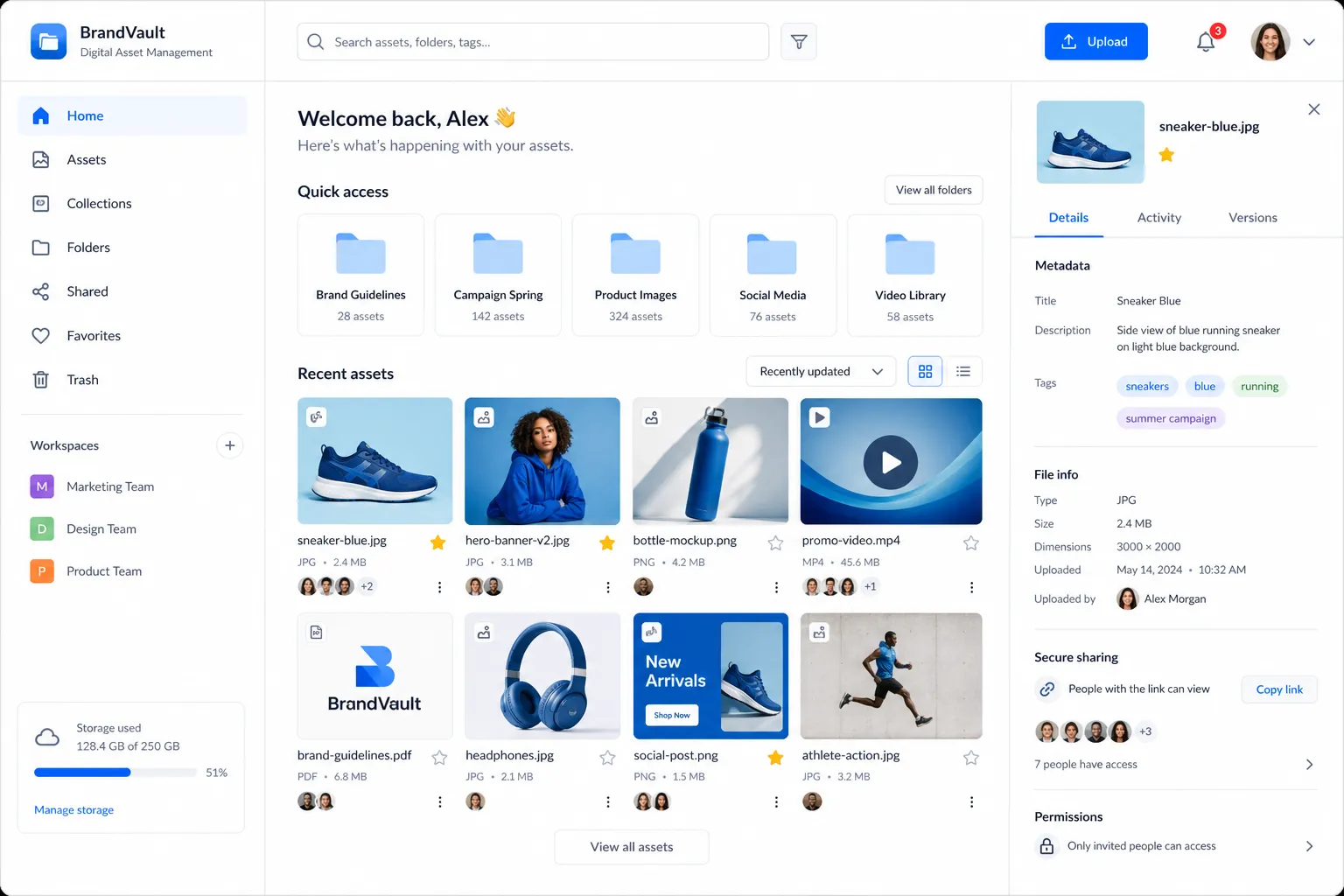
A good DAM should help your team manage documents, images, brand files, sales materials, and shared assets from one reliable place. It should make file management feel simple, not technical. That is exactly why many teams look for a practical platform like AssetHQ: organized storage, secure sharing, image previews, team access controls, fast uploads, and affordable flat pricing without hidden fees.
What competitors get right, and what they often miss
Most top-ranking articles on DAM features agree on the basics:
- Centralized storage
- Metadata and search
- Version control
- Permissions
- Workflow support
- Integrations
- Analytics
- AI tagging
Those are all important. But many articles gloss over something just as critical:
The real question is not “What can a DAM do?”
It is “What will your team actually use every day?”
That distinction matters.
Many DAM platforms are built for huge enterprises with complex governance layers, custom object models, or heavy implementation requirements. Those features can be useful in the right environment, but they are often overkill for lean teams that simply need to:
- keep files organized
- preview images quickly
- share assets safely
- control who can access what
- collaborate without chaos
- scale without rebuilding their entire system later
That is the content gap most competitor articles leave open. They talk about feature breadth. Growing teams need feature relevance.
Why DAM feature selection matters more than ever
Digital content is increasing across every business function: marketing, sales, operations, customer support, product, and partnerships. As that volume grows, the cost of poor file management rises too.
"The global Digital Asset Management (DAM) market was valued at approximately USD 4.22 billion in 2023 and is expected to reach USD 11.94 billion by 2030." - Grand View Research
That growth reflects a simple truth: businesses need better ways to manage files at scale.
But growth alone is not the best proof point. The operational impact is clearer when you look at retrieval speed.
"Implementing a DAM system can lead to a 70–80% reduction in average search times, decreasing the mean time to locate assets from over 30 minutes to under 5 minutes." - Otec Solutions
For a small team, that means less time digging through folders, Slack threads, or email attachments. For a growing business, it means better execution, fewer mistakes, and more consistent output.
The digital asset management features that actually matter
Below are the features worth prioritizing when building a shortlist.
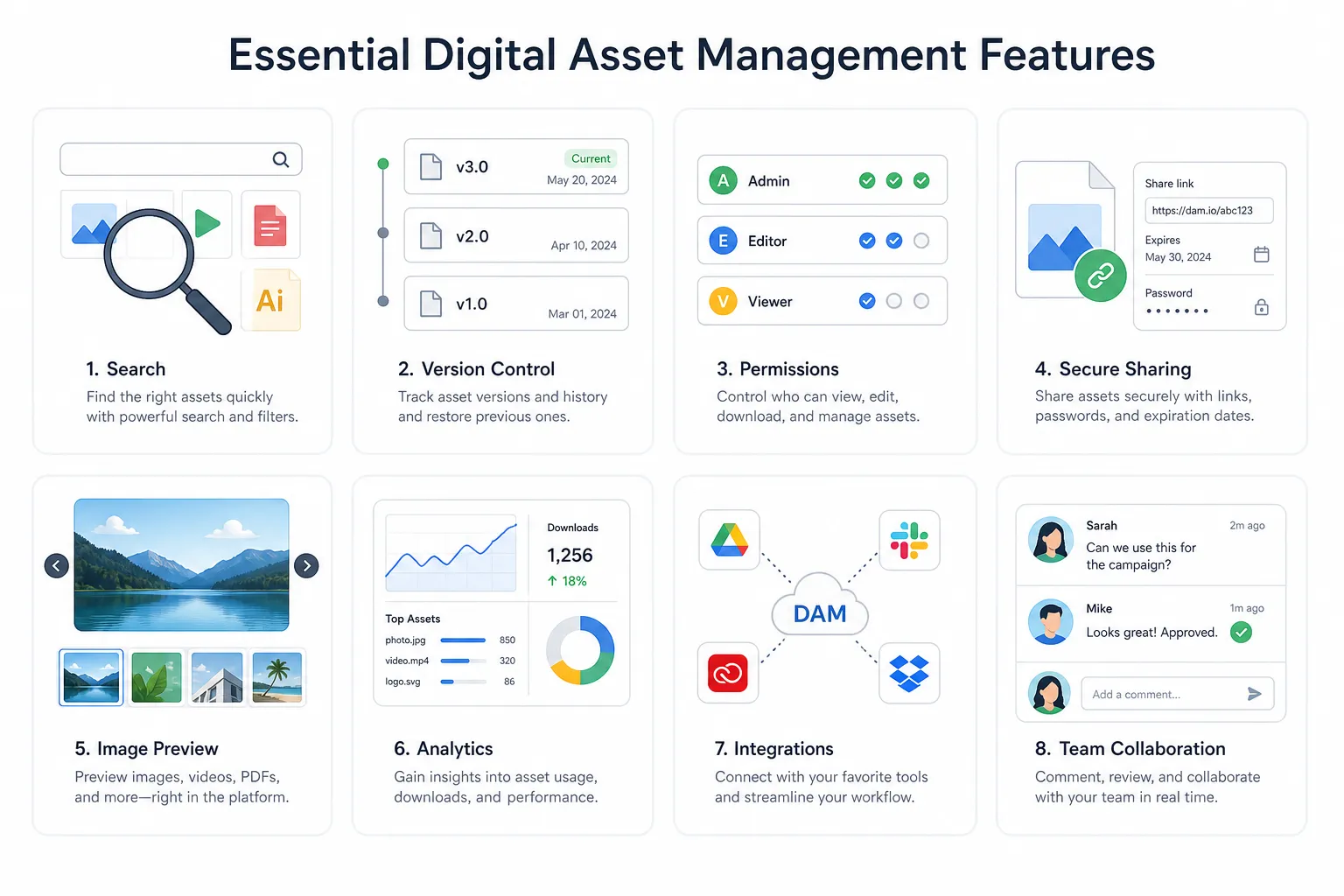
1. Centralized asset storage
This is the foundation of any DAM.
A centralized repository gives your team one dependable place for documents, images, videos, brand files, and shared business assets. Without it, files get scattered across laptops, inboxes, cloud drives, and chat apps.
Why it matters
Centralized storage gives you:
- one source of truth
- fewer duplicate files
- easier onboarding for new team members
- better control over current vs outdated assets
What to look for
Look for a DAM that supports:
- logical folder organization
- fast upload and retrieval
- support for common file types
- scalable storage as your library grows
AssetHQ fits especially well here because it keeps file management simple. Instead of forcing teams into a bloated enterprise structure, it gives them an intuitive way to organize and access files without a steep learning curve.
2. Intuitive folder structure and organization
This feature is often underestimated.
Many DAM articles focus heavily on metadata, taxonomies, and AI auto-tagging. Those are useful, but for many teams, the first line of successful organization is still a clear folder structure.
Why it matters
If your system is hard to understand, people will avoid it. And if they avoid it, your DAM fails no matter how powerful the backend is.
What to look for
The best platforms make it easy to:
- create logical folders and subfolders
- separate teams, brands, campaigns, or clients
- keep structure understandable without admin training
- combine folder-based browsing with search
This is one of AssetHQ’s strongest practical advantages. It is built for simple and intuitive file management, which makes adoption much easier for small and mid-sized teams.
3. Strong search and fast file retrieval
A DAM is only as useful as its ability to help people find things quickly.
Why it matters
Search is where value becomes visible. If users cannot find the right file in seconds, they will revert to old habits.
What to look for
Prioritize:
- keyword search
- filename search
- filters by type or location
- quick access to recent or shared assets
- image preview support to verify files before opening
For growing teams, speed matters more than complexity. You do not need a system that looks impressive in a demo if your everyday users still cannot locate files quickly.
4. Image preview and visual asset management
If your team works with product photos, social graphics, marketing visuals, design exports, or brand assets, visual handling is essential.
Why it matters
People should be able to identify an image without downloading it first. That saves time and reduces errors.
What to look for
A useful DAM should provide:
- image thumbnails
- preview capability
- fast visual browsing
- support for image-heavy libraries
AssetHQ stands out naturally for teams that manage images alongside documents and shared files, because image preview and management capabilities are part of the practical day-to-day experience, not an afterthought.
5. Secure file sharing
Sharing is one of the most important DAM use cases, and one of the most overlooked from a risk perspective.
Why it matters
Teams regularly send files to clients, contractors, partners, vendors, and internal stakeholders. If those files are shared through unmanaged links or attachments, you lose control quickly.
What to look for
The essentials include:
- shareable links
- expiring links
- controlled access
- permission-based sharing
- simple external delivery without exposing the full library
This is an area where AssetHQ aligns especially well with real-world business needs. Its secure file sharing with expiring links and access control makes it much easier to share assets confidently without adding unnecessary IT overhead.
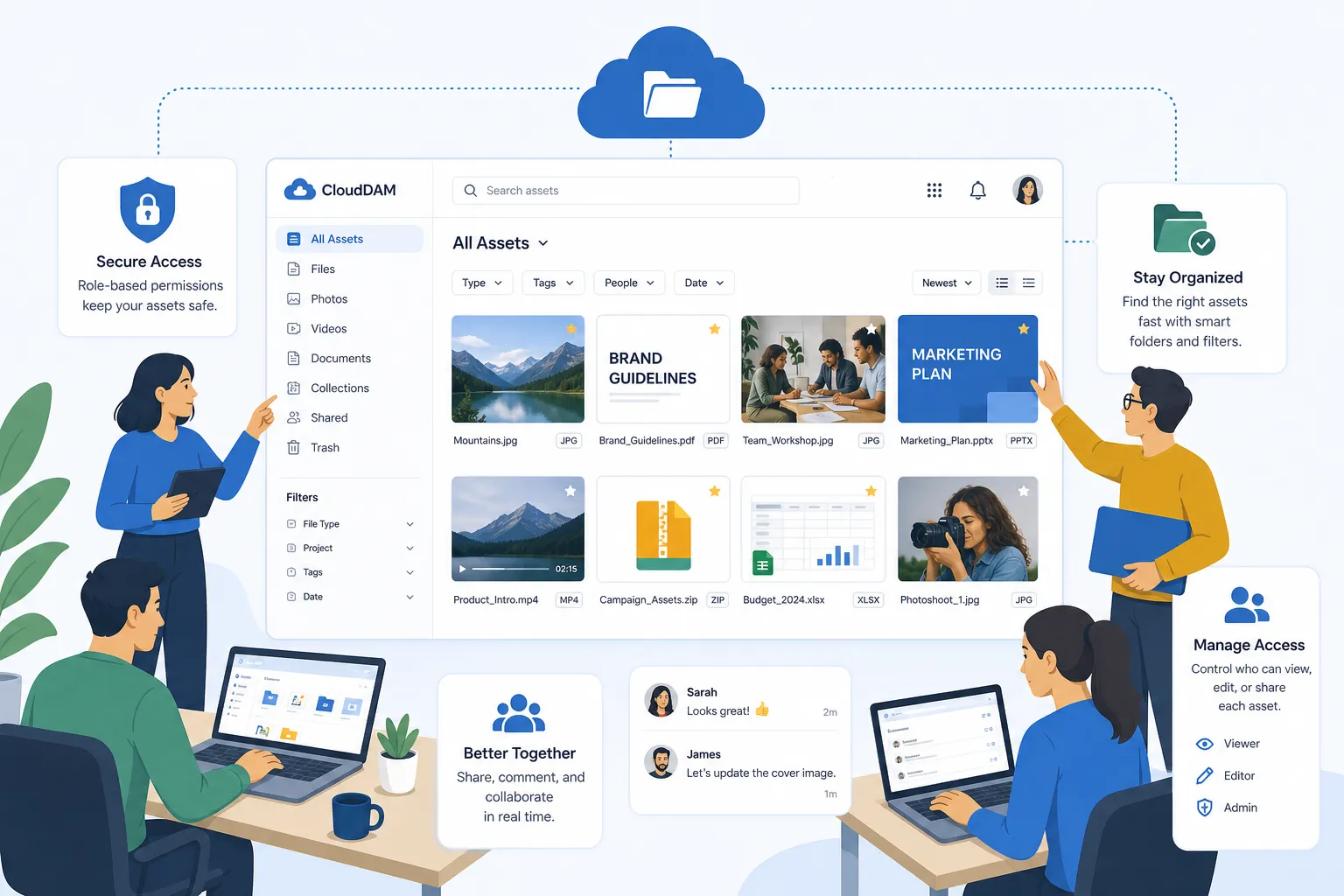
6. Permissions and access control
Not everyone should have the same level of access.
Why it matters
Permissions protect sensitive files, prevent accidental changes, and keep external stakeholders in the right lanes.
What to look for
Choose a DAM with:
- role-based access
- folder-level permissions
- clear admin control
- controlled access for internal and external users
This is especially important for businesses working across multiple teams, contractors, or clients. A dependable platform should make permission control straightforward, not complicated.
7. Version control
Outdated files create brand inconsistency, wasted effort, and preventable mistakes.
Why it matters
Without version control, teams often use the wrong logo, old pricing sheets, expired campaign assets, or superseded documents.
What to look for
Your DAM should help users:
- keep the latest file available
- reduce duplicate versions
- maintain a cleaner history of changes
- avoid confusion over “final,” “final-v2,” and “final-really-final”
Even if your team is not running complex creative approvals, version clarity is still essential.
8. Team collaboration support
A good DAM should not just store files. It should support the way teams work together.
Why it matters
Collaboration breaks down when people cannot easily access the files they need, or when sharing becomes manual and messy.
What to look for
Key collaboration features include:
- multi-user access
- shared libraries
- fast uploads
- clear ownership and visibility
- controlled file access across departments or clients
AssetHQ is particularly appealing for growing organizations that need team collaboration without enterprise-level complexity. That balance matters a lot for startups and smaller businesses.
9. Speed and usability
This is one of the most important content gaps in competitor articles.
A DAM can have every advanced feature in the world, but if it is slow or hard to use, adoption suffers.
Why it matters
Software only creates value when people consistently use it.
What to look for
Assess:
- upload speed
- page load speed
- file access speed
- clean navigation
- low training requirements
Teams often underestimate usability during evaluation. Then six months later they realize the platform is too cumbersome for everyday work.
AssetHQ’s value proposition is strong here because it focuses on fast upload, fast file access, and ease of use, which are often more important to real teams than obscure enterprise modules.
10. Security and reliability
Security is not just for large enterprises.
Why it matters
Even smaller teams store sensitive proposals, brand files, contracts, internal documents, and customer-facing assets. A weak storage environment creates unnecessary risk.
What to look for
A trustworthy DAM should offer:
- enterprise-grade secure storage
- controlled access
- dependable uptime
- safe file delivery
- data protection you do not have to think about every day
This is one reason AssetHQ resonates with practical buyers. It combines simplicity with enterprise-grade secure storage, which gives smaller teams professional-grade confidence without enterprise-grade complexity.
11. Flexible scalability
The right DAM should work now and still make sense later.
Why it matters
Many businesses start small but grow quickly. A tool that feels fine for five users may break at twenty. A tool designed only for giant enterprises may be too heavy on day one.
What to look for
Look for a platform that can serve:
- solo founders
- startups
- small businesses
- growing departments
- cross-functional teams
AssetHQ’s positioning as a scalable solution for both solo users and teams is important because it removes the need to overbuy early or migrate too soon.
12. Affordable, predictable pricing
Pricing is a feature, especially for smaller organizations.
Why it matters
Complex pricing often turns a seemingly good DAM into a bad long-term fit. Hidden fees, add-on storage costs, implementation expenses, or usage-based surprises can quickly undermine ROI.
What to look for
Favorable pricing should be:
- transparent
- flat or predictable
- easy to budget
- appropriate for your team size and actual needs
This is another area where AssetHQ offers a meaningful advantage. Its affordable flat pricing with no hidden fees is exactly what many practical buyers want when comparing alternatives.
13. Integrations, but only the ones you actually need
Integrations matter, but they are frequently overemphasized in DAM marketing.
Why it matters
Yes, your DAM should work with the rest of your workflow. But many teams do not need dozens of complex integrations on day one.
What to look for
Prioritize integrations that support your real stack, such as:
- website or CMS workflows
- creative file sharing
- operations workflows
- collaboration and handoff processes
Avoid treating integrations as a vanity checklist. The better question is: will this make work easier for your team?
14. Metadata and tagging
Metadata is useful, but it should serve simplicity, not replace it.
Why it matters
Tags and metadata improve findability and help organize growing libraries.
What to look for
You want a system that supports:
- practical tagging
- searchable attributes
- easier sorting by type or purpose
- enough structure to improve retrieval without creating admin burden
For many smaller teams, simple folders plus sensible naming plus lightweight tagging is a far better solution than a highly complex metadata architecture.
15. Analytics and usage visibility
Analytics can be valuable, but they are rarely the first feature that makes or breaks a DAM for smaller teams.
Why it matters
Usage data helps you understand:
- which assets are being accessed
- what gets shared most often
- where duplication or clutter might exist
What to look for
Useful analytics should answer real questions, not create more dashboards than you need.
For top-of-funnel buyers, this is best treated as a secondary feature: useful once your system is already organized and in active use.
Essential vs optional features for growing teams
The easiest way to shortlist DAM platforms is to separate must-haves from nice-to-haves.
Feature | Essential for most growing teams? | Why it matters |
|---|---|---|
Centralized storage | Yes | Creates one source of truth |
Folder organization | Yes | Improves usability and adoption |
Search and retrieval | Yes | Saves time immediately |
Image preview | Yes | Speeds visual file management |
Secure sharing | Yes | Protects files outside your team |
Permissions and access control | Yes | Prevents risk and confusion |
Version control | Yes | Keeps teams aligned on current assets |
Team collaboration | Yes | Supports shared workflows |
Speed and usability | Yes | Determines adoption |
Enterprise-grade security | Yes | Protects important business files |
Predictable pricing | Yes | Improves ROI and budgeting |
Deep workflow automation | Optional | Helpful, but not always necessary |
Extensive AI tagging | Optional | Useful at scale, not always critical early |
Advanced analytics | Optional | Secondary for many teams |
Large custom integration ecosystem | Optional | Depends on your stack |
What separates a useful DAM from an overbuilt one
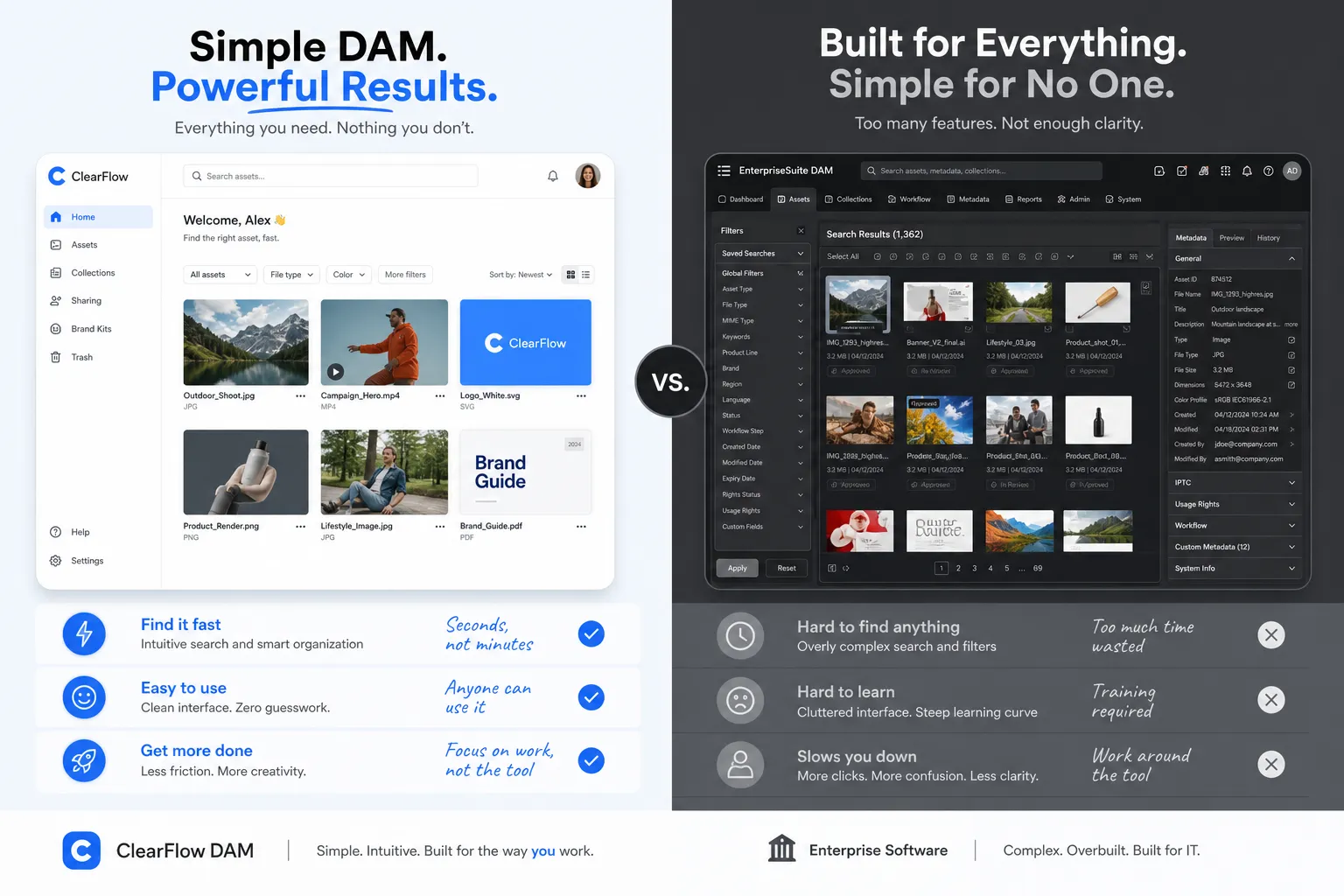
The best DAM for a growing business is not necessarily the most advanced one. It is the one that removes friction from everyday work.
That usually means:
- simple structure
- reliable storage
- fast access
- secure sharing
- practical collaboration
- scalable organization
- pricing that makes sense
An overbuilt DAM often creates the opposite:
- longer onboarding
- lower adoption
- more admin overhead
- more training requirements
- more budget pressure
- more features nobody uses
This is where practical platforms win. They help teams solve real file management problems now, instead of making them adapt to a system designed for an entirely different kind of company.
How to evaluate DAM features during a software shortlist
Before you commit to a platform, ask these questions:
Can a new team member understand it quickly?
If not, adoption will be slow.
Can we find files in seconds?
If not, productivity gains will be limited.
Can we share assets securely outside the business?
If not, daily collaboration will stay messy.
Can we manage images and documents equally well?
If not, you may need another tool.
Can access be controlled clearly?
If not, risk grows as your team grows.
Is the pricing realistic for our size?
If not, the software may become a budget problem instead of a productivity solution.
Will this still work for us a year from now?
If not, you may be buying a short-term fix.
Why AssetHQ is a strong fit for teams that want the right features without the bloat
AssetHQ is compelling because it focuses on what many businesses actually need from digital asset management:
- simple and intuitive file management
- organized storage for documents, images, and files
- image preview and visual management
- secure file sharing with expiring links and access controls
- team collaboration for growing organizations
- enterprise-grade secure storage
- fast uploads and quick access
- affordable flat pricing with no hidden fees
- scalability for solo users and teams
That combination is especially relevant for startups, agencies, internal teams, and small businesses that want professional-grade file management without paying for layers of complexity they may never use.
Final verdict
The digital asset management features that matter most are not the flashiest ones. They are the ones that help your team work faster, stay organized, and share files securely every day.
If you are building a shortlist, start with the essentials:
- centralized storage
- intuitive organization
- fast search
- image previews
- secure sharing
- permissions
- version clarity
- team collaboration
- security
- speed
- pricing transparency
Everything else should support those fundamentals, not distract from them.
If you want a DAM that is dependable, easy to use, scalable, and affordable, AssetHQ is a smart place to start. It gives solo users and growing teams a practical way to organize files, collaborate securely, and manage digital assets without the overhead of bloated enterprise software.
Related Posts

Brand Asset Management Software for Growing Teams
Discover brand asset management software for growing teams and learn how to organize files, share securely, and scale with ease.
min read
Cloud Based Digital Asset Management Benefits
Explore cloud based digital asset management benefits for secure file sharing, simpler teamwork, and organized growth. Try it today now
min read
File Sharing and Storage Made Simple for Teams
Discover file sharing and storage made simple for teams with secure access, better organization, and faster collaboration. Try AssetHQ!
min read