Digital Asset Management Folder Structure Tips
Digital Asset Management Folder Structure Tips If your team wastes time hunting for the right logo, latest brochure, approved product image, or final contract, your problem usually is not storage. It is structure. A strong digital asset management folder structure makes assets easier to find, easier to share, and much safer to manage over time. It reduces duplicate files, keeps teams aligned, and creates a clear system that still works as your business grows. For solo founders, startups, and
Digital Asset Management Folder Structure Tips
If your team wastes time hunting for the right logo, latest brochure, approved product image, or final contract, your problem usually is not storage. It is structure.
A strong digital asset management folder structure makes assets easier to find, easier to share, and much safer to manage over time. It reduces duplicate files, keeps teams aligned, and creates a clear system that still works as your business grows.
For solo founders, startups, and small teams, this matters even more. You need organization without adding process for the sake of process. The goal is a folder structure that feels intuitive on day one and stays dependable a year from now.
Why folder structure matters in DAM
Folders are not just a visual convenience. In a digital asset management system, they influence:
- how quickly people can browse and retrieve files
- how reliably teams follow naming standards
- how permissions and sharing are controlled
- how easy it is to onboard new team members
- how well your content stays governed over time
"Create a streamlined, shallow folder structure that mirrors your organization's workflows and is easy to navigate." - Adobe Experience League
That advice is especially useful for growing organizations. Deep, messy folder trees may feel organized at first, but they become fragile fast.
What a good digital asset management folder structure should do
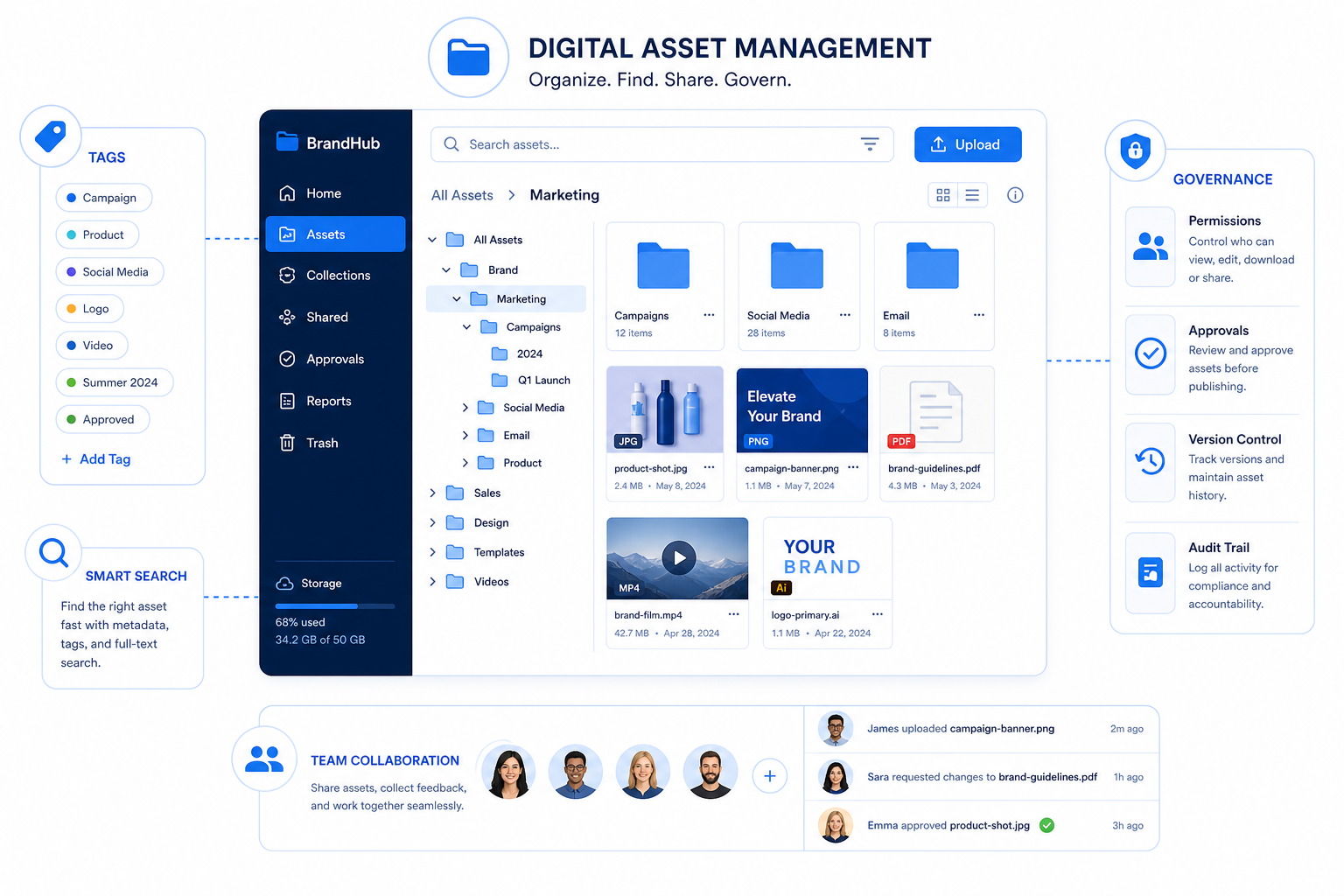
A useful DAM folder structure should be simple enough for anyone to understand, but structured enough to support long-term control.
It should help your team answer these questions instantly:
- Where should this file live?
- How do I know this is the right version?
- Who should have access to it?
- Is this asset approved for use?
- Can I share this safely with an external partner?
The best structures are built around real business workflows, not abstract theories.
A strong folder structure should be:
Principle | What it means |
|---|---|
Simple | People can browse it without training |
Consistent | The same logic applies everywhere |
Scalable | New clients, campaigns, and departments fit naturally |
Search-friendly | Folder paths and names support quick retrieval |
Governed | Permissions, approvals, and archiving are easy to manage |
This is where a simple platform can outperform bloated systems. AssetHQ is especially practical for this kind of setup because it gives teams intuitive file organization, fast uploads, image previews, secure sharing, and permission control without forcing enterprise-level complexity on smaller organizations.
Start with how your team actually works
Before creating folders, map how assets move through your business.
Most teams create assets around one or more of these dimensions:
- department
- brand
- client
- campaign
- content type
- date
- region
- status
You do not need all of them in your top-level structure. In fact, using too many creates confusion.
Ask these planning questions first
- Who creates the assets?
- Who reviews and approves them?
- Who uses them after approval?
- Do external partners need access?
- Will you organize primarily by team, brand, or campaign?
- Which assets need tighter controls?
This planning step is where many competitor articles stop too early. They talk about folders broadly, but not enough about aligning folders with real workflows, permissions, and lifecycle stages.
Choose one primary organizing logic
A common mistake is mixing several logics at the top level. For example:
- Marketing
- Product Photos
- 2025 Campaigns
- Client A
- Approved Assets
That becomes hard to scan because each folder follows a different principle.
Instead, pick one primary method for the top level, then use lower levels for supporting detail.
Common top-level models
Model | Best for | Example top-level folders |
|---|---|---|
By department | Internal teams with clear ownership | Marketing, Sales, Product, HR |
By brand | Multi-brand companies | Brand A, Brand B, Brand C |
By client | Agencies and service businesses | Client Alpha, Client Beta |
By campaign | Marketing-heavy teams | Spring Launch, Q3 Promo, Holiday |
By function | Mixed-use file storage | Brand Assets, Sales Collateral, Legal, Operations |
For many small businesses and growing teams, by function or by department is usually the most intuitive starting point.
Recommended DAM folder structure examples
Here are practical structures that work well.
Example 1: Small business or startup
Brand Assets Logos Brand Guidelines Templates Marketing Campaigns 2025 Spring Launch Summer Promotion Social Media Email Website Sales Pitch Decks One-Pagers Case Studies Operations SOPs Internal Docs Vendor Files Archive
Example 2: Agency or client services team
Clients Client A Brand Assets Campaigns Deliverables Approved Archive Client B Brand Assets Campaigns Deliverables Approved Archive
Example 3: Ecommerce or product-driven team
Products SKU-1001 Original Images Edited Images Lifestyle Video Approved SKU-1002 Original Images Edited Images Lifestyle Video Approved Brand Logos Packaging Guidelines Campaigns 2025 Black Friday Summer Sale
The right answer depends on how your team thinks first. A folder structure should feel obvious, not clever.
Keep folder hierarchies shallow
The deeper your hierarchy, the more likely people are to put files in the wrong place or give up and upload them anywhere.
A better pattern is:
- 3 to 5 top-level folders
- 1 to 3 levels beneath them
- metadata, tags, and search to handle the rest
Too deep
Marketing > 2025 > North America > Paid Social > Instagram > Video > Final > Approved > Exported
Better
Marketing > Campaigns > 2025 Spring Launch > Approved
Then use file naming, tags, and metadata for platform, asset type, region, and format.
This is one reason a lightweight DAM is often more effective than a complicated one. In AssetHQ, teams can pair a clean folder layout with previews, controlled sharing, and fast access, so they do not rely on endless nested folders just to stay organized.
"Keep file names concise, avoid special characters and spaces, and implement version control." - Acquia
Use folders for broad structure, not every detail
One of the biggest content gaps in competitor coverage is this: folders should not carry the full organizational burden.
Use folders for the big categories:
- ownership
- project grouping
- lifecycle stage
- access boundaries
Use naming conventions and metadata for the details:
- asset type
- size
- region
- language
- version
- approval status
- channel
If you force folders to represent every variable, the structure collapses under its own weight.
Create naming conventions before you scale
Even a smart folder structure breaks down if file names are inconsistent.
Compare these:
- final-logo-new.png
- brand_final_v2_revised.png
- ACME_Logo_Primary_Black_RGB_20250115.png
The third file is easier to understand, search, sort, and govern.
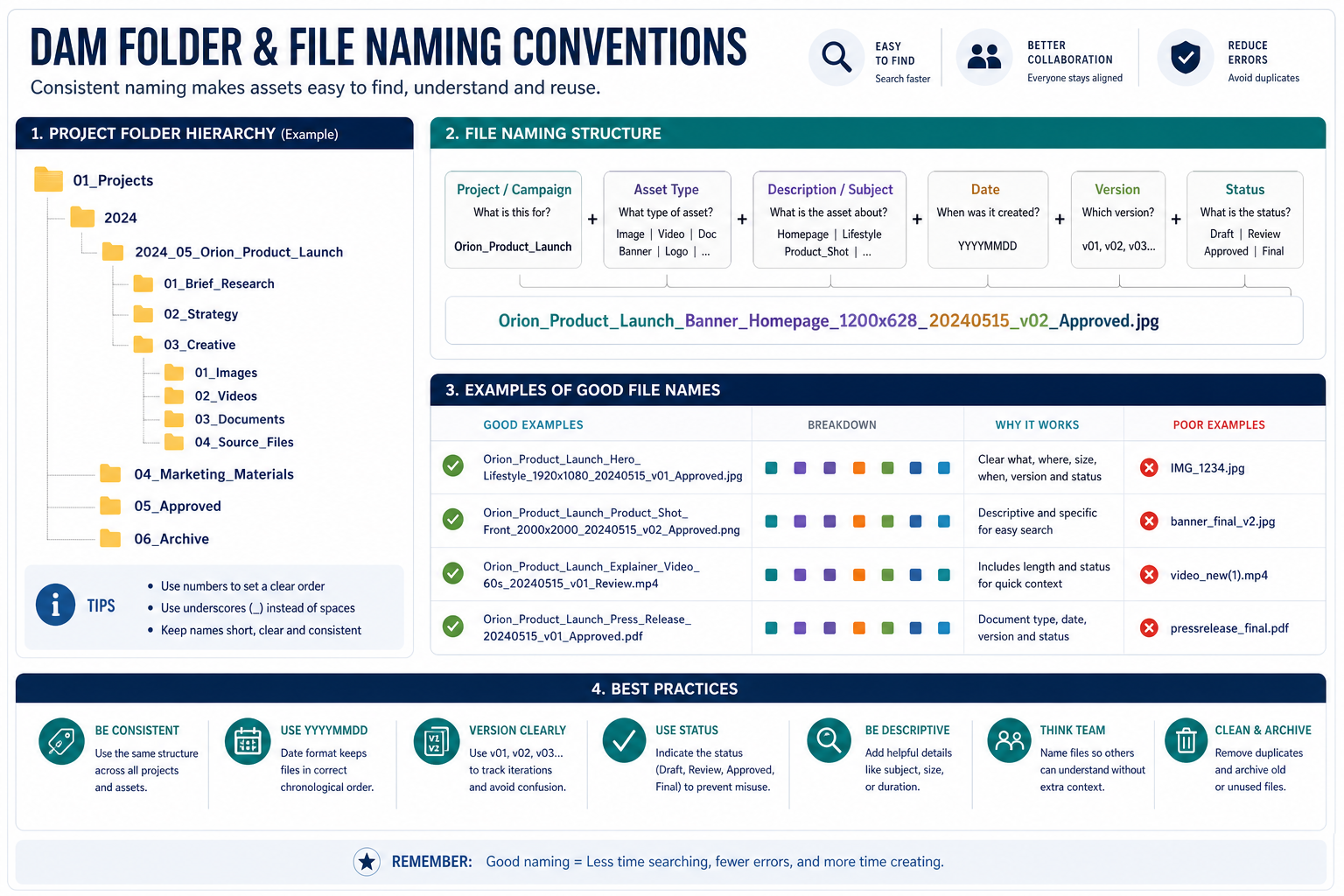
A simple file naming formula
Use a format like:
Brand_Project_AssetType_Description_Date_Version
Example:
Acme_SpringLaunch_EmailHeader_Promo_20250310_v03.jpg
File naming best practices
- use consistent date format like
YYYYMMDD - avoid spaces
- use hyphens or underscores consistently
- make names descriptive but not long
- include version numbers when needed
- avoid words like
final,final-final, ornew
Folder naming best practices
- keep names human-readable
- avoid abbreviations unless everyone knows them
- use singular logic consistently
- do not mix dates, teams, and file types at the same level unless intentional
Build folders around asset lifecycle
A great DAM structure does not just store files. It manages change.
Assets move through stages:
- draft
- in review
- approved
- published
- archived
If your structure ignores lifecycle, teams will use outdated or unapproved files.
A practical lifecycle model
Campaigns 2025 Spring Launch Working Review Approved Published Archive
This approach is excellent for governance because people know exactly which folder contains approved content.
For teams sharing files internally and externally, this matters a lot. AssetHQ makes this easier by supporting organized storage, secure sharing, and access controls, so approved assets can be shared confidently without exposing everything else.
Plan permissions into your folder structure
Permissions should not be an afterthought.
If folders are your primary access boundaries, structure them so permissions are easy to apply. For example:
- HR documents should not sit beside public marketing files
- client-specific folders should be isolated from one another
- internal drafts should be separated from approved shareable assets
Example permission-friendly structure
Folder | Typical access |
|---|---|
Brand Assets > Approved | Company-wide |
Marketing > Working | Marketing team only |
Clients > Client A | Client A account team only |
Operations > Contracts | Leadership or operations only |
Archive | Admin or limited access |
This is especially important when sharing files outside your company. AssetHQ’s expiring links, access control, and secure file sharing are valuable here because they let teams maintain a clean internal structure while still sharing assets safely.
Don’t forget image-heavy workflows
Many DAM articles discuss folders like they are just for documents. But image-heavy teams need another layer of practicality.
If your business manages visual assets, your folder structure should support:
- quick previewing
- easy separation of originals and derivatives
- approved vs working versions
- campaign reuse
- rights-safe sharing
A smart image workflow example
Brand Photos Originals Edited Web Optimized Approved Archive
With image preview support, teams can visually confirm what they are opening instead of relying only on filenames. That is a major usability advantage for marketers, designers, ecommerce teams, and founders handling visuals themselves.
Use date-based folders carefully
Dates help, but they should rarely be the only organizing principle.
A structure like this:
2023
2024
2025
does not tell users what is inside or why it matters.
Dates work best as a supporting layer inside a meaningful category.
Good use of dates
Marketing Campaigns 2025 Spring Launch Black Friday
Weak use of dates
2025 March Final
Use dates to sort time-bound work, not as the full strategy.
Standardize approved vs working assets
Another common weakness in competitor content is not clearly separating storage from usage readiness.
Not every stored file should be used.
Your DAM folder structure should make the difference obvious.
Recommended distinction
Folder type | Purpose |
|---|---|
Working | Drafts and in-progress assets |
Review | Files pending feedback or signoff |
Approved | Cleared for use |
Published | Already distributed live |
Archive | Retired but retained |
This reduces costly mistakes like using the wrong logo, old pricing sheet, or unapproved product image.
Common mistakes to avoid
A lot of DAM folder chaos comes from a few predictable mistakes.
1. Creating too many top-level folders
If everything is top-level, nothing feels grouped. Keep your root simple.
2. Going too deep
If users must click through 7 levels, they will upload files to the wrong place.
3. Mixing organizing logic
Do not combine department, asset type, client, and date randomly at the same level.
4. Letting people invent names freely
Without naming rules, searchability drops fast.
5. Storing approved and draft assets together
This creates version confusion and brand risk.
6. Ignoring permissions until later
Permissions are much easier when baked into structure from the start.
7. Using folders instead of search strategy
Folders help browsing, but search, previews, and metadata are still critical.
8. Never archiving old content
Old files make good files harder to find.
A simple governance framework for long-term control
Folder structure is not a one-time setup. It needs lightweight governance.
That does not mean bureaucracy. It means a few clear rules.
Governance checklist
- define folder owners
- document naming conventions
- define what “approved” means
- assign access by role
- review old folders quarterly or biannually
- archive outdated assets
- train new users on where files belong
For small teams, this can be a one-page guide. It does not need to be complicated.
Folder structure vs tags vs metadata
You need all three, but each should do a different job.
System | Best use |
|---|---|
Folders | Broad organization and access boundaries |
Tags | Cross-category grouping and flexible discovery |
Metadata | Search, filtering, rights, status, and context |
For example, an asset might live in:
Marketing > Campaigns > 2025 Spring Launch > Approved
But also include:
- tag: social-media
- tag: paid-campaign
- metadata: region = North America
- metadata: status = approved
- metadata: usage rights expire = 2025-12-31
That is a much stronger system than trying to express everything through folders alone.
How to roll out a new DAM folder structure without chaos
If you already have messy storage, do not try to fix everything in one week.
Better rollout plan
Phase 1: Audit
- identify your most-used assets
- find duplicates and outdated files
- list current folder patterns
Phase 2: Design
- choose top-level logic
- define folder templates
- create naming rules
Phase 3: Pilot
- test the structure with one team or one department
- get feedback
- simplify where needed
Phase 4: Migrate
- move high-value assets first
- archive old content
- apply permissions carefully
Phase 5: Train
- show people where new uploads go
- explain naming standards
- define who owns approvals
This phased approach is often more successful than trying to restructure everything at once.
A practical folder template you can adapt
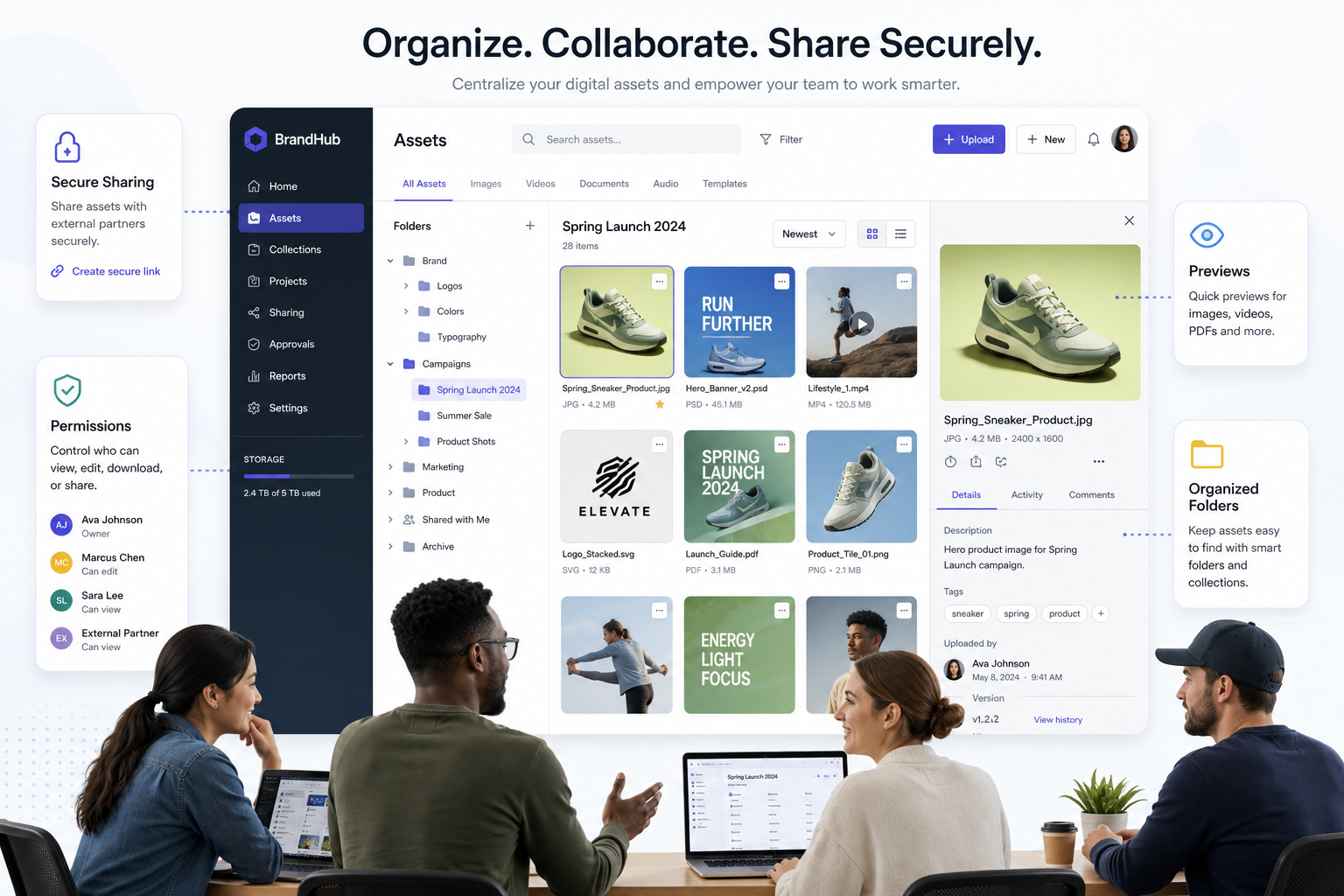
If you want a reliable starting point, this template works for many growing organizations:
Brand Assets Logos Guidelines Templates Approved Marketing Campaigns 2025 Campaign Name Working Review Approved Published Social Media Website Email Sales Decks One-Pagers Case Studies Approved Operations Internal Documents Contracts Policies Archive
This gives you:
- clear top-level ownership
- campaign-based organization where needed
- lifecycle visibility
- room for permissions
- a clean archive path
Why simpler DAM systems often produce better folder discipline
Large enterprise systems often assume dedicated DAM administrators and complex taxonomies. Smaller teams usually do not have that luxury.
That is why the best solution is often the one people will actually use consistently.
AssetHQ is a strong fit here because it focuses on the essentials that matter most:
- simple and intuitive file management
- organized storage for documents, images, and files
- image preview and management capabilities
- secure sharing with expiring links and access control
- team collaboration without unnecessary complexity
- enterprise-grade secure storage
- fast upload and file access
- flat, affordable pricing
- scalability for solo users and growing teams alike
That combination is important. A perfect folder structure on paper means nothing if the system feels too complex for everyday use.
Final thoughts
A great digital asset management folder structure is not about building the most detailed hierarchy. It is about creating a system your team can trust.
The best folder structures are:
- shallow
- consistent
- permission-aware
- aligned to workflows
- supported by naming conventions, tags, and governance
If you get those basics right, your assets become easier to find, safer to share, and much easier to manage as your business grows.
If your current setup feels messy, slow, or unreliable, now is the right time to simplify it. AssetHQ gives you a practical way to organize digital assets, manage images and files, collaborate with your team, and share content securely without paying for complexity you do not need.
For founders, startups, and growing teams that want dependable DAM and file storage with straightforward pricing, AssetHQ is a smart place to start.
Related Posts

Brand Asset Management Software for Growing Teams
Discover brand asset management software for growing teams and learn how to organize files, share securely, and scale with ease.
min read
Cloud Based Digital Asset Management Benefits
Explore cloud based digital asset management benefits for secure file sharing, simpler teamwork, and organized growth. Try it today now
min read
File Sharing and Storage Made Simple for Teams
Discover file sharing and storage made simple for teams with secure access, better organization, and faster collaboration. Try AssetHQ!
min read