Dropboxstatic Com: What It Is and Why It Matters
Dropboxstatic Com: What It Is and Why It Matters If you have seen dropboxstatic.com, cfl.dropboxstatic.com, or similar Dropbox-related domains in your browser history, network logs, email links, or uploaded shortcut files, the short answer is this: they are typically part of Dropbox’s legitimate web infrastructure. Dropbox uses static-content domains to deliver things like images, scripts, icons, stylesheets, and other website assets separately from its main application. That matters for speed
 Kevin SimphiweMay 31, 20269 min read
Dropboxstatic Com: What It Is and Why It Matters
If you have seen dropboxstatic.com, cfl.dropboxstatic.com, or similar Dropbox-related domains in your browser history, network logs, email links, or uploaded shortcut files, the short answer is this: they are typically part of Dropbox’s legitimate web infrastructure.
Dropbox uses static-content domains to deliver things like images, scripts, icons, stylesheets, and other website assets separately from its main application. That matters for speed, reliability, and security. But it also matters because users often notice these domains out of context and wonder whether they are safe, suspicious, or a sign of phishing.
For solo founders, startups, and growing teams, this confusion is common. You need to know when a domain is normal product behavior versus when it deserves closer scrutiny. And if you are already rethinking how your team stores and shares files, this is also a good time to consider whether a simpler platform like AssetHQ would reduce the friction altogether.
What is Dropboxstatic?
Dropboxstatic generally refers to Dropbox’s static asset delivery domains. In plain English, these are web domains used to serve supporting files that help Dropbox’s site or app load correctly.
That can include:
- Logos and icons
- Interface images
- JavaScript files
- CSS stylesheets
- Embedded resources
- Cached visual assets
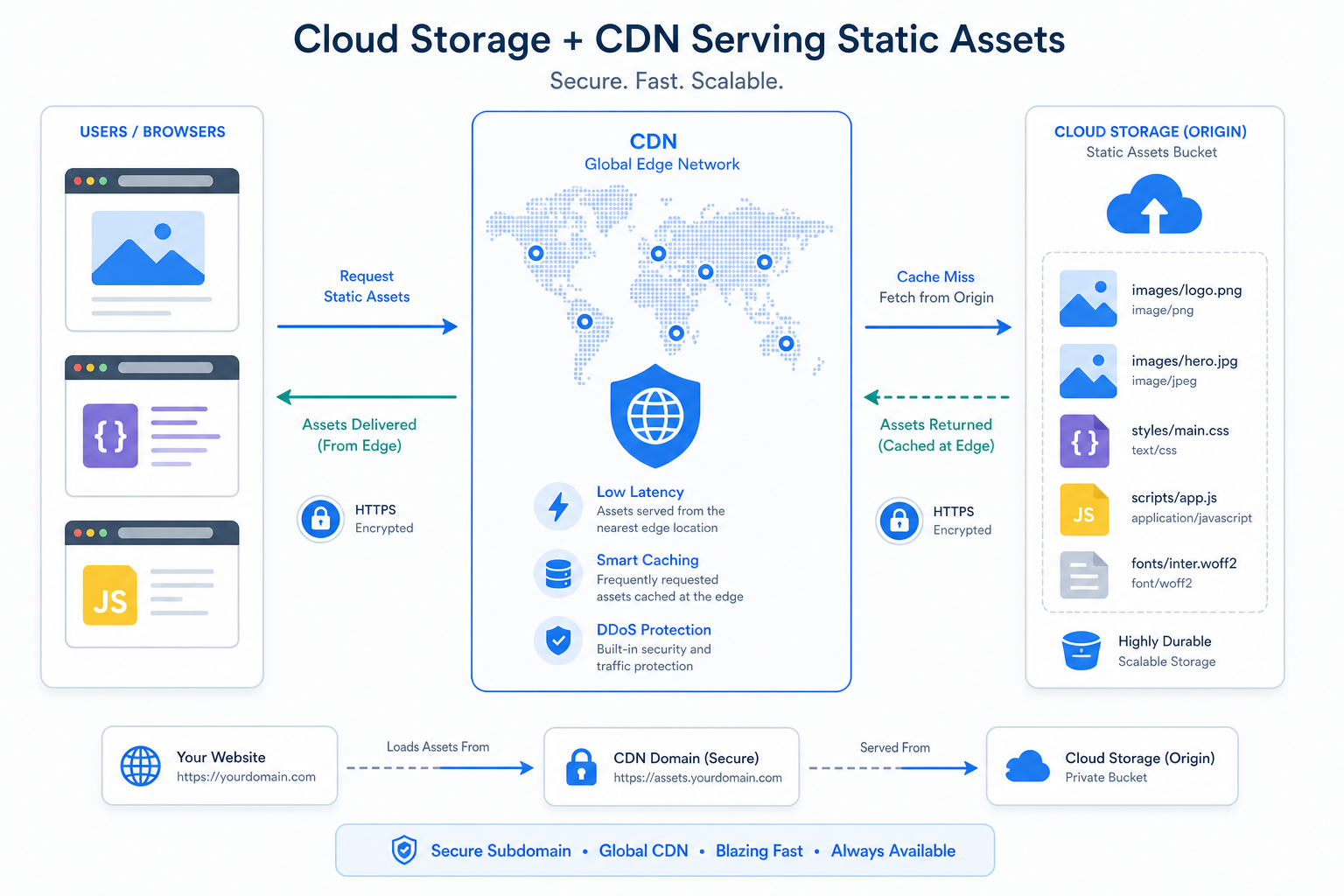
Instead of loading every file from dropbox.com, large web services often separate their app logic from their static files. This is a standard modern web architecture pattern.
What does “dropboxstatic com” mean?
When people search for dropboxstatic com, they are usually referring to a domain like:
dropboxstatic.comcfl.dropboxstatic.com- other Dropbox-owned subdomains used for static delivery
These domains are not usually where you log in or manage files. They are mostly supporting infrastructure used behind the scenes.
Why Dropbox uses a separate static domain
Dropbox is not unusual here. Many major SaaS companies use dedicated domains or subdomains for static assets because it improves performance and control.
1. Faster page load times
Serving static assets from a specialized domain or CDN-backed setup can make websites load faster, especially across regions.
"Enabling a CDN reduced the Time to First Byte (TTFB) by up to 93% for users distant from the origin server." - Techplained
That is one reason you may see Dropbox assets load from a different hostname than the main site.
2. Better caching
Static resources do not change as often as application data. Separating them helps browsers cache those files more efficiently, which improves repeat visits and app responsiveness.
3. Security isolation
Using separate domains for static content can reduce risk by isolating different types of web traffic and tightening security controls for scripts, cookies, and application sessions.
4. Reliable global delivery
Large platforms want icons, images, and UI assets to load consistently no matter where users are. Static delivery domains help distribute that load.
Is dropboxstatic.com legitimate?
In normal circumstances, yes. dropboxstatic.com is associated with Dropbox infrastructure and is commonly used to serve static website content.
However, legitimacy is about context, not just recognition.
A domain can be real, while the surrounding message can still be suspicious
For example:
- A phishing email could mention Dropbox
- A fake website could imitate Dropbox branding
- A malicious sender could embed legitimate-looking links alongside fake ones
So while dropboxstatic.com itself is generally not a red flag, you should still verify:
- the full URL
- the sender address
- whether you were expecting the message or file
- whether the link leads to an actual Dropbox-owned destination
What is cfl.dropboxstatic.com?
One especially confusing variation is cfl.dropboxstatic.com. Users often notice it because it appears in .url files, browser logs, or shortcut artifacts.
Based on Dropbox’s own community explanation, this domain was tied to static resources and sometimes appeared when users accidentally dragged a URL into Dropbox on the web, creating a .url shortcut file instead of moving the intended file.
In other words, in many cases:
- it was not malware
- it was not a hidden document
- it was just a URL shortcut to a static Dropbox asset
That is why users sometimes found files like cfl.dropboxstatic.com.url in their Dropbox folders.
Why you might see Dropboxstatic in browser activity
There are several normal reasons this domain appears.
Website loading
When you open Dropbox in a browser, your browser may request images, icons, scripts, and styles from Dropbox static domains.
Email previews or shared links
If you preview a Dropbox page, shared folder, or email template, embedded assets may load from those domains.
Browser developer tools or firewall logs
If you inspect network traffic, ad blockers, DNS logs, or endpoint monitoring, static resource domains often become visible.
Shortcut file creation
In some cases, especially with browser drag-and-drop actions, a .url file may be created that references a Dropbox static asset rather than the file you meant to move.
Is Dropboxstatic a security risk?
Usually, no by itself. A static asset domain is a normal part of how web apps operate.
The real security question is whether the broader interaction is trustworthy.
Safe signs
These are generally reassuring:
- You were already on
dropbox.com - The page loaded as part of normal Dropbox usage
- The domain is exactly spelled as a Dropbox-owned domain
- The activity matches UI assets, scripts, or images
Caution signs
Look more carefully if:
- the URL is misspelled
- the email sender is odd or unrelated
- the login page is asking for unusual information
- the page behavior feels inconsistent with Dropbox
- the link chain redirects through unfamiliar domains first
"In the first quarter of 2026, Microsoft detected over 8.3 billion email-based phishing threats." - TechRadar
That is why domain awareness matters. Recognizing a valid infrastructure domain is useful, but so is understanding that attackers often rely on confusion.
Dropboxstatic vs Dropbox: what is the difference?
Here is the easiest way to think about it:
Domain type | Main role | Typical user action |
|---|---|---|
| Main application, account, sharing, login | Sign in, manage files, collaborate |
| Static asset delivery | Usually no direct action needed |
Dropbox subdomains | Specialized services or infrastructure | Depends on feature or product flow |
For most users, dropboxstatic.com is supporting infrastructure, not the place where the core workflow happens.
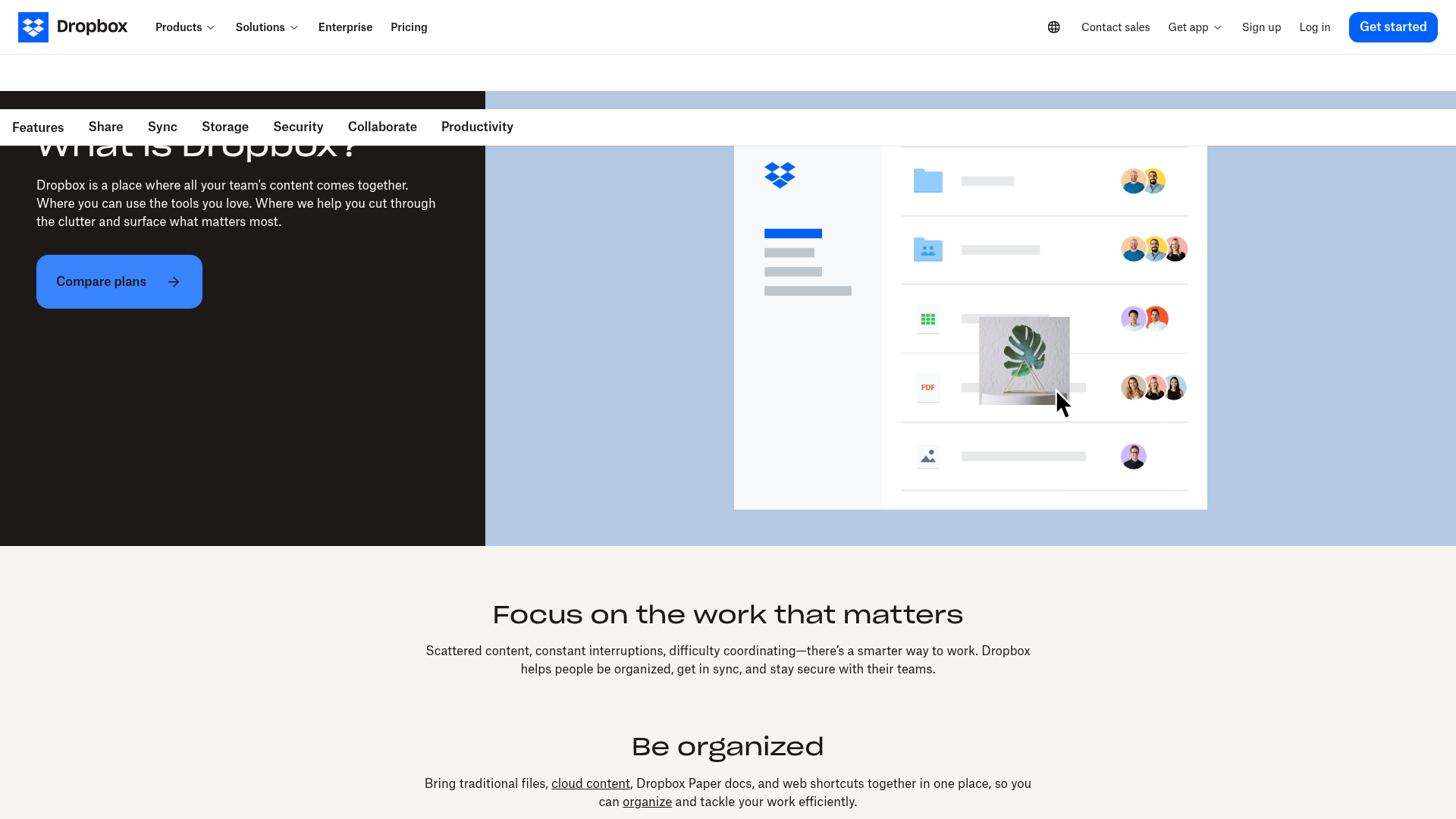
A real-world screenshot of Dropbox’s web experience
Seeing the main product page helps explain why a service like Dropbox needs multiple assets loading in the background.
What many articles miss about Dropboxstatic
A lot of pages on this topic stop at “it is a Dropbox domain.” That is only half the answer. The more useful explanation is why users care.
The real issue is trust, not just terminology
People search this keyword because they want to know:
- Is this safe?
- Why did this show up?
- Is my browser infected?
- Did someone fake a Dropbox link?
- Why did a weird
.urlfile appear?
Those are practical questions, especially for small teams without a full-time IT department.
Browser behavior can create confusion
A major source of confusion comes from accidental drag-and-drop behavior. If a browser interprets your action as dragging a URL rather than moving a file, Dropbox may store a shortcut file.
That can make it look like:
- a file disappeared
- a strange domain was inserted into your storage
- Dropbox “created” something on its own
In many cases, the explanation is much simpler: a web shortcut was saved.
How to check whether a Dropbox-related link is safe
Use this quick checklist before clicking.
Link safety checklist
- Check the full domain
- Look for exact spelling
- Watch for extra words, dashes, or suspicious endings
- Inspect the sender
- Confirm the email comes from an expected business domain
- Be cautious if reply-to and from-address differ
- Hover before clicking
- Preview the destination URL first
- Avoid panic actions
- Do not sign in through a rushed email prompt if you can instead open Dropbox directly in your browser
- Use official navigation
- Visit Dropbox by typing the site directly rather than trusting a random link
What this means for teams managing shared files
If your team regularly handles documents, images, sales assets, marketing files, and client deliverables, domain confusion is a symptom of a bigger issue: file systems should feel simpler, clearer, and more controlled.
That is exactly where many teams outgrow bloated or inconsistent platforms.
Where AssetHQ fits in
AssetHQ is built for teams that want professional file management without enterprise-heavy complexity.
Why teams choose AssetHQ over cluttered file workflows
AssetHQ gives growing organizations a cleaner way to handle digital assets:
- Simple and intuitive file management
- Secure file sharing with expiring links and access controls
- Organized storage for documents, images, and shared files
- Image preview and management for visual workflows
- Fast uploads and file access
- Team collaboration without unnecessary admin overhead
- Enterprise-grade secure storage
- Affordable flat pricing with no hidden fees
- Scalable structure for solo users and growing teams
If your current setup makes people second-guess links, hunt through folders, or wrestle with overcomplicated permissions, that slows work down. AssetHQ focuses on the essentials: store, organize, preview, share, and control access with confidence.
Dropbox vs simpler DAM workflows
Dropbox is well known, but not every team needs a broad ecosystem with multiple moving parts. Sometimes what matters most is clarity.
Need | Traditional cloud storage approach | AssetHQ approach |
|---|---|---|
File organization | Can become messy across shared folders | Clean, intuitive structure |
Sharing control | Varies by plan and setup | Secure sharing with access control and expiring links |
Image handling | Basic, depending on workflow | Strong preview and asset management support |
Team onboarding | Can require process workarounds | Easy for solo users and teams alike |
Pricing clarity | May depend on plan tiers and add-ons | Straightforward flat pricing |
Complexity | Can grow with ecosystem sprawl | Purpose-built simplicity |
For founders and lean teams, that simplicity is not a “nice to have.” It is a productivity advantage.
Common misconceptions about dropboxstatic com
“If it is not dropbox.com, it must be fake.”
Not true. Large platforms commonly use separate domains for assets and infrastructure.
“If I see it in logs, my device is infected.”
Usually false. Browser logs often reveal perfectly normal asset requests.
“A weird .url file means someone hacked my folder.”
Not necessarily. It may just be a saved web shortcut caused by drag-and-drop behavior.
“Every Dropbox-looking link is safe.”
Also false. Attackers can mix familiar branding with deceptive destinations, so context still matters.
Best practices if you manage storage for a small business
Whether you stay with Dropbox or move to another platform, the best habits are the same.
Keep your file environment easy to audit
Use:
- clear folder structures
- consistent naming
- permission rules by role
- limited public sharing
- expiring links for sensitive files
Train your team on domain awareness
They do not need to become security analysts. They just need to know:
- check sender addresses
- verify domains
- avoid rushed logins from email links
- report anything unusual
Choose a platform people actually understand
The best security and efficiency gains often come from removing confusion. AssetHQ is especially strong here because it gives smaller teams the control they need without forcing them into enterprise-style complexity.
Final verdict
Dropboxstatic.com is generally a legitimate Dropbox static content domain used to load website assets like images, scripts, and interface files. Seeing it in browser activity or network requests is usually normal. Variants like cfl.dropboxstatic.com have also appeared in harmless .url files caused by Dropbox web behavior.
What matters most is not just identifying the domain, but understanding the context. A real Dropbox infrastructure domain does not automatically make every email or workflow safe, and domain confusion is often a sign that your file operations are more complicated than they need to be.
If your business wants simpler storage, cleaner organization, secure sharing, visual asset previews, and dependable collaboration without hidden complexity, AssetHQ is the practical next step. It gives solo founders, startups, and growing teams a more intuitive way to manage digital assets at a price that stays predictable.
FAQ
How can you tell if a Dropbox email is real?
Check the full sender address, hover over links before clicking, and confirm the destination uses a legitimate Dropbox-owned domain in the proper context. When in doubt, open Dropbox directly in your browser instead of using the email link.
Why is Dropbox shutting down?
Dropbox is not shutting down as a company. People sometimes confuse product changes, domain names, or service notices with shutdown rumors, but Dropbox remains an active cloud storage platform.
Is Dropbox a legitimate website?
Yes, Dropbox is a legitimate website and file storage service. Still, users should verify the exact URL and email context because scammers can imitate trusted brands.
What is the downside of Dropbox?
For some teams, the main downside is workflow complexity as folders, sharing rules, and supporting domains become harder to interpret over time. Smaller businesses may prefer a simpler platform like AssetHQ for organized storage, secure sharing, and easier collaboration.
How can you tell a fake email address?
Look for misspellings, unusual domain endings, mismatched reply-to addresses, and unexpected urgency. If the sender or link destination feels slightly off, treat it as suspicious until verified.
What is the official Dropbox email?
Dropbox uses multiple legitimate addresses, so there is not just one single official email for every message. The safest approach is to verify that the message comes from an authentic Dropbox-owned domain and then access your account directly from the official site if needed.
Related Posts

Brand Asset Management Software for Growing Teams
Discover brand asset management software for growing teams and learn how to organize files, share securely, and scale with ease.
min read
Cloud Based Digital Asset Management Benefits
Explore cloud based digital asset management benefits for secure file sharing, simpler teamwork, and organized growth. Try it today now
min read
File Sharing and Storage Made Simple for Teams
Discover file sharing and storage made simple for teams with secure access, better organization, and faster collaboration. Try AssetHQ!
min read