Secure Cloud Storage: What Growing Teams Need
Secure Cloud Storage: What Growing Teams Need Growing teams do not need more complexity. They need a dependable way to store, organize, protect, and share files without turning file management into a full-time job. That is why interest in secure cloud storage, secure cloud file storage, secure cloud data storage, and encrypted cloud storage keeps rising. Teams want the flexibility of cloud access, but they also want confidence that documents, images, and shared assets are protected from the mo
 Emma LarsonJune 1, 202610 min read
Secure Cloud Storage: What Growing Teams Need
Growing teams do not need more complexity. They need a dependable way to store, organize, protect, and share files without turning file management into a full-time job.
That is why interest in secure cloud storage, secure cloud file storage, secure cloud data storage, and encrypted cloud storage keeps rising. Teams want the flexibility of cloud access, but they also want confidence that documents, images, and shared assets are protected from the most common risks: accidental oversharing, weak permissions, lost files, and unauthorized access.
For solo founders, startups, and small businesses, the challenge is usually not finding a storage tool. It is finding one that balances security, speed, simplicity, and affordability. Many platforms are either too basic to protect business files properly or too bloated to roll out easily.
This guide explains what truly makes cloud storage secure, which features matter most for growing organizations, and how to evaluate practical solutions that support collaboration without enterprise-heavy complexity.
"Only 4% reported sufficient security for all their cloud data." - Cloud Security Alliance / CSO Online
"Small businesses are three times more likely to be targeted by cybercriminals than larger companies." - CISA
What secure cloud storage actually means
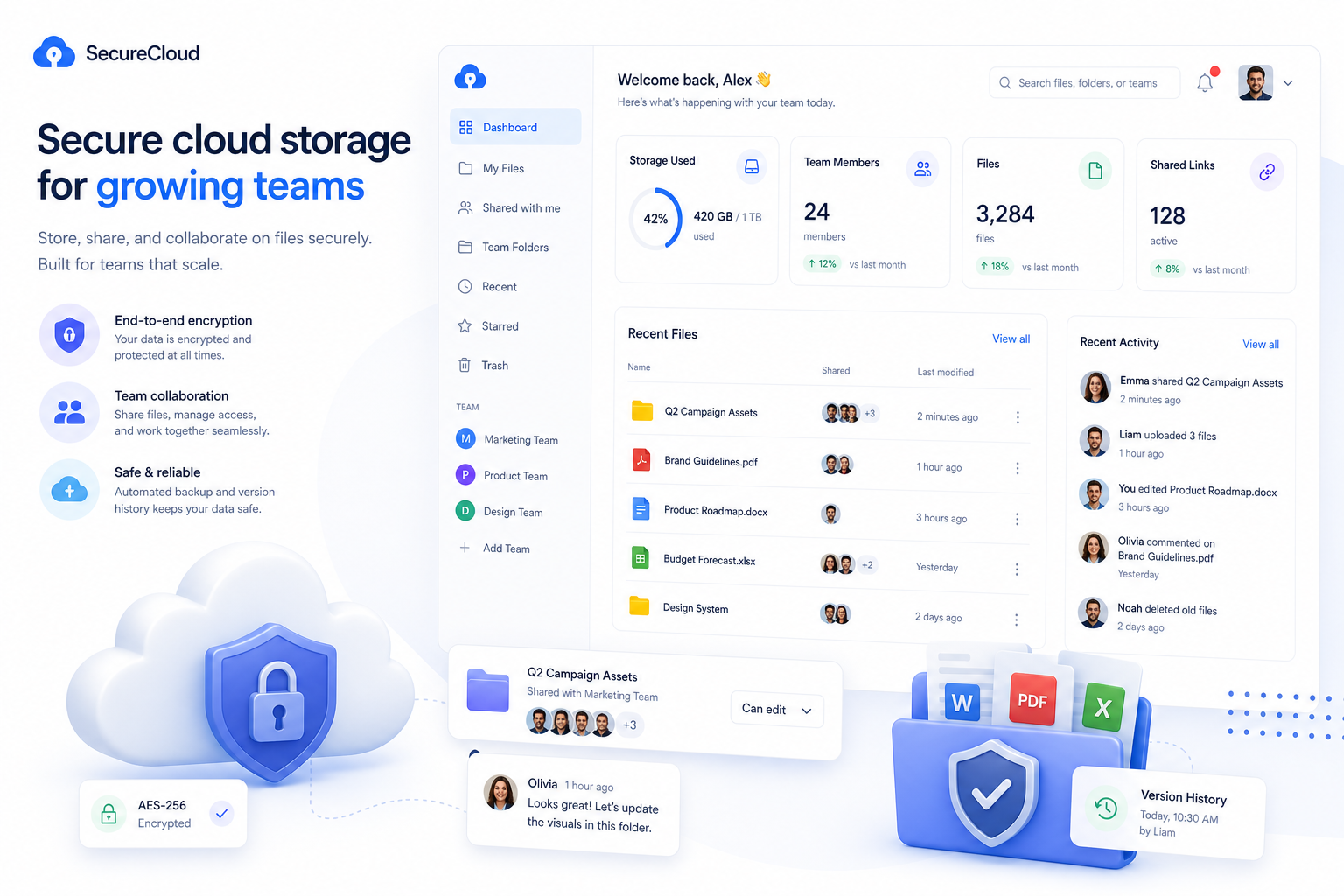
Secure cloud storage is more than “files stored online.” A truly secure system protects files at every stage:
- while they are being uploaded
- while they are stored
- while they are being shared
- while teams are collaborating on them
- while admins are managing access over time
In practical terms, secure cloud storage should help a business do five things well:
- Keep data private
- Control who can access what
- Track activity
- Recover from mistakes or incidents
- Make secure collaboration easy enough that people actually use it
If a system is hard to navigate, people work around it. They send files by email, duplicate documents across tools, or store sensitive assets in personal accounts. That creates more risk, not less.
This is why modern teams increasingly need security paired with usability. AssetHQ fits that need by combining simple file organization, secure sharing, fast access, and team-friendly permissions in a platform that does not overwhelm smaller organizations.
Why growing teams need a different approach than enterprises
Most content on cloud security is written for IT-heavy enterprises. But growing teams have different needs.
They usually need to manage:
- client documents
- marketing assets
- product screenshots
- contracts and internal files
- shared folders across departments or contractors
What they often do not need is an expensive, overengineered platform with months of setup and dozens of features nobody uses.
A growing team needs a platform that is:
Need | Why it matters |
|---|---|
Simple to adopt | Teams move faster when the folder structure and sharing rules are intuitive |
Secure by default | Good permissions and protected sharing reduce avoidable mistakes |
Fast to access | Slow uploads and hard-to-find files hurt productivity |
Affordable | Predictable flat pricing helps teams scale without budget surprises |
Flexible for solo users and teams | A founder can start small and expand without switching systems |
This is the gap many businesses run into. They outgrow consumer-grade storage, but they are not ready for enterprise bloat. AssetHQ is designed for that middle ground: professional, secure file storage and digital asset management without unnecessary overhead.
The biggest risks in cloud file storage
Before choosing a provider, it helps to understand what usually goes wrong. Most cloud storage problems do not begin with “the cloud.” They begin with poor setup, unclear permissions, or weak internal practices.
1. Misconfigured access
This is one of the most common problems. Files are technically stored securely, but the wrong people can still view, edit, or share them.
Examples include:
- public links that never expire
- folders shared too broadly
- former employees keeping access
- contractors seeing files beyond their project scope
2. Weak login security
If users reuse passwords or skip multi-factor authentication, even a well-built cloud system becomes vulnerable.
3. Uncontrolled file sharing
File sharing should be easy, but not reckless. Teams need ways to share externally without permanently exposing documents.
That means features like:
- expiring links
- access controls
- permission-based sharing
- download restrictions where appropriate
4. Poor organization
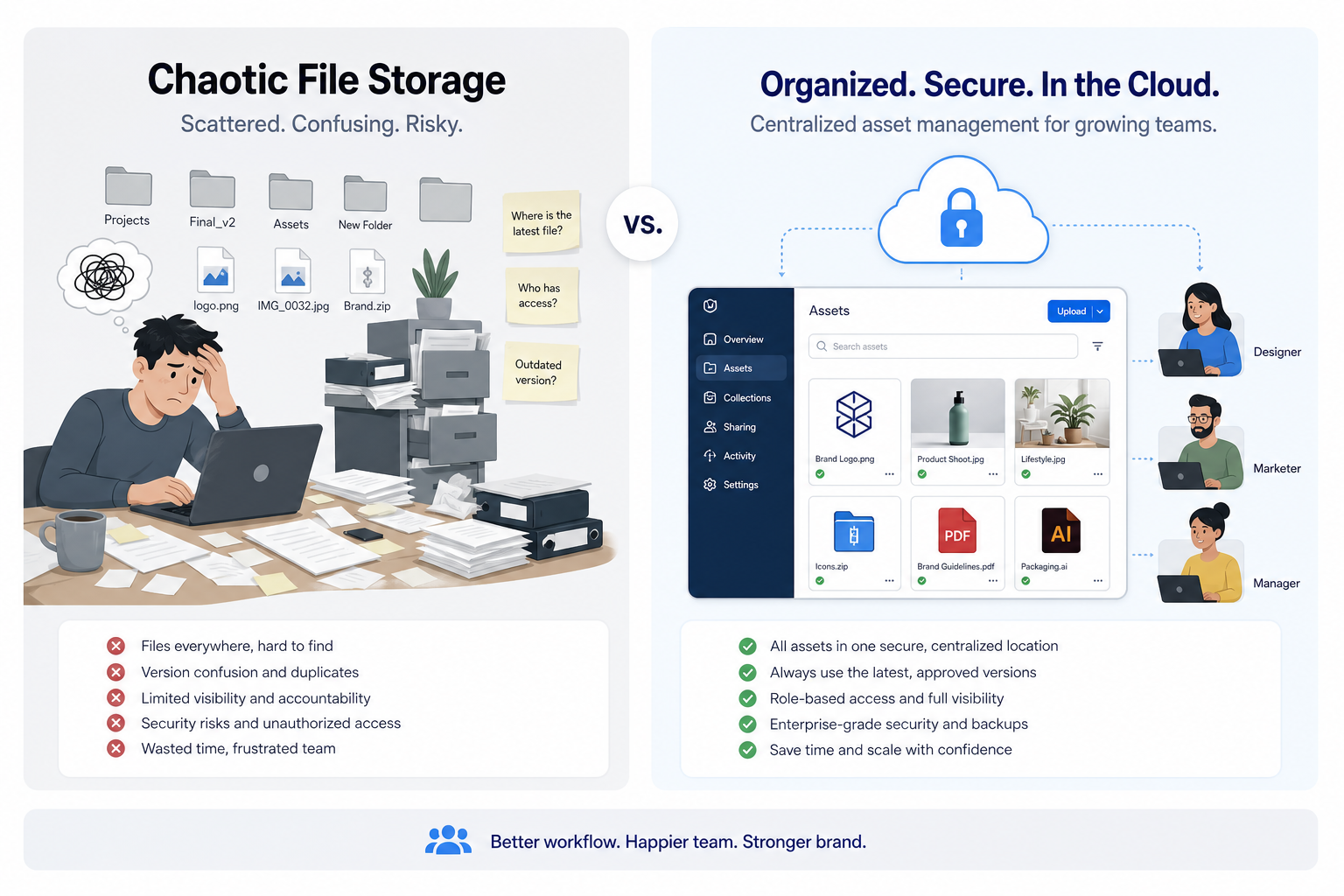
Security is not just technical. It is operational. When files are scattered across inboxes, desktops, chat threads, and personal drives, teams lose control.
5. Limited visibility
If you cannot see who accessed, changed, or shared a file, it becomes much harder to investigate mistakes or suspicious activity.
The must-have features in encrypted cloud storage
If you are evaluating secure cloud data storage, these are the features that deserve the most attention.
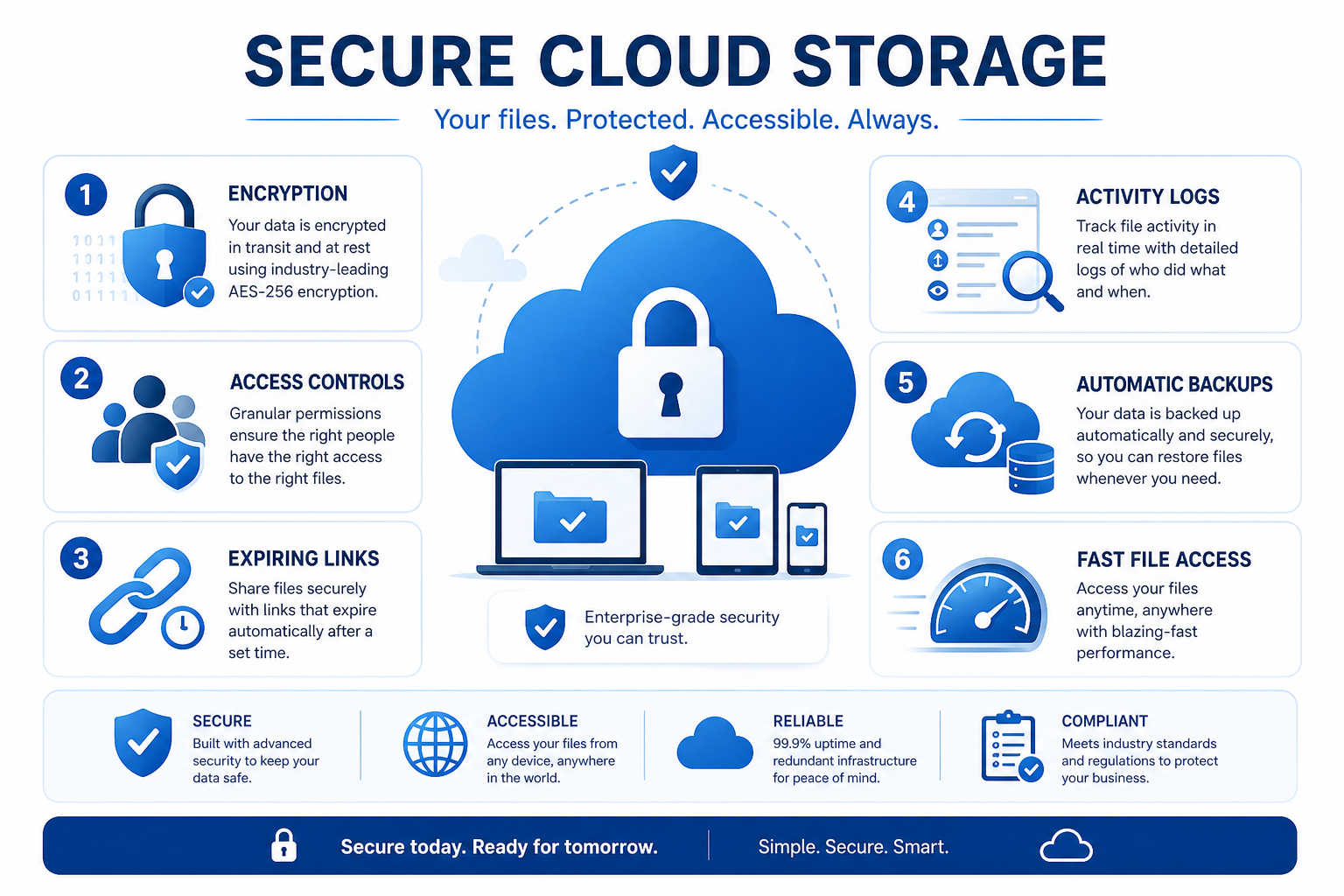
Encryption in transit and at rest
This is foundational.
- In transit means files are protected while moving between your device and the provider.
- At rest means stored files remain encrypted on the provider’s infrastructure.
If a provider cannot clearly explain this, keep looking.
Role-based permissions
Not every user needs the same level of access. Strong systems let you define who can:
- view
- edit
- upload
- download
- share
- manage folders
This is essential for growing teams with mixed roles.
Secure file sharing
This is where many tools fall short. Secure sharing should include:
- expiring links
- password protection where needed
- user or team-specific access
- the ability to stop access later
AssetHQ is especially strong here because it helps teams share files professionally without giving up control. That matters for client work, external reviews, and temporary collaboration.
Activity tracking and visibility
If a file is sensitive, you should know what happened to it. Activity history and access visibility improve both accountability and incident response.
Reliable backups and version history
People delete the wrong file. Teams overwrite assets. Contractors upload the wrong version. A secure system should help you recover quickly.
Fast upload and retrieval
Performance is a security issue too. When a platform is slow, teams bypass it. Fast upload and file access make the secure path the easy path.
Intuitive organization
A clean folder structure, image previews, and logical file management reduce friction. Teams can locate assets faster and avoid duplicate uploads or scattered storage habits.
That is one of the biggest practical benefits of AssetHQ: it makes organized, secure file storage feel simple instead of technical.
Secure cloud storage vs encrypted cloud storage
These terms are related, but not identical.
Term | Meaning |
|---|---|
Secure cloud storage | Broad category covering encryption, access controls, permissions, monitoring, recovery, and sharing safeguards |
Encrypted cloud storage | Focuses specifically on the encryption of data during transfer and storage |
Encryption is essential, but encryption alone is not enough.
A platform may encrypt files and still be weak in real-world use if it lacks:
- proper user permissions
- secure link settings
- organized asset management
- team collaboration controls
- easy administration
That is why growing teams should evaluate the full workflow, not just the encryption label.
What teams should look for beyond security checkboxes
Competitor articles often stop at encryption and compliance. But in real businesses, secure storage only works when it supports daily operations.
Here are the practical decision points that matter just as much.
Can your team find files quickly?
A secure platform that slows everyone down creates shadow systems. Teams start saving files elsewhere.
Look for:
- intuitive folder structure
- clear naming support
- image previews
- quick search and browsing
- logical team spaces
Can you scale without rebuilding everything?
A good solution should work for:
- solo founders today
- a 5-person team next quarter
- a cross-functional organization later
AssetHQ is especially well suited here because it is designed to be simple enough for small teams and structured enough for growing organizations.
Is pricing predictable?
Some tools become expensive as soon as you need more users, better permissions, or safer sharing. Hidden costs often show up in the form of add-ons, admin upgrades, or storage complexity.
AssetHQ’s appeal is straightforward: flat, transparent pricing with no hidden fees, making it easier to plan as your business grows.
Does it help teams collaborate safely?
Cloud storage should not just store files. It should support how teams actually work together:
- internal reviews
- external client sharing
- version alignment
- asset reuse
- controlled collaboration across departments
How secure cloud storage helps different kinds of teams
Solo founders
Founders need one place for contracts, brand assets, product files, and internal docs. The best solution is one that stays organized from day one without requiring IT support.
Small businesses
Small businesses often juggle shared files across admin, sales, operations, and marketing. Secure cloud storage brings structure and controlled sharing to a business that is growing quickly.
Startups
Startups need speed. They move fast, iterate often, and collaborate across tools. A secure system helps them avoid chaos early without slowing down execution.
Growing teams
As headcount increases, access control becomes more important. Teams need to share more often, but with clearer boundaries. This is where a scalable platform like AssetHQ adds real value through team collaboration, folder-based organization, image management, and access-controlled file sharing.
How to evaluate a secure cloud storage provider
Here is a practical framework you can use when comparing options.
Security checklist
Ask these questions:
- Are files encrypted in transit and at rest?
- Can you set user-specific or team-specific permissions?
- Are file-sharing links controllable and revocable?
- Is there version history or recovery support?
- Can admins manage access clearly?
- Is the platform built for business use, not just personal storage?
Usability checklist
Also ask:
- Is the interface intuitive?
- Can non-technical users adopt it quickly?
- Does it support clean folder organization?
- Are images easy to preview and manage?
- Are uploads and downloads fast?
Business-fit checklist
And finally:
- Will pricing still make sense at 3, 10, or 25 users?
- Does it help us present files professionally to clients?
- Can it support both internal collaboration and external sharing?
- Does it remove complexity instead of adding more?
A simple comparison table for growing teams
Feature | Consumer-grade storage | Enterprise-heavy DAM | AssetHQ |
|---|---|---|---|
Easy setup | Usually | Often slow | Yes |
Secure sharing with access control | Limited | Yes | Yes |
Expiring links | Sometimes | Yes | Yes |
Image preview and asset management | Basic | Advanced but complex | Strong and simple |
Team collaboration | Basic | Advanced | Built for growing teams |
Pricing clarity | Mixed | Often expensive | Straightforward |
Suitable for solo founders to teams | Limited | Usually overkill | Yes |
Enterprise-grade secure storage | Not always | Yes | Yes |
Best practices for secure cloud data storage
Even the best platform works best with the right habits.
Use least-privilege access
Give users only the access they need. Review it regularly.
Turn off stale sharing links
If a link was only needed for one week, it should not still work three months later. Expiring links matter.
Keep one source of truth
Avoid duplicates across inboxes, chat attachments, and personal drives. Centralize important files in one organized system.
Create a folder structure early
A good structure saves time and reduces accidental exposure. Organize by client, team, department, or project.
Train your team on secure sharing
Most file risks are human, not technical. Teams should know when to share links, when to limit access, and how to avoid exposing files too broadly.
Review access during growth changes
As new people join and roles change, permissions should evolve too.
Common mistakes to avoid
Mistaking storage for management
Saving files somewhere is not the same as managing them properly. Teams need organization, visibility, and secure sharing controls.
Choosing based on storage size alone
More storage is not automatically better. Security, speed, and usability matter more than raw gigabytes for most growing teams.
Ignoring external sharing controls
A lot of risk enters through links sent outside the company. If you cannot control or revoke them easily, that is a problem.
Overbuying enterprise complexity
If your team needs a practical, reliable workspace for documents, images, and shared files, enterprise-heavy software can create more confusion than value.
Why simplicity is a security advantage
This is one of the biggest content gaps in competitor articles. They often treat simplicity as a convenience feature. In reality, simplicity improves security.
When file management is intuitive:
- people use the approved system
- fewer files live in personal accounts
- permissions are easier to understand
- admins can review access more confidently
- teams share links more deliberately
- onboarding is faster and safer
That is the philosophy behind AssetHQ. It offers simple and intuitive file management, organized storage for documents, images, and files, and secure collaboration features without the friction of enterprise-heavy platforms.
For many small and midsize organizations, that balance is exactly what secure cloud storage should look like.
When AssetHQ is the right fit
AssetHQ is a strong fit if your team wants:
- secure cloud file storage without unnecessary complexity
- organized folders for documents, images, and digital assets
- image preview and management capabilities
- secure file sharing with expiring links and access control
- team collaboration for growing organizations
- enterprise-grade secure storage with fast access
- affordable pricing that stays predictable
- a scalable solution that works for solo users and teams alike
Instead of forcing businesses into bloated workflows, AssetHQ helps teams build a clean, secure system they can actually maintain.
Final verdict
The best secure cloud storage for a growing team is not the one with the longest enterprise feature list. It is the one that helps your business protect files, manage access, share confidently, and stay organized as you grow.
That means looking beyond generic claims and asking better questions:
- Is it secure by default?
- Is it easy for real teams to use?
- Can it scale without adding chaos?
- Can it support both file storage and practical collaboration?
If your business wants encrypted cloud storage, secure cloud data storage, and simple digital asset management in one approachable platform, AssetHQ is built for exactly that use case.
It gives growing teams a smarter way to store, organize, preview, and share files securely, without hidden fees or enterprise overload. If you want file management that feels professional, fast, and easy to control, AssetHQ is well worth a closer look.
FAQ
Why is cloud storage useful for Teams?
Cloud storage gives teams a central place to store, organize, and access files from anywhere. It improves collaboration, reduces duplicate files, and makes secure sharing much easier across departments, clients, and remote team members.
What are the top 3 cloud security risks?
The top risks are misconfigured access permissions, weak login security such as reused passwords or missing MFA, and uncontrolled external sharing through open links. Most cloud storage issues come from poor setup and file-sharing habits rather than the cloud itself.
What are three good practices for securing cloud services?
Use least-privilege access, enable secure sharing features like expiring links, and keep files in one organized system instead of spreading them across personal drives and inboxes. Regular access reviews and team training also make a big difference.
Which all cloud storage options can be used in Teams?
Teams can use platforms such as general cloud storage tools, encrypted storage services, and digital asset management systems. For growing businesses, the best option is usually one that combines secure storage, access control, and simple collaboration in a single platform like AssetHQ.
What are 5 disadvantages of cloud storage?
Potential downsides include internet dependence, misconfigured sharing, ongoing subscription costs, vendor lock-in, and reduced control if the platform is hard to manage. These risks are easier to handle when you choose a provider with clear permissions, reliable performance, and transparent pricing.
Related Posts
Dropbox Shared Link Dl 0 Explained
Learn what Dropbox shared link dl 0 means, how to verify link safety, open files correctly, and share smarter with confidence today
min read
Cloud Storage and File Sharing: Best Free Options
Discover cloud storage and file sharing tools to compare free options for links, large transfers, and team use. Find your best fit now.
min read
End to End Encrypted File Sharing Benefits
Discover end to end encrypted file sharing benefits, use cases, and security tips for modern teams, then choose the right tool now.
min read